
 Chris Chatterton
The Future of Marketing Is Here.
What Does Moving to Marketing Cloud Next Look Like?
Marketing technology is changing, and Salesforce Marketing Cloud Next presents an opportunity for organisations to rethink how they communicate with their audiences. With closer integration between marketing and CRM, more sophisticated audience segmentation, personalisation and automation, the platform promises to make marketing more connected, relevant and responsive.
For organisations already using Salesforce, the opportunity is particularly interesting. Much of the information needed to deliver more meaningful marketing experiences may already exist within CRM. The challenge is making that information available and useful to the marketing team, without creating an increasingly complicated collection of lists, segments, integrations and automated journeys.
But what does moving to Marketing Cloud Next actually involve? How much of your existing marketing operation needs to be rebuilt? Will you need to redesign your campaigns, retrain your team or reorganise your data? And how do you make the most of the new capabilities without turning a platform migration into an enormous transformation project?
At AlphaSys, our approach is to make the transition manageable while using it as an opportunity to improve the way your organisation engages with its audiences. Rather than simply recreating everything from your existing platform, we help you establish the core capabilities needed to operate Marketing Cloud Next effectively, then progressively build on those capabilities as your marketing requirements evolve.
Moving forward without starting again
Most organisations considering a migration already have an established marketing operation. They have email templates, mailing lists, automated journeys, consent arrangements and reporting processes that support their everyday activities. Some of these have been carefully designed, while others have developed organically as new campaigns, programs and requirements have emerged.
The first question is what should move across. It’s tempting to treat migration as a replication exercise, rebuilding every template, audience and journey exactly as it exists today. While this might appear to reduce change, it can also carry forward the limitations of the previous platform and miss opportunities to simplify the marketing operation.
We prefer to begin by understanding what you have and how it is being used. We review the existing marketing environment, including your templates, journeys, audience structures, brand assets and consent arrangements. We also look at the information already available within Salesforce and how it might support marketing activities in the new environment.
This doesn’t mean conducting an exhaustive audit of every campaign you’ve ever run. The objective is to understand the capabilities your team depends on, identify any important gaps and agree on what needs to be available when the new platform goes live. Some existing activities may be reproduced with relatively little change, while others present opportunities to take advantage of Marketing Cloud Next’s capabilities.
By establishing these priorities early, we can focus the migration on getting your marketing team operational without making the project dependent on rebuilding everything at once.
A better understanding of your audiences
One of the most valuable opportunities presented by Marketing Cloud Next is the ability to bring marketing activities closer to the audience information already held within Salesforce. Rather than maintaining separate lists and repeatedly preparing data for individual campaigns, marketing teams can begin working with audiences that reflect the organisation’s existing relationships and activities.
To make this useful, we spend time understanding how your organisation thinks about its audiences. Our Know Your Audience process considers three complementary dimensions: who people are, what interests them and where they are in their relationship with your organisation.
For example, an education organisation might engage with prospective students, current students, alumni and industry partners. These are different audience archetypes, each with different motivations and expectations. Within those groups, people may have interests in particular courses, disciplines, events or professional development opportunities. Their relationship with the organisation also changes over time, as someone moves from considering a course to applying, enrolling, graduating and eventually becoming an alumnus.
These distinctions help us establish a more useful approach to segmentation. Instead of creating a separate mailing list for every combination of audience, interest and activity, we can use structured information within Salesforce to identify the people relevant to a particular communication.
During the migration, we work with your team to establish an initial audience model and demonstrate how it can be used. This typically includes configuring a representative fixed audience, such as the recipients of a particular campaign, alongside a dynamic segment that updates as the underlying Salesforce information changes.
The intention isn’t to model every possible audience before going live. It’s to establish an approach your marketing team understands and can extend as new requirements emerge.
Making sense of preferences and consent

Audience segmentation is closely related to another important consideration: how people manage the communications they receive.
Many organisations have accumulated a collection of subscription lists, consent flags and preference fields over time. Some indicate whether someone has agreed to receive particular communications, while others describe their interests or relationships with the organisation. These are different concepts, but they are frequently managed together.
A migration provides an opportunity to clarify these arrangements. We review your existing consent information and preference centre, then work with you to establish a structure that supports both appropriate consent management and more meaningful audience preferences.
For example, someone might have consented to receive marketing communications but only be interested in particular programs or activities. By distinguishing their permission to receive communications from the topics that interest them, marketing teams can make more informed decisions about what to send.
Within Marketing Cloud Next, we establish the agreed preference centre and supporting tag structures. Where appropriate, existing fields can be transformed into tags, and processes that currently create those fields can be updated to support the new approach. Existing consent requirements and suppression rules remain important throughout this process.
This work helps avoid a common migration problem: carrying forward years of accumulated mailing lists and preference settings without reconsidering whether they still make sense. It also gives your organisation a more consistent way to introduce new interests, programs and communication opportunities in the future.
Establishing your marketing toolkit
While the audience work is progressing, we also establish the practical capabilities your marketing team needs to start using Marketing Cloud Next.
The technical setup includes configuring the environment, user access and permissions, sender settings and email authentication. We connect Marketing Cloud Next with Salesforce CRM and establish the foundational configuration needed to support the agreed marketing activities.
We then turn our attention to email creation. Most organisations already have established branding and a collection of templates, so the objective is not necessarily to redesign everything. Instead, we use your existing brand assets to establish reusable templates and components that make it easier to produce consistent communications.
This component-based approach allows marketing teams to assemble emails using established patterns rather than continually recreating layouts. It also provides a foundation for introducing personalisation, where different recipients can receive content relevant to their information or interests.
As part of the migration, we demonstrate standard personalisation capabilities, dynamic content variations and email experimentation. These allow your team to see how Marketing Cloud Next can support more sophisticated communications without needing to implement every possible variation immediately.
The emphasis is on establishing a practical toolkit that your marketing team can use independently, rather than delivering a collection of finished emails that require technical assistance whenever something needs to change.
Getting your first journey running
Automated marketing journeys are often among the most complicated parts of a migration. An established organisation may have numerous journeys supporting different audiences, campaigns and business processes, with varying levels of complexity.
Attempting to rebuild all of these simultaneously can make the migration unnecessarily difficult. Some may rely on data that isn’t yet available in Salesforce, while others may have been designed around limitations of the previous platform that no longer apply.
Our approach is to agree on a priority journey that can be established using information already available within Salesforce. This provides a practical opportunity to demonstrate how audience selection, communications, consent controls and reporting work together in Marketing Cloud Next.
For example, an organisation might choose a prospective student engagement journey. When someone meets an agreed set of criteria within Salesforce, they enter a sequence of communications designed to help them explore relevant study opportunities. The journey can use their available information to personalise communications, apply appropriate suppression rules and provide reporting on engagement.
The specific journey will depend on your organisation’s priorities. What matters is that it represents a genuine marketing requirement and establishes an approach that can be reused.
Once that first journey is working, your team has a practical reference for building others. Rather than learning the platform through abstract training exercises, they can see how the different capabilities come together in an activity relevant to their everyday work.
What happens during the migration?
For a focused initial Marketing Cloud Next implementation, our approach typically follows a ten-week program divided into five two-week stages. The intention is to provide enough structure for everyone to understand what is happening, while allowing the detailed configuration to respond to the priorities and complexity of your organisation.
Weeks 1–2: Getting ready and understanding your current environment. We begin with a project kick-off, confirm licensing and access, establish the delivery arrangements and review your existing marketing operation. This includes walking through your current templates, journeys and consent arrangements, as well as discussing the approach to preference management. We also prepare our initial thinking about your audiences, interests and lifecycle stages.
Weeks 3–4: Establishing the platform and designing your audience model. We configure the core Marketing Cloud Next environment, including users, permissions, sender settings and reusable brand assets. During this period, we also conduct the Know Your Audience workshop, where we work through the proposed audience archetypes, interests and lifecycle stages. These discussions inform the tag structure and preference centre proposal, which we review and agree with your team before configuration.
Weeks 5–6: Building the working marketing capabilities. With the foundational decisions made, we configure the agreed audience structures, preference centre and priority marketing journey. This includes establishing representative fixed and dynamic audiences, implementing the relevant tags and transformations, and connecting Marketing Cloud Next with Salesforce. Much of this work is undertaken by the delivery team, with questions and decisions managed through the agreed project process rather than requiring continuous workshops.
Weeks 7–8: Demonstrating the solution and enabling your team. We move into practical demonstrations and coaching, showing your marketing team how to create emails, manage audiences, work with journeys and interpret reporting. We also demonstrate personalisation, dynamic content and experimentation. This is an opportunity for your team to become familiar with the configured solution, ask questions and begin understanding how they will operate it after the migration.
Weeks 9–10: Testing and going live. The final stage focuses on testing, resolving defects, completing production checks and preparing for launch. We work through the agreed go-live arrangements, finalise operational documentation and support the transition into production use.
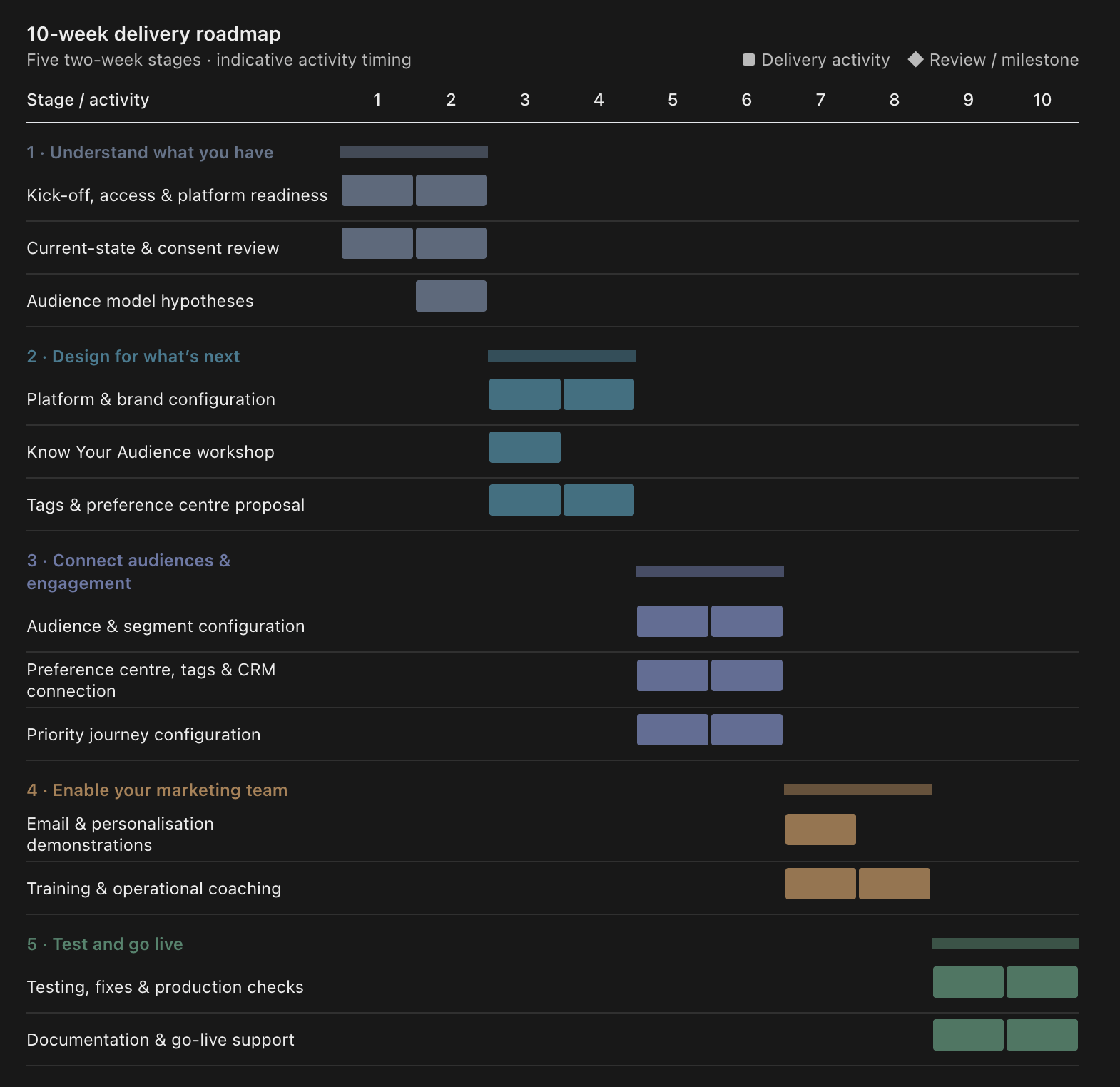
Throughout the project, we use an iterative delivery approach, progressively configuring and demonstrating the solution rather than waiting until the end to reveal a completed implementation. Your team participates in the key workshops, reviews the proposed structures, makes prioritisation decisions and becomes familiar with the platform as it takes shape.
The ten-week structure is intended for a focused migration. More extensive requirements, such as substantial data cleansing, additional integrations or rebuilding a large portfolio of complex journeys, may require further work and should be considered separately.
What will you have when the migration is complete?
By the end of the initial migration, the objective is to have a working Marketing Cloud Next environment that your marketing team can begin using, rather than simply a technically configured platform.
This includes the foundational platform configuration and Salesforce connection, reusable email creation capabilities, an agreed approach to audience segmentation and preference management, and at least one prioritised marketing journey, subject to the agreed delivery scope and capacity. Your team will also have been introduced to the platform’s personalisation, experimentation and reporting capabilities through practical demonstrations and coaching.
Just as importantly, you’ll have a clearer understanding of how your organisation can use Salesforce information to support marketing engagement. The audience archetypes, interest groups and lifecycle stages established during the migration provide a common framework for considering future campaigns and journeys.
Not everything needs to be completed during the initial project. You may still have historical journeys to migrate, additional audiences to configure, data quality improvements to undertake or more advanced personalisation opportunities to explore. These can be prioritised as subsequent activities rather than becoming prerequisites for the initial launch.
This is an important distinction. A successful migration doesn’t necessarily mean every historical capability has been reproduced. It means your organisation has the essential capabilities needed to operate the new platform, with a clear and practical path for extending them.
Where do you go from here?
Moving to Marketing Cloud Next is an opportunity to reconsider how marketing operates within your organisation, but it doesn’t need to become a wholesale reinvention of everything you do.
You can preserve the campaigns and communications that already work, simplify the audience structures that have become difficult to manage and progressively introduce more sophisticated segmentation, personalisation and automation.
As your marketing team becomes more familiar with the platform, new opportunities will emerge. You might introduce additional lifecycle journeys, use dynamic segments to make campaigns more responsive, experiment with different content for different audiences or develop more detailed reporting on engagement.
The audience understanding developed through the migration can also have value beyond email. The same archetypes, interests and lifecycle stages can inform website experiences, broader CRM activities and engagement across other channels, helping the organisation develop a more consistent approach to its relationships.
Ultimately, the aim is to make marketing less dependent on managing lists, preparing data and rebuilding individual communications, and more focused on understanding audiences and delivering relevant engagement.
The future of marketing is not simply a new platform. It’s a better way of connecting with the people who matter to your organisation.
At AlphaSys, we help organisations make that transition through a structured, practical Marketing Cloud Next migration that establishes the essential capabilities first, enables their teams and creates room for marketing to evolve.
From Website Replacement to a Sustainable Digital System
Many organisations we work with are not struggling because they cannot update their website. They are struggling because their website has become increasingly difficult to change.
The organisation has evolved since the site was built. Services and programs have changed, new audiences have emerged, priorities have shifted and the story the organisation wants to tell is no longer quite the story the website was designed to tell. Yet seemingly straightforward changes can become surprisingly difficult. There is nowhere obvious to put something new, navigation is already crowded, the same information exists across multiple pages, and changing one part of the story creates consequences somewhere else.
Eventually the website starts influencing the organisation rather than supporting it. Teams hesitate to restructure content, reconsider journeys or refresh the brand because they know that doing so may trigger significant design and development effort. The organisation can edit the website, but it cannot easily reframe it.
Much of this comes from how websites have traditionally been created. A familiar agency process is to define a sitemap, create wireframes, produce visual mock-ups, configure a CMS or page builder, populate the pages, test them and launch. There is nothing inherently wrong with that approach, and it can produce very good websites. Its limitation is that the website itself becomes the thing being designed and built. Content, navigation, presentation and technology become progressively intertwined around the experience required for that particular launch.
A sustainable digital project starts from a different objective. We still need to launch an excellent website, but we also want to establish a digital system capable of accommodating the organisation that website will need to become.
That changes the flow of the project:
Take Stock → Know Your Audience → Atomic Design → Content Modelling → Content Planning → Content Pooling → Experience Design → Site Building
The sequence progressively separates and then reconnects the things that traditional website projects often bind together: audiences, content, structure, presentation and experience. In practice the stages overlap and later learning will cause us to revisit earlier decisions, but there is still value in understanding the logical sequence and what each stage contributes.
And the bonus with this approach is that the early work extends well beyond the website. Take Stock and Know Your Audience are focused on digital engagement rather than simply web engagement, so the understanding we develop about audiences, interests and engagement life stages can also inform social engagement, direct email marketing, campaigns, CRM journeys and other digital channels. The website may be the immediate project, but the thinking behind it helps strengthen the organisation’s broader digital engagement.
1. Take Stock
The first step is to understand what already exists before deciding what the new website should become.
That means taking stock of the existing websites, content, navigation, technology, integrations, forms, search, analytics, SEO and security, as well as the broader digital environment around them. We want to understand what is working, what is creating friction, what has become difficult to maintain and where the existing environment is limiting the organisation.
Importantly, this is not simply an exercise in finding problems. An ageing website can still contain years of valuable organisational thinking, useful content, established stakeholder journeys and functionality that continues to serve its purpose. Replacing the technology does not mean everything built on it should automatically be replaced.
The content estate deserves particular attention. Over time, websites accumulate pages, duplicated information, outdated material and structures that made sense when they were created but may no longer reflect the organisation. Taking stock allows us to identify what should be retained, what can be rationalised or consolidated and what no longer needs to move forward.
We also need to understand the wider systems with which the website interacts. CRM, marketing platforms, payments, forms, identity, search and other services may all form part of the digital experience even though they sit outside the website itself. Understanding those dependencies early helps prevent the new site from simply recreating existing integration and operational problems on a newer platform.
The objective is not to redesign anything yet. It is to establish a reliable starting point: what we have, what remains valuable, what needs to change and what constraints or opportunities the existing environment creates. A sustainable digital project should rarely begin with a blank canvas. It should begin with a clear understanding of what is already there.
2. Know Your Audience
Once we understand the existing digital estate, the next step is to understand the people the digital system needs to serve.
Rather than developing a large collection of traditional personas, we use a deliberately constrained three-dimensional audience model. It considers people across three dimensions: archetype, interest and engagement life stage.
Archetypes describe the broad type of relationship a person has with the organisation. Interests describe what they are interested in or trying to achieve. Engagement life stages recognise that the needs of someone discovering an organisation for the first time can be very different from those of someone already participating, supporting or maintaining a long-term relationship.
We deliberately keep each dimension small, typically to three or four meaningful categories. Archetype × Interest creates our engagement matrix, giving us a manageable set of audience combinations rather than dozens of personas. Each cell in that matrix is then considered across the engagement life stages to understand how that audience’s needs, motivations, messages, calls to action and experiences may change as their relationship with the organisation develops.
The model gives the rest of the project a practical lens for decision-making. We can ask which archetypes a piece of content serves, which interests it addresses and at what engagement stage it becomes relevant. That thinking will later inform content modelling, navigation, journeys, search, personalisation and experience design.
The value of the model comes from keeping it usable. We want enough variation to expose genuinely different audience needs without creating so many audience definitions that every decision becomes an exercise in managing theoretical personas.
By the end of this stage, we have not designed the website. We have established a manageable model of who may be engaging with us, what they are interested in and where they are in their relationship with the organisation.
3. Atomic Design
With the existing environment understood and a practical audience model established, we can begin exploring how the organisation’s brand might translate into a contemporary digital experience.
We typically start with an exaggerated visual interpretation of a homepage. At this point, it is not intended to be the final homepage or even a page that will necessarily be built. It is a creative device that allows us to explore the digital expression of the brand more freely and make ideas tangible enough for stakeholders to respond to them.
The design deliberately pushes further than a conservative first draft might. It explores typography, colour, imagery, spacing, movement, hierarchy, calls to action, content treatments and interaction ideas together in one rich visual composition. This is often much easier for stakeholders to respond to than discussing individual design elements in isolation.
We then take that interpretation through a small number of feedback loops( usually two – its easy to find yourself in analysis paralysis here). The objective is not to perfect the homepage. It is to establish enough confidence in the visual direction to understand the design language that sits underneath it.
Once that direction has emerged, we explode the design into its atomic parts.
Typography, colours, spacing, buttons, cards, links, controls, imagery treatments and other foundational elements become atoms. Those combine into increasingly useful components and patterns such as cards, navigation elements, content treatments, calls to action and form elements. What began as a deliberately expressive visual concept starts becoming a structured and reusable Atomic Design system.
This is an important distinction from designing a homepage and then proceeding page by page through the rest of the website. The initial homepage exploration is being used to discover the system, not define the site.
Nor is the Atomic Design system considered finished at this point. It establishes the initial visual vocabulary and enough reusable structure for the next stages of the project. As real content and audience experiences are designed later, those atoms, components and patterns will be tested, refined, polished and extended.
By the end of this stage, we have moved from an expressive interpretation of what the digital brand could feel like to the beginnings of a reusable system that can consistently express that brand across the experiences we design next.
4. Content Modelling
By this point, we already know considerably more about the shape of the future digital system than we did at the beginning.
Taking stock has shown us what content exists, how the current site is structured, what performs well and where duplication or structural problems have accumulated. Knowing our audiences has given us a model for who needs that information, what they are interested in and how those needs change across their engagement life stages. Atomic Design has started making the future experience tangible and has helped expose the different ways information may need to be presented.
Together, those stages begin to shape three closely related things: the navigation systems, the SEO and discoverability framing, and the content model underneath them.
Content Modelling is where we bring that emerging understanding together and give it structure.
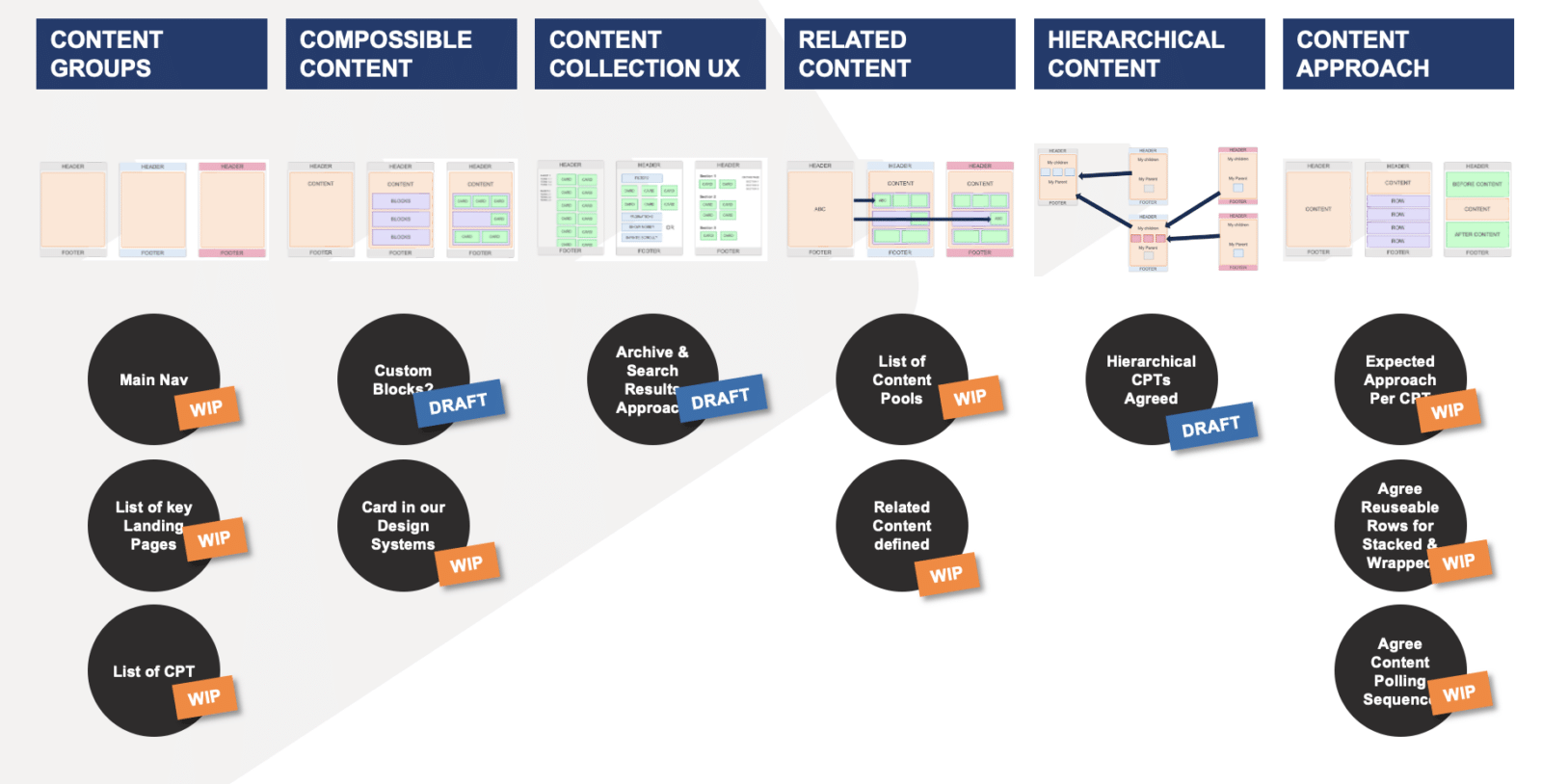
Rather than beginning with a sitemap and treating the page as the fundamental unit of the website, we identify what the organisation’s information actually represents. Programs, services, people, locations, events, stories, campaigns and resources become meaningful content types with their own attributes and relationships.
A program, for example, might have a name, description, audience, location, dates, eligibility, cost, related people, events, stories and calls to action. Those attributes belong to the program itself rather than to whichever page happens to present it.
At the same time, we begin giving clearer form to how people will find and navigate that information. Some pathways will be hierarchical, some will be driven by audience or interest, and others will emerge through search, related content and relationships between content types. The navigation system therefore begins to reflect both what the organisation needs to communicate and how its audiences are likely to look for it.
SEO and broader discoverability are part of the same thinking rather than something applied at the end of the project. Understanding how audiences describe their needs, what they search for and how the organisation’s information should be grouped helps shape content types, naming, hierarchy, metadata and the relationships between information. The structure needs to make sense to people, search engines and increasingly AI-driven discovery systems.
The audience model developed earlier becomes particularly useful here. Content can be associated with relevant archetypes, interests and engagement life stages without being permanently embedded inside a page designed for one particular audience. That creates the foundations for different navigation pathways, related content, search, future personalisation and experiences that can change as the organisation evolves.
The objective is not to turn every paragraph into a database field. We structure information where doing so creates genuine value through reuse, relationships, consistency, search, filtering or future flexibility, while leaving editorial content appropriately flexible.
By the end of Content Modelling, the future site is beginning to have a recognisable structure. We understand the major types of content, how they relate, the emerging navigation systems through which audiences will discover them, and the SEO and discoverability framework that helps connect audience needs with organisational information.
5. Content Planning
Content Modelling gives us the structure of the system: the types of content we expect to manage, their important attributes, how they relate to one another and the emerging navigation and discoverability structures around them.
The next step is to develop a Content Plan: what do we currently expect to fill that model with?
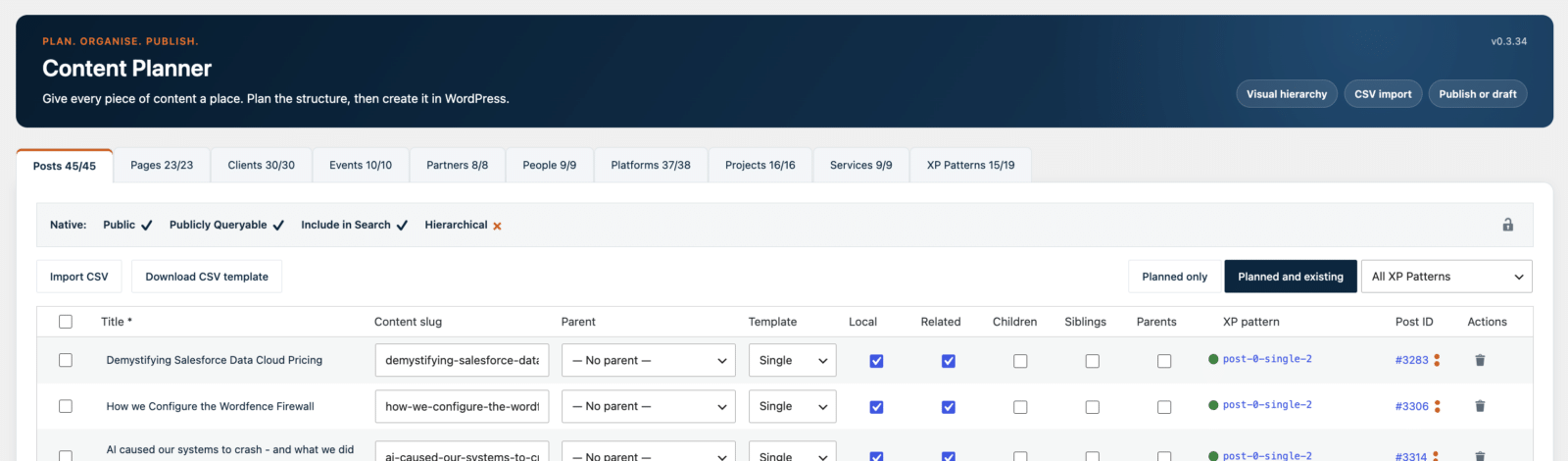
The Content Plan is not intended to be a perfect or literal specification of the finished website. Like any useful plan, it gives us direction, establishes expectations and provides something tangible to work towards while accepting that our understanding will continue to develop as the project progresses.
If we have established Programs, People, Locations, Stories, Events or Resources as content types, we begin identifying the actual programs, people, locations, stories, events and resources we expect the new system to contain. Alongside those content pools, we identify the broader pages and experiences we currently expect to need: major landing pages, audience pathways, organisational content, campaigns and other parts of the emerging site.
This gives us an increasingly complete picture of the future website without requiring every page to have been written or designed. It allows us to test whether the content model is sufficiently complete, whether the emerging navigation makes sense and whether the needs identified through our audience model have somewhere to be addressed.
It also creates practical expectations around content. We can identify what already exists and can be reframed, what should be consolidated, where genuine gaps exist and where materially new content may eventually be required. This allows content effort to be understood and managed rather than discovered unexpectedly during design or build.
The Content Plan also gives us enough structure to begin establishing the complete site. Placeholder pages can be created for the experiences we expect to build, even though their final content and presentation have not yet been determined. This allows navigation, hierarchy, URLs and relationships to begin taking shape around a representation of the whole site rather than only the content that has already been completed.
Those placeholders are deliberately provisional. Some will become substantial standalone pages. Others will become highly assembled experiences drawing from multiple content pools. Some may merge, disappear or change purpose as the project develops.
That is why this is a plan rather than a specification. Its purpose is not to predict the finished website perfectly. It is to give the project enough direction and shared expectation to move confidently into the next stage.
6. Content Pooling
With the content model and Content Plan established, we can begin moving real content into the new system.
The experiences we eventually create will sit on a continuum. At one end are pages that contain largely their own substantive content: a story, program, service, person, location, resource or other piece of information that can meaningfully stand on its own. At the other end are highly assembled experiences that may contain very little unique content of their own, instead bringing together related information from many different parts of the system.
We start with the first group.
These relatively self-contained pieces of information form our content pools. Rather than immediately trying to recreate every finished experience, we take the content identified during the stocktake and begin moving it into the content types and structures established through Content Modelling.
This is where rationalisation and migration happen together. Existing material can be retained, consolidated, lightly reframed or retired. Where the same information currently appears in several places, we can identify an authoritative source rather than carrying that duplication into the new system.
A program becomes part of the Program pool. A person belongs in the People pool. Stories, locations, services, events, resources and other meaningful content are treated in the same way. Each piece of content is structured according to what it is, rather than according to where it happened to appear on the old website.
At the same time, the placeholder structure established through the Content Plan allows the broader site to begin taking shape. Navigation can operate across the expected site structure and relationships can begin connecting pooled content with experiences that have not yet been fully designed.
This creates an important separation between content and experience. The content pool does not need to know every page, journey or experience in which its information will eventually appear. It provides the underlying information; later work determines how that information should be assembled and presented for different audiences and purposes.
That separation also changes the content-maintenance cycle. In a traditional page-oriented website, changing a piece of information can mean finding every page on which it has been repeated and updating each occurrence. In the pooled model, the aim is to maintain information once at its source and allow the experiences that reference it to reflect that change.
Starting with the content pools gives us real material with which to design the more complex experiences that follow. Instead of designing landing pages and journeys around placeholder content, we increasingly have structured, rationalised organisational content available to assemble.
By the end of Content Pooling, we have established much of the source material of the future digital system, while also having a working skeleton of the broader site through which navigation and relationships can already operate.
7. Experience Design
By this stage, we have most of the ingredients we need. We have …
- an audience model,
- an emerging navigation and content architecture,
- base atoms, a visual language and design system,
- structured content pools and a Content Plan
Now we bring those things together.
Most organisational websites have a core offering: products, services, programs, events, courses, locations or some equivalent representation of what the organisation actually does. We typically start there because these experiences sit close to the centre of both the organisation’s story and its audiences’ needs, and give us broad coverage of the visual systems to refine the experience that will influence the whole site.
We also start at the top of the experience and work down. We establish how …
- the global navigation works,
- how the page introduces itself through its hero and primary messaging,
- how breadcrumbs and other wayfinding operate,
- how local content is presented,
- how related content is drawn from the wider content pools, and
- how the experience resolves through calls to action and the footer.
This gives us our first complete expression of how the system works as an experience rather than as a collection of separate ingredients.
From there, we work through the content-pool experiences. Programs, people, stories, events, locations, resources and other structured content types need appropriate ways of presenting their own information while also exposing their relationships with the rest of the system. Because the underlying content has already been pooled and related, these experiences can increasingly draw relevant information into the page rather than requiring editors to manually recreate it.
Finally, we work through the remaining experiences identified in the Content Plan. These are often further towards the assembled end of the spectrum: landing pages, audience pathways, campaigns and other experiences that may contain relatively little unique content of their own and instead bring together information from across the content pools.
Importantly, Experience Design happens in the site itself.
We are not producing a succession of static mock-ups that are approved and subsequently handed to somebody else to reproduce in code. We use the real design system, real components, real content and real relationships to design the experience where it will ultimately operate. When something works, it is already part of the site.
This inevitably refines the Atomic Design system established earlier. Real experiences expose states, combinations and requirements that could not reasonably have been anticipated when the initial atoms and visual language were created. Components are adjusted, new patterns emerge and existing ones become more sophisticated.
That refinement is expected. The system was deliberately built for change.
The important discipline is that improvements discovered through one experience are considered as improvements to the wider system. A useful new pattern should become available elsewhere rather than remaining a one-off solution embedded in a particular page.
By the end of Experience Design, the site should be substantially real. A useful way to think about the target is 80% wide, 80% deep and 80% visually resolved. Most of the planned site exists, most of the meaningful content and relationships are operating, and the experience looks and behaves substantially as intended.
It does not need to be perfect. The remaining work is refinement rather than invention.
That is a very different position from completing a set of approved mock-ups and then beginning the website build. We already have the system, the content and most of the experience operating together.
We have designed by building.
8. Site Building
By the time we reach Site Building, there should be very little about the website that is still abstract.
The site is already substantially assembled. The content pools are populated, navigation and relationships are operating, the major experiences have been designed in the site itself, and the Atomic Design system has evolved into a practical set of reusable components and patterns. We are starting from something that is approximately 80% wide, 80% deep and 80% visually resolved.
Site Building is therefore not the traditional moment where approved mock-ups are handed to developers and development begins. Much of that work has already happened as part of Experience Design. This stage is about completing the wider digital system and bringing the remaining parts of the implementation up to the same level of maturity.
That includes completing functionality and integrations that sit behind or across the experience. Forms and their submission behaviours are completed, search is refined, analytics and conversion measurement are implemented, CRM and other integrations are connected,
A website is the outcome, not the system
Build for the next change
At the end of this process, we have launched a website. But the better test of what we have built comes afterwards.
What happens when the organisation introduces a new program? What happens when an audience becomes more important, the strategy changes, a proposition needs to be reframed or the brand is refreshed? Can the organisation make those changes through the system it now owns, or does changing the story once again mean changing the website underneath it?
That is where the sequence matters. Content exists in reusable pools rather than being unnecessarily repeated across pages. The audience model provides a continuing framework for considering who an experience needs to serve. Atomic Design gives the organisation a visual system that can evolve. Content Modelling provides structures and relationships that allow information to be reorganised, while Experience Design creates patterns that can be reused and recombined as new needs emerge.
The result is not a website designed never to change. It is almost the opposite: a website designed on the assumption that it will change.
That does not remove the need for future design and development. New ideas will require new capability, brands will evolve and technology will continue to move. The difference is that normal organisational change no longer needs to begin with the assumption that the website itself must be replaced.
Why hierarchical Salesforce campaigns create more marketing value
There is a persistent debate about how campaigns should be organised in Salesforce. Some teams prefer a flat structure, where every campaign sits at the same level. Others use broad or long-running campaigns to group people around a topic or activity. Both approaches can serve a purpose, but simplicity is not the only measure of a useful campaign model.
Well-designed campaign hierarchies can help marketing organisations interpret engagement more meaningfully and govern activity more consistently. Specific campaigns capture targeting and responses, their position in the hierarchy provides context, and carefully defined roll-ups turn those records into useful measures. The question is not simply where to store a list of people, but what campaign membership should tell us about them.
Treat campaigns as signals
Salesforce campaigns often begin life as administrative containers. A team creates a campaign, adds some members and uses it to support an email, event or advertising activity. Campaigns become more valuable when membership carries a defined meaning.
A campaign might tell us that someone was part of an audience marketing intended to target, registered for an event, completed a form, attended something or requested further contact. Viewed together, those memberships create a history of the relationship between marketing activity and individual engagement.
This requires an important distinction. Inclusion in an outbound audience records marketing’s intention to target someone, but it does not necessarily prove that the person saw the message. An inbound response provides stronger evidence of something the person actually did. Both signals are useful, provided we do not confuse them.
Separate outbound intent from inbound engagement
In this model, inbound and outbound describe two different campaign purposes. They are operating conventions rather than standard Salesforce campaign categories, and they can be organised as separate campaign hierarchies.
The outbound hierarchy describes what marketing is trying to influence. It contains the audiences, activities and individual executions used to reach people. In MCN, where each email send is represented as a separate Salesforce campaign, hierarchy becomes particularly useful because those sends can remain distinct without becoming a flat collection of unrelated records.
The inbound hierarchy describes what people actually do. It might represent registrations, memberships, donations, applications, event participation or other forms of engagement. The two structures do not need to mirror each other, because marketing may target people with the intention of increasing participation in a programme while those people ultimately engage through several different pathways.
Together, the two hierarchies give us complementary views of what marketing intended to influence and what people actually did.
Let the business shape the hierarchy
There is no single hierarchy that suits every organisation. Both inbound and outbound structures will often begin with a financial or calendar year and work down towards a specific activity or engagement instance, with the important design work sitting in the levels between.
An outbound hierarchy might follow a pattern such as:
Financial year → Objective → Activity → Execution
An inbound hierarchy might look more like:
Financial year → Programme → Location → Engagement Instance
These are patterns rather than rules. The right structure depends on how the organisation works: how new people enter, how existing people re-engage, and which programmes, services, locations, audiences or activities matter enough to report on. Those answers should shape the hierarchy, which is why campaign design is really an exercise in understanding the business rather than simply configuring Salesforce.
Understand the individual, not just the list
Imagine opening a person’s Salesforce record and seeing the outbound campaigns they were targeted through and the inbound campaigns through which they engaged. That history can reveal the programmes or subjects marketing believed were relevant to them, the activities they responded to, and the pattern and recency of their engagement.
The meaning comes from the combination of the campaign, its position in the hierarchy and the member’s status. A status such as “Targeted” means something different from “Registered”, “Attended” or “Requested Contact”, so consistent Campaign Member Statuses are central to the model. They should describe the person’s relationship with that campaign rather than act as vague substitutes for their overall customer or lead stage.
Turn engagement into future understanding
Campaign membership should preserve the interaction that actually happened. If someone joins an inbound campaign because they registered, attended, donated, applied or completed another engagement, that campaign becomes part of their history.
From there, the engagement can create other signals that are more useful for future marketing. In our implementations, campaign membership can trigger marketing tags that represent an emerging or confirmed interest. Someone engaging with a particular programme, service or subject can therefore build a richer interest profile over time without using broad evergreen campaigns as a substitute for their engagement history.
This separation is useful. Campaigns tell us what happened and in what context. Marketing tags help us understand what that behaviour may tell us about the person and what might be relevant to them next.
Why hierarchy adds value
Detailed campaigns explain individual interactions, but marketing teams also need to understand the broader initiative behind them. A campaign hierarchy connects those views by allowing a specific campaign to tell us that someone participated in a particular event or received a particular send, while its parent campaigns provide the programme, activity or reporting context around that interaction.
Salesforce supports campaign hierarchies of up to five levels, which makes hierarchy design important. Each level should have a clear reporting or governance purpose rather than simply acting as another filing category. Campaigns can have many useful attributes, including programme, audience, channel, location and direction, but not all of them need to become hierarchy levels. Other dimensions can be represented as fields and used in reporting, leaving the hierarchy to represent the relationships that matter most.
Use roll-ups carefully
Salesforce provides standard hierarchy statistics that aggregate defined campaign metrics from child campaigns. Where an organisation needs more selective calculations, tools such as Declarative Lookup Rollup Summaries (DLRS) can be used to create filtered roll-ups.
This allows the hierarchy and the measurement rules to do different jobs. The hierarchy explains how campaigns relate to one another, while the roll-up rules define which records contribute to a particular measure. That distinction matters because campaign placement should follow the business meaning, while measurement should follow the definition of the metric.
Be precise about what the numbers mean
A sophisticated hierarchy can still produce misleading reporting when the measures are poorly defined. If two campaigns each contain 100 members, adding those totals produces 200 campaign memberships, but it does not necessarily mean that 200 different people were reached.
Filtering and deduplication are separate problems, so each reported measure should make clear what is being counted, which Campaign Member Statuses qualify, whether the result represents memberships or distinct people, and what has been included or excluded. A visible number is only useful when its meaning remains intact.
Consistency matters more than any single pattern
The biggest risk is not choosing the “wrong” hierarchy. It is failing to commit to a campaign model at all.
When inbound, outbound, flat and evergreen approaches are mixed together without clear rules, campaign membership becomes difficult to interpret. The same type of record may mean different things in different parts of Salesforce, roll-ups become less reliable, and marketers are left guessing whether a campaign represents an audience, an activity, an engagement or an ongoing interest.
A well-designed model avoids that ambiguity by giving each concept a clear role. Outbound campaigns represent marketing intent and execution. Inbound campaigns represent actual engagement. Longer-term interests can be carried forward as marketing tags or other attributes rather than being mixed into the campaign structure.
The specific hierarchy can vary between organisations, but the conventions should be deliberate and consistently applied.
Hierarchy as a governance framework
The value of hierarchy extends beyond reporting. A defined structure gives marketers a common answer to practical questions such as when a new campaign should be created, where it belongs, how it should be named, which statuses it should use and which totals it should contribute to.
A hierarchy does not create governance automatically. The organisation still needs conventions, ownership and maintenance, but it gives those conventions a visible structure inside the platform where people actually work.
A foundation for future engagement
Good campaign structure also creates a stronger foundation for what happens next. Salesforce reports can be used to identify groups of people and add them to campaigns, allowing what we learn about someone to become part of their future engagement history rather than remaining trapped in a report.
Campaign Member data adds another layer. Alongside status and response information, we commonly capture attribution data such as UTM source, medium and campaign through our webhooks. That makes the Campaign Member record useful not only for showing that an engagement happened, but also for preserving context about how it happened.
Combined with marketing tags, this creates a richer picture over time. Campaigns preserve the events and activities, Campaign Member fields preserve the detail of individual interactions, and tags carry forward useful signals about likely interests.
This becomes increasingly valuable as AI is introduced. A structured history of what someone was targeted with, what they responded to, how they arrived and which interests have emerged gives AI much better context for summaries, recommendations and future personalised engagement.
The value of campaign architecture is therefore not only better reporting today. It is also about creating richer, more structured data that can support better decisions and more relevant engagement tomorrow.
Flat structures remain valid
A flat campaign structure is not inherently wrong. It may be entirely adequate for an organisation with relatively few campaigns, simple reporting requirements or strong external reporting tools.
The case for hierarchy becomes stronger as the organisation needs to connect detailed activity to broader programmes, understand engagement in context, manage campaigns consistently across teams and govern a growing volume of marketing activity. The comparison is not between a correct model and an incorrect one, but between different levels of organisational need.
A stronger foundation for marketing
A useful Salesforce campaign model should help marketers understand both sides of the relationship: what did we try to influence, and what did people actually do?
Hierarchical campaign structures help connect those views. Specific campaigns preserve the signals, parent campaigns provide context, roll-ups turn those records into useful measures, and governance keeps the model consistent.
Used this way, campaigns become more than buckets of names. They become a structured account of marketing intent, individual engagement and how those activities contribute to the organisation’s wider programmes. That structure improves reporting today and creates richer context for AI summaries, recommendations and more personalised engagement in the future.
What Does a Good Managed Services + Product Owner Cadence Look Like?
In our previous article, we talked about what it means to become the Product Owner of an important business platform. It’s an opportunity to shape where the product goes, what gets better and where future investment and effort are focused.
The good news is that you don’t need to figure out how to do all of that on your own.
One of the benefits of having a Managed Services partner is having people alongside you who know the technology, understand the history of your solution and can help you make sense of what you’re hearing from the business. You bring your understanding of the organisation, its people and what you’re trying to achieve. We bring our understanding of the technology, what we’re seeing through support and delivery, and experience continually evolving platforms like yours.
A good Product Owner and Managed Services cadence is really about creating a simple rhythm for bringing those perspectives together. It shouldn’t require hours of additional meetings or turn Product Ownership into another job. For many products, it can be as simple as a 30-minute conversation each week, a slightly longer look ahead once a month and a shared view of where we’re going.
Bring us what you’re hearing
You don’t need to arrive at our conversations with a perfectly groomed backlog or a collection of fully formed requirements. Bring us what you’re hearing.
Maybe several people are struggling with the same part of a process. Someone has an idea they think would make their job easier. A team isn’t adopting something we thought they would. There are recurring support requests. A new business priority has emerged. Or perhaps something just doesn’t feel like it’s working as well as it should.
These are all useful signals.
The real value comes from having a regular conversation with someone who carries the voice of the business. Something you raise this week might not feel particularly significant. We talk about it, perhaps help in the moment, and move on. Then something similar comes up next week. Individually, neither moment may have justified changing the product, but together they start to tell us something.
This is where we can step above the individual requests and look for themes. What are we seeing? What does it really mean? How important does it feel? And what, if anything, should we do about it?
Over time, those regular conversations build shared context. Eventually we might find ourselves saying,
we’ve talked about this a few times now; this feels like something worth addressing. Let’s plan for it next month.
That’s continuous improvement in practice.
Sometimes the answer is more than one thing
Identifying a theme doesn’t mean the answer is automatically to build something.
Perhaps people aren’t aware of something the platform can already do, so we can train them on a better way to work now. There might be a process we can change immediately to make things easier. We might also identify a small product improvement worth making next month while recognising that there is a larger capability we want to come back to later.
The response to one theme could quite reasonably be:
- train this now,
- change this process,
- build this next and
- release something larger later.
This is where having the business and technology perspectives together becomes valuable. You know what people are experiencing and what the organisation is trying to achieve. Your Managed Services partner can help you understand what the technology already does, what could change, what other parts of the solution might be affected and what different options might look like.
Neither side needs to arrive with the answer. We work it out together.
A simple 30-minute weekly rhythm
For a product with a steady flow of business needs and opportunities, the cadence itself can be remarkably simple. Thirty minutes, once a week, starting with the same question:
What’s new?
This is your opportunity to bring the voice of the business into the conversation. What have you heard since we last spoke? What’s changed? Has something come up repeatedly? Is there a new pain, opportunity or priority we should know about? We don’t need to solve everything there and then. Sometimes the most useful thing we can do is hear it, talk about it and see whether it connects with anything else we’re seeing.
From there, loop through what’s In Progress. This shouldn’t become a detailed project status meeting. Give a quick update, identify anything that’s blocked and surface any decisions or input we need from you. If everything is moving, keep moving.
Then look at what’s next. Is the work sitting in the current month still practical to achieve? Have priorities changed? Is there too much there? Leave some stretch items if that’s useful, but be realistic about what the delivery team and the business can actually deliver, test, adopt and absorb. Move the balance into future months rather than allowing the current month to become an ever-growing wish list.
Do as much of that as you can in 30 minutes. Then stop and do it again next week.
The board shouldn’t only move during the meeting either. Both the Product Owner and Managed Services team should review it beforehand and come prepared. Updates, housekeeping and moving obvious items can happen in the background during the week. The meeting is valuable conversation time, not board administration time.
Make the roadmap something you can move
A simple Kanban-style board can become one of the most useful tools in the relationship. Trello, Monday, Confluence or whatever shared tool you already use can work.
The useful part is the model behind it. Rather than one enormous backlog, use time as part of the structure. Start with a What’s New? column for emerging ideas, pains, opportunities and themes. Upcoming months become planning buckets, with In Progress for active work and previous months retained as a history of what has been completed.
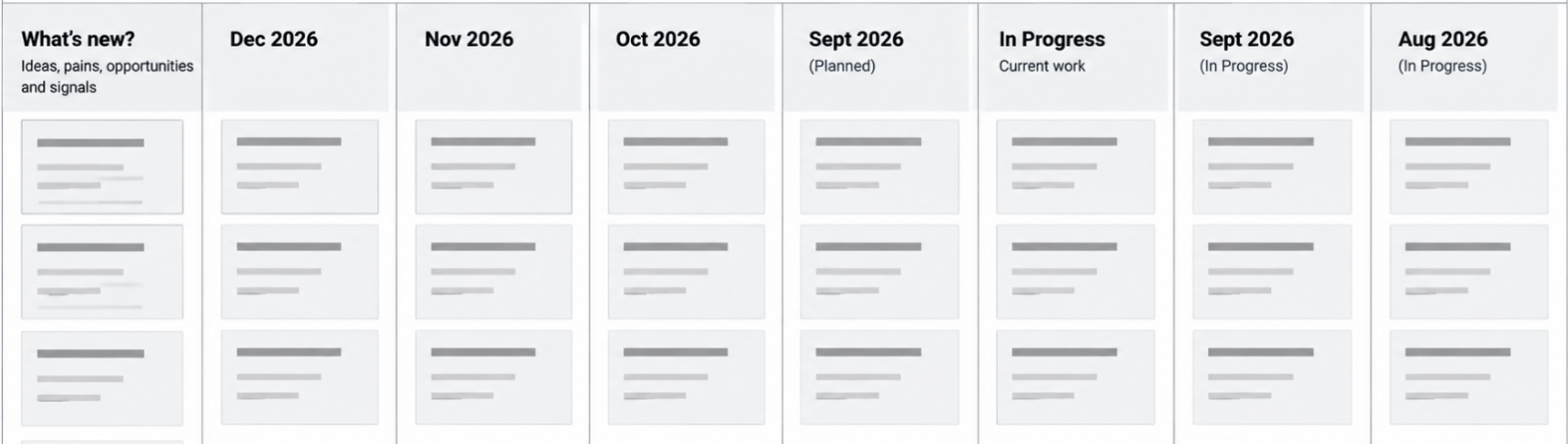
The months aren’t fixed commitments. They help us organise priorities and have practical conversations about capacity. Something might sit in What’s New? while we learn more, then become important enough to say, let’s put that into next month. Keep some stretch items in each month, but if there is clearly too much, move things forward.
Over time, the board gives everyone a simple view of what we’re hearing, what’s coming next, what’s happening now and what we’ve already achieved.
The conversation finds the themes. Time gives them a place. The board keeps them moving.
Once a month, look a little further ahead
Once a month, make the weekly session an hour. Use the first 30 minutes for exactly the same rhythm you use every week: what’s new, what’s in progress and what’s next. Then use the second half to lift your eyes a little further.
Look properly at next month and the month after that. Given everything we’ve learned over the last few weeks, do the things sitting there still feel right? Are themes emerging that now deserve a place? Has something become less important? Are there dependencies we need to prepare for? Is the amount of change realistic for the capacity available?
This is also a useful opportunity to look at pace. Are we moving at roughly the rate we expected? Is there room to bring something forward? Are we consistently carrying too much from one month into the next? Is there a larger enhancement on the horizon that might need additional investment or planning?
This isn’t about locking down another project plan. It’s about maintaining enough certainty about what comes next that everyone can move with confidence, while leaving enough flexibility to respond to what we learn.
Plan for value and the capacity for change
A Managed Services relationship has capacity. So does the business. Both matter.
There may be enough delivery capacity to make ten changes, but if the business only has the capacity to test, adopt and absorb three, delivering ten isn’t necessarily success. Equally, a Product Owner might identify twenty genuinely valuable opportunities, but that doesn’t mean they all need to happen immediately.
The board makes those trade-offs visible. We can keep some stretch items in the current month and pull them forward if things move faster than expected. We can move other things into future months knowing they haven’t been forgotten. And when something genuinely becomes more important, we can bring it forward and consciously move something else.
That is very different from continuously adding things to a backlog and hoping we eventually get to them. We’re organising change around value, impact and the capacity to absorb it.
Don’t combine Product Owner cadences
If you have multiple Product Owners across a connected ecosystem, it can be tempting to bring them all into the same weekly Managed Services conversation. Generally, we wouldn’t.
Each Business Product Owner benefits from having their own regular conversation because their product, users and needs are different. A CRM Product Owner might talk about processes, reports, flows and configuration, with many of those conversations leading to product change. A Marketing or Digital Product Owner might talk about audiences, engagement, campaigns, conversion and analytics, with the conversation leaning more towards strategy, advice and making better use of the capabilities they already have.
The person they meet with from the Managed Services team may be different too. The CRM Product Owner might benefit from someone who knows their solution and can help shape functional change, while the Marketing Product Owner may get more value from someone bringing marketing, digital and engagement expertise. The cadence should connect the Product Owner with the people best equipped to help them make their product better.
IT and Data Product Owners can work differently again. They are often more on demand, becoming involved when a need, opportunity or risk emerges: we need to think differently about PII, or I think we’ve identified a data risk. Those conversations may need architecture, data or integration expertise rather than a standing weekly cadence.
Combining all of this into one meeting can actually reduce its value. People spend time listening to conversations that don’t need them, while the conversations that do matter get less time and less access to the right expertise. Collaboration doesn’t require everyone to be in everything.
Keep the individual cadences focused and bring people together when there is something worth connecting. For closely related products, an additional monthly cross-product conversation can still be useful for looking ahead at dependencies and shared impacts, but it should complement the individual relationships rather than replace them.
Give each Product Owner the conversation they need, with the people they need, then connect those conversations when it matters.
Keep it simple and keep talking
That’s really what a good Managed Services and Product Owner cadence looks like. And it doesn’t need to look identical for every product.
Where there is a steady flow of business change, start every week with what’s new? Listen for the voice of the business and the themes beginning to emerge. Quickly check what’s in progress and clear anything getting in the way. Look at what’s next and make sure the current month remains realistic. Keep the board moving in the background rather than spending your meeting administering it.
Once a month, spend another 30 minutes looking ahead and shaping the next couple of months. Where there are multiple related products, occasionally bring those Product Owners together to look across the ecosystem without turning every decision into a committee decision.
Then do it again next week.
The value isn’t in the meeting itself, the Kanban board or having the perfect backlog. The value is in the continuity of the conversation. Something that seems small today can connect with something we hear next week, and over time those signals help us recognise where attention and investment will create the most value.
You don’t need to manage all of that alone. Bring us what you’re hearing from the business and where you want to go. We’ll bring what we’re seeing through support and delivery, what we know about the technology and the experience to help you give it shape.
Keep talking, keep learning, and together we’ll keep making the product better.
You’ve Been Made the Product Owner.
Now What?
You’ve been told you’re the Product Owner for Salesforce, your marketing platform, fundraising platform or another important business system.
So, what exactly have you just become responsible for?
Product Owner is one of those titles that sounds reasonably self-explanatory until you actually have to do the job. You might not administer the platform. You may not be particularly technical. There may already be an internal IT team, an implementation partner or a Managed Services partner responsible for much of the work. You probably don’t manage everyone who uses the product either.
Yet somehow, you’re now its owner.
At its simplest, a Product Owner is accountable for the direction, priorities and ongoing evolution of a product. Your job is to understand what the product is there to achieve, who it serves, where it needs to improve and what matters most next.
That doesn’t mean you need to know how to build everything. In fact, one of the most important distinctions in Product Ownership is between what and why and how. You should be able to explain what the business needs, why it matters, who it affects, how important it is and what a good outcome would look like. Your technical teams and delivery partners can then help determine how best to achieve it.
In practical terms, that means taking responsibility for a number of things:
- Own the product direction and priorities. Decide what matters most, where the product needs to go and what should happen next.
- Maintain and prioritise the product backlog. Balance strategy, business needs, user feedback, support insights, defects and opportunities rather than treating the backlog as a queue of requests.
- Triage support demand. Users should be able to report the pain, problem or opportunity they experience without diagnosing the underlying technology or prescribing the solution. You help determine whether the need is support, training, process change, a defect or a genuine product improvement.
- Protect the product from drift. User feedback and support demand should inform the roadmap, but the product shouldn’t be shaped by the loudest user, the most recent request or simply the greatest number of requests.
- Define what and why, not necessarily how. Articulate the problem, desired outcome, importance and what good looks like, then work with technical and delivery specialists to determine how best to achieve it.
- Understand the product ecosystem. Know the important upstream and downstream influences, integrations and hand-offs affecting your product. You don’t need to be the expert in all of them, but you need to know when your decisions have consequences beyond your product.
- Collaborate across product boundaries. When an issue or opportunity involves another platform, work with its Product Owner rather than expecting users to understand or navigate the underlying architecture.
- Own value, not just change. Consider adoption, training, usability and business outcomes, not simply whether functionality has been delivered.
Product Ownership is an important responsibility, but it doesn’t need to become your whole job. In many organisations, it is something you bring into the role you already have: a clearer responsibility for listening, setting direction, making priorities visible and helping shape how the product evolves. You don’t need to become the technical expert or spend every day managing a backlog. What you gain is the opportunity to influence how an important business product develops, make sure investment is focused where it can create the most value, and help turn the things you and your colleagues experience every day into meaningful improvement.
And you aren’t doing that alone. You bring your understanding of the business, its people and its priorities; your implementation or Managed Services partner brings their understanding of the technology and what it can do. Product Ownership is where those two perspectives come together.
You own the product, not the technology
For a business-facing platform such as Salesforce CRM, Product Ownership will often sit in the Business. That’s because most of the important decisions about its ongoing evolution are ultimately business decisions. How should we manage this relationship? Where is this process creating unnecessary effort? What information do our people need? What should we improve next? Which opportunity is more important?
That doesn’t mean every platform should be Business-owned. Enterprise-enabling products such as an integration platform or enterprise data platform may quite reasonably have IT or Data Product Owners because their primary responsibilities span multiple business products and include architecture, data, security, reliability and governance.
The important principle is that Product Ownership should sit close to where the product’s primary value can be understood and governed.
It can also change over time. During the very early stages of a major transformation, IT-led Product Ownership can make a lot of sense. When you’re replacing Dynamics with Salesforce, for example, the immediate risks may be migration, architecture, security, integration, data and establishing strong technical foundations. Once that platform moves into business requirement, however, the emphasis changes. The question becomes less about successfully establishing Salesforce and more about continually making Salesforce work better for the business.
The ownership model should be able to mature with the product.
Your backlog is not a list of requests
Once you’re the Product Owner, people are going to tell you what they want.
Some will have problems. Others will have ideas. Someone will want another field. Someone else will want a report. A team will have developed a workaround they want automated. A senior stakeholder will have seen something another organisation does and want the same thing. Support tickets will arrive. Your implementation or Managed Services partner will identify technical debt and opportunities. Vendors will release new capabilities.
All of these are signals. They are not automatically priorities.
One of the Product Owner’s most important responsibilities is turning those signals into a coherent product direction and prioritised backlog. That requires understanding the problem behind the request rather than simply accepting the requested solution.
But you’re not expected to do that alone. You know your business. Your implementation or Managed Services partner knows the technology. This is where the relationship between the two becomes really valuable.
As Product Owner, you should be able to have open and honest conversations about what you want for the business: what’s getting in the way, what you’re trying to improve, where people are struggling, what opportunities you can see and what outcomes matter most. You don’t need to translate all of that into a technical solution before bringing it to your partner. In fact, it’s often better if you don’t.
A good implementation or Managed Services partner can take that business context and bring their understanding of the platform, architecture and available capabilities to the conversation. Together, you can explore what is possible, challenge assumptions and find a better way to achieve the outcome. The Product
- Owner brings clarity about the business problem, the desired outcome and its priority;
- the partner brings clarity about how the systems can help achieve it.
This is where some of the best product decisions happen. Rather than the Business prescribing a solution and the partner simply building it, both sides bring their expertise to the problem. The result can be simpler, more sustainable and sometimes quite different from what either side would have proposed independently.
- Someone asking for another field may actually have a reporting problem.
- Someone requesting automation may have a broken process.
- A recurring support ticket may indicate a training problem rather than a technology problem.
- Something described as a defect may actually be the product behaving exactly as designed, but in a way users don’t understand.
The Product Owner needs to understand those differences, but they have a partner to help them do it.
This is why support should inform the product roadmap; it should not define it. The number of people asking for something matters, but Product Ownership isn’t product development by popular vote. Equally, the loudest person, most senior person or person who most recently raised an issue shouldn’t automatically determine what happens next.
Your job is to listen broadly, work with the people who understand the technology and decide deliberately.
Users should tell you what hurts
There is another important distinction when triaging demand: users shouldn’t be expected to diagnose the technology.
Modern platforms rarely operate independently. Salesforce might be connected to a fundraising platform, an integration platform, Data Cloud, a marketing platform, finance systems and a collection of other services. The person using Salesforce doesn’t need to understand any of that.
If they can’t see a donation they expect to see, that’s what they should tell you. They shouldn’t have to decide whether Salesforce is broken, Raisely hasn’t sent something, MuleSoft has failed or Data Cloud hasn’t resolved an identity correctly.
Users should report the pain, problem or opportunity in the product in front of them.
The Product Owner and supporting team can then triage that signal and determine what it means. It might require support, training, process change, defect resolution or a genuine product enhancement. Investigation might also determine that the underlying cause sits in another product.
That’s where another part of Product Ownership becomes important.
You own a product within an ecosystem
Having a Product Owner for Salesforce doesn’t mean that person owns every technology connected to Salesforce.
As we explored in our article, What Role Do Your Systems Play?, systems play different roles within an organisation. Some are systems of engagement, others provide identity and authority, integration, automation, knowledge or insight. Increasingly, the same platform may even play more than one of those roles. Understanding those roles helps us think about where Product Ownership should sit and, just as importantly, where the boundaries between products exist.
An organisation might have Salesforce CRM owned by Partnerships, Marketing Cloud and Raisely owned by Marketing, while Data Cloud and MuleSoft are owned by IT. Each has a different purpose, different users and different priorities, so separate Product Ownership can make good sense.
But those Product Owners cannot operate independently. The systems may have different roles and owners, but they are part of the same ecosystem. A change to Salesforce might affect an integration into MuleSoft, the data represented in Data Cloud or the audiences available to Marketing. A change in Raisely might alter what arrives in CRM. A new marketing requirement might depend upon data that originates somewhere else entirely.
A good Product Owner therefore understands the important upstream and downstream influences on their product. They don’t need to become an expert in every connected platform, but they need enough awareness of the ecosystem to recognise when a decision crosses a product boundary and when another Product Owner needs to be involved.
Ownership gives you authority within your product. It doesn’t give you authority over connected products.
The model works when there is clear ownership locally, cooperation at the boundaries and shared responsibility for the end-to-end outcome.
The Product Owner as the signal between Business and Delivery
All of this becomes even more important when an organisation is working with an implementation partner or Managed Services partner. In fact, I think Product Owner may be the most critical client-side role in making those engagements successful.
A delivery partner can bring architects, consultants, developers, administrators, analysts, testers and specialists. They can understand the technology, recommend approaches and deliver change. What they cannot independently determine is what matters most to your organisation.
Without effective Product Ownership, the partner is exposed directly to the noise of the business. Different stakeholders raise different priorities. Users submit enhancement requests. Someone escalates a support ticket. A meeting creates three new ideas. Another team wants something urgently. An executive asks whether a new feature can be implemented. Meanwhile there is technical debt to address, an existing backlog and strategic work already underway.
If all of those signals travel directly into delivery, the partner can become very busy without the product necessarily becoming much better.
Filter and focus
This is where the Product Owner creates enormous value. Their job isn’t to block the Business from the delivery team. It is to filter and focus what the Business is telling us into signals that delivery can respond to effectively.
That means listening to the noise and finding the patterns within it. It means separating symptoms from causes and problems from proposed solutions. It means identifying where several apparently different requests are actually manifestations of the same underlying issue. It means deciding when something is important enough to interrupt current priorities and when it belongs in the backlog.
Most importantly, it means providing delivery with clarity.
Instead of five users independently asking a Managed Services team for five slightly different Salesforce changes, the Product Owner might be able to say:
“We’re seeing a consistent problem with how our Partnerships team manages this part of the relationship lifecycle. Here are the users affected, here is what they’re trying to achieve, here is the business impact and this is now one of our priorities.”
That’s a very different signal. It gives the delivery team something they can investigate, design around and solve properly rather than simply implementing a collection of requests.
Protecting the product from drift
Most individual requests are reasonable. That’s what makes this difficult. Adding a field might genuinely help somebody. Changing a workflow might make one team’s job easier. Creating another automation might solve an immediate problem. None of these decisions necessarily looks damaging in isolation.
Over several years, however, hundreds of individually reasonable decisions can create a product nobody deliberately designed. Processes become inconsistent, fields proliferate, automations overlap and different teams solve similar problems differently. The underlying architecture becomes harder to understand and eventually the organisation begins describing the platform as complicated or difficult to use.
This isn’t necessarily the result of bad implementation. It can simply be the accumulated effect of change without strong Product Ownership.
The Product Owner protects against that drift by continually bringing decisions back to the product’s purpose, strategy and priorities. They don’t prevent change; they make change deliberate. Your implementation or Managed Services partner can challenge, advise and help you shape those decisions, but they shouldn’t become the de facto Product Owner. Ultimately, the decisions about what matters to the business and where the product should go need to remain with the organisation.
So, you’ve been made the Product Owner
Congratulations. You’ve been given the opportunity to shape a product that matters to your organisation and the people who use it. You have a voice in where it goes next, what gets better and where future investment and effort are focused.
Users will tell you what they’re experiencing. Stakeholders will tell you what they need. Support will show you where there is friction. Strategy will tell you where the organisation is going, and your technology partners will help you understand what is possible.
Your job is to bring those signals together and decide what they mean for the product.
That’s an important role — and a pretty exciting one to have.
Deterministic, Immutable and Other Words I’ve Picked Up From AI
I do a lot of vibe coding these days. We hear plenty about the importance of keeping a qualified human in the loop when working with AI. In my case, I am that human. I make sure the AI and I agree on the requirements, approach and solution before we start building, and I stay involved as we progressively design, build and test the result.
During those conversations, and throughout the build process, I’ve noticed something interesting. There are certain words and actions that AI comes back to again and again.
They’re not AI words. AI didn’t invent them. In many cases they’ve been part of software engineering for decades. Some I’ve known and used for years, some I’ve rarely had reason to use, and others describe familiar concepts with a level of precision that makes them particularly useful when a human and an AI are trying to agree on exactly how something should behave.
What interests me is how naturally they’re becoming part of the language of AI-assisted development. I suspect the next generation of designers, developers and solution people are going to hear them a lot more often too.
The danger is that we start repeating the language without really understanding what we’re saying. So I’ve started compiling a list of the words I keep encountering, what they actually mean and, perhaps more importantly, why they’re useful ideas in the first place.
Here are a few that keep coming up.
Deterministic
Something is deterministic when the same input, under the same conditions, produces the same result.
If I give a system A, B and C today and get X, I want A, B and C tomorrow to produce X again. That’s particularly interesting when we’re building with AI because AI itself can be probabilistic. Ask essentially the same question twice and you may get slightly different answers.
So when someone asks whether part of a solution is deterministic, they’re really asking a simple question: can we rely on this behaving the same way next time?
That’s often exactly what we want from software, even when we’re using a less predictable tool to help us build it.
Heuristic
A heuristic is essentially a practical rule of thumb. It won’t guarantee the right answer every time, but it gives us a useful way to make a decision when an exact answer would be difficult, expensive or unnecessary.
We use heuristics all the time without necessarily calling them that. If we decide that a piece of content over a certain length probably needs a summary, or that three failed attempts should trigger a different process, we’re using a simple rule to make a reasonable decision.
This makes heuristic a useful companion to deterministic. Sometimes we’re saying, “If A happens, B must always happen.” Other times we’re saying, “When we see A, B is usually a sensible thing to try.”
A heuristic isn’t a fact or a guarantee. It’s an informed shortcut that’s useful often enough to help us make a decision.
Immutable
Immutable means something can’t be changed after it has been created.
That doesn’t necessarily mean nothing can ever change. It means we don’t rewrite the original. If something changes, we create a new value, version or record while preserving what existed before.
Think of a historical transaction. If we change yesterday’s transaction every time our understanding changes, eventually we no longer have a reliable record of what actually happened yesterday.
Calling something immutable is therefore more than saying, “Please don’t edit this.” We’re saying that preserving its original state is part of the design.
Idempotent
Idempotent is probably one of the less familiar words on this list, but it describes a very useful idea.
Something is idempotent when you can do the same thing more than once without each repetition creating an additional unintended result.
Imagine we send a request to create a payment but don’t receive a response. Did the payment fail, or did it succeed and we simply didn’t hear back? We need to try again, but we certainly don’t want to charge the person twice.
If that operation is idempotent, we can safely repeat the request. The system recognises that we’ve already asked it to perform that particular action and doesn’t blindly do it again.
This comes up constantly in integrations, APIs and automation because retries are a normal part of building reliable systems. Networks fail, responses time out and processes get interrupted.
The useful question behind the word is wonderfully simple: what happens if we do this twice?
If the answer is “we accidentally create two of them”, idempotency might be something worth thinking about.
Scalar
A scalar is simply a single value.
That value might be a number, a piece of text, a true/false value or another simple value depending on the context. The important distinction is that we’re talking about one value rather than a collection, structure or more complex object.
If someone’s age is 51, that’s a scalar. If we have a list containing the ages of 100 people, we’re no longer dealing with a single scalar value. Likewise, "Sydney" can be a scalar value, while a customer record containing a name, address, phone number and email is a more complex structure made up of multiple values.
You’ll hear the term used in slightly different ways across programming, databases, mathematics and data systems, but the underlying idea is similar.
When AI says it “expects a scalar”, the useful translation is usually: give me one value, not a collection of things.
Smoke Test
A smoke test is a quick test to establish whether the important parts of something basically work before we spend time testing it more deeply.
We deploy a change. Does the application load? Can we perform the core action? Are the important components responding? Has anything obviously caught fire?
If the smoke test fails, there isn’t much point beginning a detailed test plan. We already know we have a fundamental problem.
That’s why you’ll hear AI coding tools suggest smoke tests so frequently. When we’re making lots of changes quickly, stopping regularly to establish that the thing basically still works is cheap insurance.
Drift
Drift is what happens when something gradually moves away from its intended or known state.
Code can drift away from the original architecture. Configuration can drift between environments. Documentation can drift away from what the application actually does. Even requirements and implementation can slowly become different versions of the truth.
The important word there is gradually. Drift doesn’t necessarily happen because someone makes one obviously bad decision. Lots of individually reasonable little changes can accumulate until what we have is no longer quite what we thought we had.
So when you hear someone talking about drift, the question underneath it is: are we still where we think we are?
Linting
Linting is automated checking of code for errors, suspicious patterns, inconsistencies and breaches of agreed coding conventions.
We’ve had linters for a long time. CSS linting, JavaScript linting and other forms of static code checking certainly aren’t inventions of the AI era. What AI-assisted development does is make linting an incredibly natural part of a very fast development loop.
Make the change, lint it, fix what the linter finds, test it and move on. A linter doesn’t prove the solution works, because that’s not its job. It catches a class of cheap, avoidable problems before they get further through the process.
That’s probably why I hear the word so much more now. AI can produce and change code quickly, and linting provides a fast way to check some of that work just as quickly.
Hydration
Hydration is one of those wonderfully visual words that modern web development has adopted for a fairly technical process.
A page can arrive from the server already containing its HTML and content. The browser then adds the JavaScript behaviour needed to make that page interactive. That process is called hydration.
The page is already there. Hydration brings it to life.
When you hear about a hydration error, it’s often because what the browser expected when it took over doesn’t quite match what was originally rendered by the server.
You don’t necessarily need to be the person fixing that problem to understand the conversation. If someone says, “This looks like a hydration issue”, you now have a pretty good idea which part of the journey they’re talking about.
Worker
Worker is a wonderfully ordinary word that has a more specific meaning when it turns up in a technical conversation.
A worker is essentially a piece of software given a job to do. Rather than everything happening inside the main application while a user waits, work can be handed off to a worker to process separately.
That job might be resizing an image, processing a queue, sending notifications, transforming data or responding to an event. Some workers run in the background, some run on a schedule and others wake up when something happens, do their job and disappear again.
You’ll hear the word used in slightly different contexts. A web worker can perform work away from the browser’s main thread. A service worker can sit between a web application and the network. A cloud worker can run code without us needing to think in terms of a traditional server sitting there waiting for requests.
The implementations are different, but the basic mental model is useful: there’s a job to do, so give it to a worker.
Once you understand that, a lot of conversations about queues, background processing and distributed applications become much easier to follow.
Canonical
Canonical means the recognised, authoritative or standard version of something when several possible representations exist.
Maybe several URLs can reach effectively the same content, but one is the canonical URL. Maybe information can arrive in several different structures, but we convert it into one canonical format before the rest of the system processes it.
In plain language, when someone asks, “What’s the canonical version?”, they’re asking: of all the ways this thing can exist, which one do we agree is the one?
That’s particularly useful when humans and AI are working together. Ambiguity creates problems quickly. Establishing the canonical representation gives everyone, human and machine, the same thing to work from.
Shape
Shape might be the least technical word on this list, which is partly why I’ve noticed it.
AI uses shape constantly. Shape the data. Shape the response. Shape the implementation. Shape the behaviour. Shape the solution around a particular requirement.
In this context, shaping something means deliberately giving it the structure or characteristics we need rather than simply accepting whatever form it happens to take.
We might receive data in one format and shape it into something our application can use. We might shape a response so it contains only the information required by the next process. Or we might shape an implementation around a set of constraints rather than allowing the technology to dictate the solution.
It’s a simple word, but it’s a useful distinction. Shape doesn’t necessarily mean create. Often the thing already exists. We’re organising, constraining or transforming it into the form we need.
And perhaps that’s why it works so well in conversations with AI. Much of what we’re doing isn’t asking AI to invent something from nothing. We’re progressively shaping an idea, requirement or implementation until it becomes the solution we actually want.
Why These Words Matter
None of these words are new, and that’s really the point.
AI isn’t inventing a new language for software development. What I think it is doing is exposing that language to a much broader group of people, while also making some existing engineering language much more common in our everyday conversations.
Someone who might previously have written requirements, designed an experience, managed a project or described what they wanted a solution to do can now sit beside an AI and progressively build that solution. Along the way, they’re going to find themselves much closer to the language and disciplines of software engineering than they might have been before.
I think that’s particularly important for the next generation coming into our industry. AI can remove a lot of the barriers to building something, but removing the barrier to writing code isn’t the same as removing the need to understand what we’re doing.
We shouldn’t learn these words because they make us sound more technical, and we shouldn’t simply repeat them because AI does. We should understand what they mean, the idea behind them and why someone chose that particular word in the first place. Once you do, many of them turn out to be remarkably good shorthand for ideas that would otherwise take a sentence or two to explain.
And there’s a slightly funny consequence I’ve noticed in myself.
After spending so much time talking to AI this way, these words have started escaping the AI conversation. I now find myself using them in my writing, in solution discussions and in everyday conversations with other people. Something has drifted. We need to shape the approach. Which version is canonical? Is the outcome deterministic?
Apparently, if you spend enough time talking to AI, it doesn’t just learn how you communicate.
You start picking up some of its vocabulary too.
What Role Do Your Systems Play?
Most organisations can produce a list of their systems. CRM, website, finance, marketing, service desk, document management, analytics, integration, collaboration, HR and, increasingly, a growing collection of AI tools. Ask what each one does, and you will might get a reasonable answer too.
But there is a slightly different question that organisations don’t ask nearly as often: what role does each system play for them?
Where does the authoritative customer record live? Which system owns identity? Where should customers engage? What system is allowed to make a decision or perform an action? Where does organisational knowledge live? How does information move between all of these places?
And perhaps most importantly, what happens when two or more systems believe they have the same job?
If you haven’t considered your technology estate this way before, maybe you should.
Start With the Systems You Already Have
Don’t start by redesigning your architecture or choosing new technology. Start by cataloguing what you already have.
List the systems your organisation currently uses, and don’t limit this to the large enterprise platforms. Include websites, SaaS products, databases, integration tools, reporting platforms, communication platforms, document repositories, collaboration tools and AI. That spreadsheet somebody relies on to run an important business process probably deserves to be there too.
Then, rather than simply documenting what each product is or what vendor provides it, consider the roles it plays within your organisation.
A single system can have several roles, and that’s completely normal. Salesforce might be a System of Record, a System of Automation and a System of Engagement. A website may provide Engagement, Experience and Communication. Microsoft Teams could provide Collaboration, Communication and Knowledge.
The objective isn’t to put every product neatly into one box. It is to make the responsibilities you have given those products visible.
A Catalogue of System Roles
There isn’t necessarily one universal taxonomy for this, and organisations will have roles specific to their environment. But the following provides a useful catalogue to start the exercise.
System of Record
A System of Record is the authoritative home of information. It is the system that has the greatest right to a particular record or piece of data.
It is common to hear organisations refer to the System of Record, but in practice there will often be several, each authoritative for a different type of information. Your CRM might be the System of Customer Record, your finance platform the System of Financial Record, your HR platform the System of Employee Record, and another system the authoritative source for products, services, assets or transactions.
The distinction can become more nuanced again. A CRM might own the customer relationship and core customer identity, while a finance system has greater authority over that customer’s billing details and transaction history. A marketing platform might hold a copy of their email address and preferences, but neither necessarily belongs there as the authoritative record. Thinking in terms of Systems of X Record helps identify these boundaries rather than trying to nominate one platform as the source of truth for everything.
Other systems will almost certainly hold copies of the same information, and that isn’t inherently a problem. The important question is what happens when those copies disagree. For each important information domain, you should be able to answer: which system has the greatest right to say what is true?
System of Engagement / Experience
A System of Engagement / Experience manages where and how people interact with the organisation. This can include websites, portals, apps and service platforms, but also communication channels such as email, SMS, messaging and push notifications. Engagement might be initiated by the person or by the organisation; what defines the role is that it sits at the point where the organisation and its audiences interact.
These systems shape what someone sees, receives and can do, but they don’t necessarily own the underlying information. A website might allow a customer to update their details, while a marketing platform sends communications based on their interests. In both cases, the CRM might remain the System of Record for the customer, their preferences and their consent.
There may legitimately be several Systems of Engagement / Experience serving different audiences, purposes and channels. Mapping them as a role helps establish which systems are authorised to engage with whom, through which channels, and using information owned by which other systems.
Examples: WordPress, Salesforce Experience Cloud, Salesforce Marketing Cloud.
System of Identity / Authority
A System of Identity / Authority establishes who someone or something is and which representation of that identity should be trusted. This can include authentication and access, but also customer identity, account matching and the relationships between different representations of the same person or organisation.
An organisation may have many identifiers for one person across CRM, website, marketing, service and transactional systems. Those systems may all know something about that person without having equal authority over their identity. A System of Identity / Authority establishes which identity should be trusted, how other identities relate to it and, where relevant, what that identity is authorised to access or do.
This becomes particularly important as systems become more connected. Knowing that two records probably represent the same person is different from having the authority to declare that they do.
Examples: Microsoft Entra ID, Salesforce Identity, Okta.
System of Integration / Ingestion
A System of Integration / Ingestion is responsible for bringing information into the organisation’s technology ecosystem and moving it between systems. It can receive, move, transform, synchronise and route information so that individual systems don’t all need bespoke knowledge of one another.
Integration generally describes information moving between known systems, while ingestion broadens the role to include information arriving from external sources, files, feeds, APIs, events or other inputs. In both cases, the role is primarily about getting information from where it is to where it needs to be.
Its responsibility should usually remain different from owning or interpreting the information it transports. Integration and ingestion systems have a habit of accumulating business logic over time. Eventually something that was intended to move information starts deciding what that information means, which can blur the responsibilities between Integration / Ingestion, Record and Automation / Action.
Examples: MuleSoft, Salesforce Data Cloud, Workato.
System of Automation / Action
A System of Automation / Action is responsible for making things happen. It responds to events, applies rules or decisions and executes the process that should follow, whether that means creating a record, assigning a task, updating a status, sending a notification or coordinating work across several systems.
The decision and the action don’t necessarily need to happen in the same place. One system might determine what should happen while another executes it, particularly as predictive models and AI become more involved in organisational processes. For the purpose of mapping system roles, however, they are part of the same broader responsibility: turning information, events and decisions into action.
There may legitimately be several Systems of Automation / Action, but where multiple systems can initiate or control the same process, it is worth establishing which has the greatest right to do so. Knowing which system is authorised to make something happen can be just as important as knowing which system owns the underlying data.
Automation may exist inside your CRM, marketing platform, integration layer or dedicated workflow technology. The important thing is knowing which system has responsibility for making a particular process happen.
Examples: Salesforce Flow, Salesforce Agentforce, Workato.
System of Collaboration
A System of Collaboration is where people work together. Teams, Slack, project workspaces and other collaborative environments are obvious examples.
These platforms frequently overlap with Communication and Knowledge. A decision discussed in Teams can quickly become organisational knowledge, even though Teams may not be where that knowledge should ultimately live. Identifying the roles helps expose those blurred boundaries.
Examples: Slack, Microsoft Teams, Jira.
System of Knowledge / Content
A System of Knowledge / Content is where an organisation creates, manages and maintains the information it wants people and systems to use. This might include website content, policies, procedures, guidance, documentation, project history, research, articles, resources and other reusable organisational knowledge.
There may be several Systems of Knowledge / Content serving different purposes. A CMS might be authoritative for published website content, a document management platform for controlled policies and procedures, and another knowledge base for internal guidance. As with Systems of Record, the important question is not necessarily whether there should be only one, but whether it is clear which system has authority over which type of knowledge or content.
This role is becoming particularly important with AI. Giving an AI assistant access to ten repositories doesn’t solve the knowledge problem; it can expose it. If several systems contain different versions of the same policy, guidance or content, the AI still needs to know which one is current, authoritative and appropriate to use. Understanding your Systems of Knowledge / Content therefore becomes part of establishing what both people and machines should trust.
Examples: WordPress, Salesforce Knowledge, Confluence.
System of Insight / Intelligence
A System of Insight / Intelligence helps turn information into understanding. This can range from reporting, analytics and dashboards that explain what has happened, through to systems that identify patterns, make predictions, summarise information, discover relationships and recommend what might happen next.
These systems often bring together information from multiple sources without becoming the authority for the underlying records. Their role is to interpret information and make it useful, rather than necessarily own it.
AI is rapidly expanding what this role can do, but intelligence doesn’t need to mean AI. Traditional reporting, behavioural analytics, forecasting, predictive models and AI can all play different parts in helping an organisation move from having information to understanding and acting on it.
Examples: Tableau, Salesforce CRM Analytics, Agentforce.
Now Look for the Overlaps
Once you have your systems and roles, create a simple matrix. Put your systems down one side and the roles across the top, then mark every role that each system currently performs. Don’t worry if individual systems end up with lots of marks. Systems performing multiple roles isn’t the problem.
What you are looking for is the pattern in the other direction: multiple systems performing the same role.
Perhaps three systems maintain customer contact details. Two systems trigger customer communications. Four places contain organisational knowledge. The CRM and finance platform both maintain an organisation name. The website, CRM and marketing platform can all update communication preferences.
None of these examples automatically means the architecture is wrong. They simply identify places where another question needs to be asked: which system has the greatest right to perform that role?
Give Your Systems Rights
When multiple systems perform the same role, the answer isn’t necessarily to eliminate all but one. Information and capabilities genuinely need to exist in multiple places in modern architectures.
Instead, establish their rights.
One system might own the information while another can create it. Several systems might consume it. Another might be permitted to update particular attributes, while others can only read them. A customer email address might legitimately appear in six systems, but there should still be an answer to which system has the greatest right to say what that email address actually is.
The same principle applies beyond data. Which system has the right to communicate with the customer? Which can make a decision? Which can initiate automation? Which can approve an action? Which owns organisational knowledge? Which can modify another system’s record?
Thinking in terms of rights turns the exercise from a system inventory into an architecture.
Look for the Gaps Too
Overlap isn’t the only thing the matrix will reveal. Empty columns can be just as interesting.
You might discover that you have plenty of Systems of Record but no clear System of Knowledge. You collect enormous amounts of information without having a meaningful System of Insight. Automation exists everywhere, but nobody can identify where governance sits. Or perhaps AI is rapidly becoming a System of Intelligence without anyone having decided which Systems of Record and Knowledge it should trust.
These aren’t necessarily reasons to buy another product. Sometimes the capability already exists and simply hasn’t been deliberately assigned. The first step is recognising that the role matters.
Turn the Catalogue Into a Roadmap
Now the catalogue becomes much more useful than an asset register. For each role, consider who performs it today, who should perform it in the future, which system has the greatest right to own it, where responsibilities are unnecessarily duplicated and where no clear owner exists.
You don’t need to fix every overlap. Some will be completely intentional, some will be practical compromises, and some platforms will continue performing several roles because they genuinely are the best place to do so.
Other overlaps will reveal obvious opportunities. An old database can stop being a System of Record. A marketing platform can consume preferences rather than own them. A website can remain the System of Engagement without becoming another customer database. An integration can stop making business decisions that belong elsewhere. An AI assistant can become a powerful System of Intelligence without quietly becoming a System of Record.
That creates a technology roadmap based on something more meaningful than which products should we replace? It asks instead: what responsibilities should our systems have in the future, and how do we move from the architecture we have today to that architecture?
Your Architecture Already Exists
Every organisation already has answers to these questions. The problem is that those answers aren’t always deliberate.
Someone needed a field, so they added it. A project needed an integration, so one was built. A team needed automation, so they configured it. Another department bought a platform. A website started collecting information. A spreadsheet became surprisingly important. Now AI is being connected to all of it.
Individually, each decision probably made sense. Collectively, those decisions became your architecture.
Cataloguing your systems and assigning their roles gives you an opportunity to make that architecture deliberate again. Start with what you have, identify the roles each system plays, find the overlaps and gaps, decide which systems have the greatest rights, and use those decisions to shape where your architecture goes next.
Before deciding what technology you need next, understand the jobs you’ve already given the technology you have.
Duplicate Matching, Merging and Unification Are Different Things
When two records appear to represent the same person, it is easy to treat the problem as a simple duplicate. But modern customer platforms provide several different ways to respond, and each one serves a different business purpose.
- Duplicate matching helps identify possible duplicates.
- Merging combines confirmed duplicates into one operational record.
- Unification connects related records to create a broader view of the person without changing the original records.
These capabilities are related, but they are not interchangeable.
Understanding the difference helps organisations make better decisions about data quality, customer service, reporting and engagement.
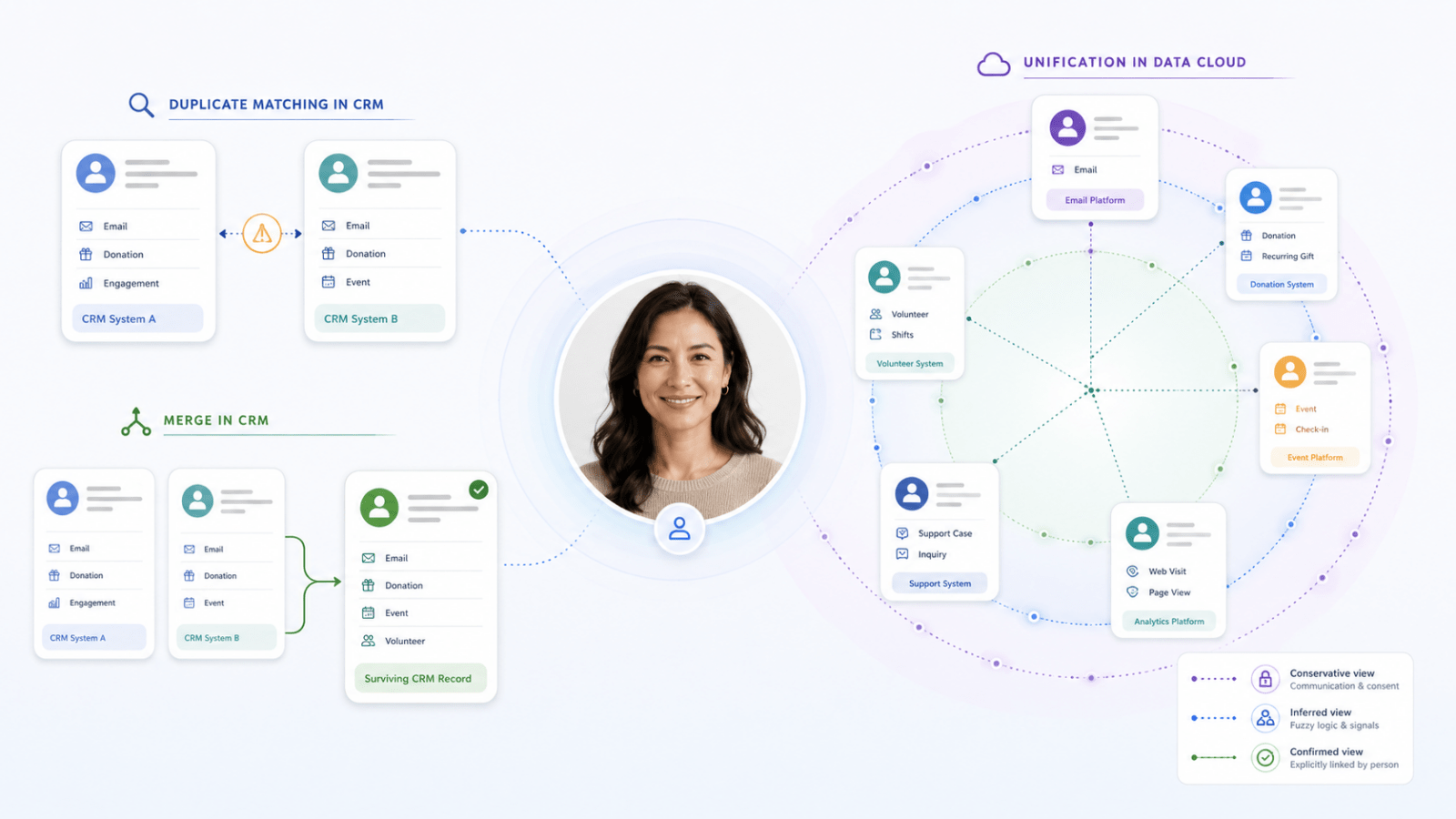
Duplicate matching happens in your CRM
Your CRM is the operational system your teams use to manage customers, supporters, members or other constituents. When a new record is created or an existing record is updated, duplicate matching rules can compare it with records already held in the CRM. Those rules might consider information such as:
- name;
- email address;
- phone number;
- postcode;
- date of birth;
- other identifying details.
Depending on how the organisation configures them, the CRM may warn the user, prevent the record from being created or flag a possible duplicate for review. For the business, this helps reduce unnecessary duplication at the point information enters the organisation. It helps staff find an existing person rather than creating another record and splitting their history across several places.
But duplicate matching does not necessarily prove that two records are the same person. It tells the business:
Duplicate review allows the business to decide
Some possible duplicates are obvious, while others require context that the system does not have.
Two records might share an email address but contain different names. Two people may live at the same address. A parent and child may use the same contact details. One person may use a work email address for one interaction and a personal address for another.
In these situations, the CRM can bring the possible match to someone’s attention so a staff member can decide whether the records are genuinely duplicates or whether they should remain separate.
This provides an important middle ground. The technology helps identify a potential issue, while the business retains control over decisions that may affect customer history, donations, registrations, services or communication preferences.
Merging changes the operational CRM record
When the organisation is confident that two CRM records are genuine duplicates, they can be merged. A merge combines the records and leaves one surviving operational record. The organisation may need to decide:
- which name and address should be retained;
- which contact details are current;
- which record becomes the surviving record;
- how activities, transactions and relationships are transferred;
- what happens when the records contain conflicting information.
For staff, merging can create one trusted place to manage the relationship. It can bring together information that was previously fragmented and reduce confusion about which record should be used.
But merging is a consequential action because it changes the operational data held in the CRM. That is why a possible match should not automatically become a merge.
Duplicate matching asks:
Do these records look like they may represent the same person?
Merging asks:
Are we confident that these records should become one operational CRM record?
They are different decisions.
Unification happens in Data Cloud
Sometimes several records appear to relate to the same person, but merging them is not necessary or appropriate.
A person may:
- register through an event platform;
- volunteer through another system;
- donate through a fundraising platform;
- appear separately in the CRM;
- subscribe using another email address.
Each platform may need to retain its own operational record, while the organisation still wants to understand those records together. This is where Data Cloud identity resolution provides a different capability. Data Cloud can evaluate information from multiple systems and determine which records should be treated as representing the same person for a defined business purpose.
The original records remain unchanged:
- the CRM record stays in the CRM;
- the volunteer record stays in the volunteer platform;
- the fundraising record remains in the fundraising platform;
- the registration record remains in the system that owns it.
Data Cloud creates a unified view across those records. For the business, this can support:
- more complete reporting;
- relevant audience segmentation;
- personalised communication;
- lifetime supporter or customer insights;
- engagement scoring;
- understanding interests and behaviour;
- calculated measures drawn from several systems.
Unification does not physically merge the source records. It allows the organisation to understand them together.
Merging and unification solve different problems
Merging is about correcting operational data in the CRM, while unification is about creating a connected view across records and systems in Data Cloud.
A merge says:
These CRM records are duplicates and should become one operational record.
Unification says:
These records should be understood together for this particular business purpose.
That distinction matters. A volunteer record may be valid in the volunteer system. A fundraising record may be valid in the fundraising platform. A CRM record may be required for customer service and relationship management.
The organisation does not need to destroy those distinctions to understand the broader relationship. Data Cloud provides the connected view while the operational systems continue to perform their own roles.
One identity resolution is not enough
It can be tempting to create one identity resolution and use it for every purpose, but our view is that this introduces unnecessary risk. Different business outcomes require different levels of confidence and different ways of deciding whether records should be understood together.
We recommend three separate identity resolutions in Data Cloud:
- a marketing and consent identity;
- an inferred relationship identity for segmentation and calculated insights;
- a confirmed relationship identity for records the person has explicitly connected.
Marketing and consent identity
The first identity resolution should support marketing communication and consent, and it should be conservative. Its purpose is to ensure that the organisation communicates through the correct contact point and respects the preferences associated with it.
One person may use a work email address for professional events and a personal email address for donations or volunteering. Those email addresses may belong to the same human, but they do not necessarily represent the same marketing relationship. Consent and communication preferences may differ between them.
For marketing, it is therefore safer to use strict matching rules and avoid combining records simply because they appear broadly similar.
The marketing identity should prioritise:
- safe communication;
- correct contact details;
- consent and preference management;
- a low risk of combining different people;
- clear segmentation and journey eligibility.
It may produce a narrower view of the person, but that is appropriate for the purpose.
Inferred relationship identity
The second identity resolution should support internal analysis, segmentation and calculated insights. Its purpose is to help the organisation understand a person’s broader relationship across time, systems and activities, even where that relationship has not been explicitly confirmed.
This identity will lean on fuzzy matching logic, using a wider range of evidence to identify records that are likely to represent the same person even when the details are not identical.
That evidence may include:
- similar or previous names;
- phone numbers;
- current and previous addresses;
- date of birth;
- current and previous email addresses;
- source-system identifiers;
- other relevant matching information.
For example, two records may have slightly different versions of a name, an old and new address, or different email addresses, but enough other information may align for Data Cloud to infer that they probably relate to the same person.
It could connect records for the purpose of calculating:
- lifetime giving;
- total event participation;
- volunteer activity;
- overall engagement;
- engagement scores;
- broader supporter or customer history.
This view effectively says:
Based on the information available and the fuzzy matching rules we have agreed, we believe these records probably relate to the same person.
That can be extremely useful for internal analysis and segmentation, provided the organisation understands that the relationship is inferred rather than proven. The broader the fuzzy matching rules, the more complete the view may become, but the greater the need to ensure the resulting insights are used for an appropriate business purpose.
Confirmed relationship identity
The third identity resolution should represent relationships the person has explicitly confirmed.
For example, someone may sign in and tell the organisation that an older email address, previous account or historical registration also belongs to them. Once that connection has been verified, the organisation has stronger evidence than it gains from matching data alone.
This view effectively says:
You have told us that these records also belong to you, so we have connected them.
A confirmed relationship identity can support more trusted customer views, stronger account continuity and more reliable personalisation.
However, it should not be treated as a complete record of the person’s history. Someone may have forgotten an old email address. They may no longer have access to a previous account. There may be historical, guest or offline activity they do not recognise or know exists.
The confirmed identity therefore provides greater certainty, but it may cover fewer records than the inferred identity.
The same person can have three valid unified views
This may initially sound unusual. If the records represent the same person, why not create one unified identity and use it everywhere?
The answer is that each identity is being resolved for a different purpose.
The marketing and consent identity asks:
Which records can be safely treated together so we communicate through the right contact point and respect consent?
The inferred relationship identity asks:
Which records probably relate to the same person and should contribute to internal insights, segmentation and calculated measures?
The confirmed relationship identity asks:
Which records has the person explicitly told us belong to them?
All three views can be valid at the same time.
The marketing identity may be the narrowest because it must minimise the risk of communicating incorrectly. The inferred identity may be the broadest because it is designed to reveal likely relationships and patterns. The confirmed identity may provide the strongest evidence, while still missing historical records the person has forgotten or cannot verify.
Using three identity resolutions allows the organisation to distinguish between safe communication, useful inference and confirmed connection without forcing one definition of identity to serve every business need.
Authentication is a separate capability
Authentication is often discussed alongside customer identity, but it solves another problem. Authentication determines who is accessing a website, portal or application. It can help people:
- use a consistent login across services;
- return to an existing journey;
- access protected information;
- manage their account;
- confirm that older records or accounts belong to them.
Authentication can provide stronger evidence about authenticated activity, but it does not replace duplicate matching, merging or Data Cloud identity resolution. A person may still have:
- historical records created before the account existed;
- guest donations or registrations;
- offline interactions;
- records created through external systems;
- activity completed on behalf of another person;
- several legitimate email addresses or contact points.
Authentication helps answer:
Who is accessing this digital service?
Duplicate matching, merging and unification answer different questions about the records held across the organisation.
Start with the outcome
The right technology depends on what the organisation is trying to achieve.
If the goal is to stop an unnecessary CRM record from being created, use duplicate matching. If the system has found a possible duplicate but the evidence is uncertain, use a review process. If two CRM records are confirmed duplicates and should be managed as one, merge them.
If valid records across several systems need to be understood together, use Data Cloud identity resolution. If the organisation needs to communicate safely and manage consent, use a conservative marketing and consent identity. If the organisation wants to understand likely lifetime engagement and calculate broader insights, use an inferred relationship identity. If a person has explicitly confirmed that other records belong to them, use a confirmed relationship identity.
Where people need consistent access across digital services, design an authentication and account experience.
The technology should follow the business purpose.
The goal is not one record or one identity rule
Better customer identity does not mean forcing every interaction into one CRM record. Nor does it mean creating one identity resolution and using it for every decision. The better approach is to use each capability deliberately:
- prevent avoidable duplicates in the CRM;
- review uncertain matches;
- merge confirmed duplicates when one operational record is required;
- use Data Cloud to connect valid records across systems;
- keep marketing and consent identity conservative;
- use a broader inferred identity for internal insights;
- retain a separate confirmed identity for relationships the person has explicitly verified;
- use authentication where a consistent account experience creates value.
When organisations understand these differences, they can improve data quality, communicate more safely and gain a fuller understanding of the people they serve without forcing every system and every business purpose into a single definition of identity.
Salesforce Feels Different Now. Here’s Why That Matters for Nonprofits.
Article by:
If you’ve been in the not-for-profit sector for a while, you probably have an opinion about Salesforce. Maybe you’ve seen it implemented well. Maybe you’ve heard mixed things. Maybe someone has tried to sell it to you and you weren’t quite sure what to make of it.
I recently had the chance to sit in on a conversation between two people I respect enormously in this space. Justin Yoon, Director of Consulting at AlphaSys, and Tammy Ven Dange, Independent Advisor to NFP Leaders for Major Technology Investments at Roundbox Consulting, have both spent years working at the intersection of technology and the nonprofit sector. What they talked about wasn’t a sales pitch. It was an honest, experienced conversation about how Salesforce has evolved, who it’s actually right for, and where it’s heading next.
The conversation is broken into clips below. Each one stands on its own, but together they paint a picture that I think is genuinely useful for any nonprofit leader thinking about their technology future.
How Salesforce went from a Sales Tool to a Sector Platform
Why watch this clip: If you’ve ever wondered how Salesforce usevolved from a B2B CRM to a nonprofit-aligned platform, Justin’s explanation of the history here is the clearest I’ve heard.
Salesforce was built for business-to-business sales. That’s just the origin story. Sales Cloud and Service Cloud were designed for organisations selling to other businesses, and when nonprofits started using it, they were working with a model that wasn’t originally built with their needs in mind.
The nonprofit sector found a way forward through something called NPSP, the Nonprofit Success Pack, which grew out of an open source community effort and eventually became a Salesforce-supported product. It helped a lot of organisations get started, and for many it worked well. But it was always a product that grew feature by feature over time rather than being architected from scratch with nonprofit complexity at its core.
About two and a half years ago, Salesforce made a significant decision: build it properly from the ground up. The result was the Industry Cloud family, purpose-built configurations for specific sectors including nonprofit and education. Rather than adapting a general-purpose tool, Salesforce borrowed proven design patterns from across their product suite, financial services, health, public sector, and built something that genuinely reflects how nonprofits receive funding, deliver services, and manage relationships.
The practical benefit is significant. Because Nonprofit Cloud now sits on the core Salesforce platform, every new investment Salesforce makes in AI, marketing, and data capability flows through automatically. The innovation curve has accelerated, and organisations using Nonprofit Cloud today are better positioned to take advantage of what’s coming than they would have been on any previous configuration.
What Actually Changed Under the Hood
Why watch this clip: Tammy asks the question most non-technical people have always wanted to ask, and Justin’s answer makes something genuinely complex very easy to understand.
For anyone who has sat in a reporting meeting and watched two people get different results from what should be the same data, this clip will feel familiar. It’s a challenge that has existed across many CRM platforms over the years, not unique to Salesforce, but one that Nonprofit Cloud has made real progress in addressing.
One of the meaningful improvements in Nonprofit Cloud is the separation of the data structure from the user interface. You can now design your data model around what your organisation actually needs for reporting and outcomes, and then configure how that data looks on screen independently. A one-off online donation, a major gift, and a corporate contribution can all be structured consistently in the background while looking completely different to the staff member entering or viewing them.
It’s a shift that sounds technical but has very practical consequences. Cleaner reporting, less workaround, and a system that’s easier to maintain and build on as your organisation evolves. For teams who have historically spent time wrestling with data rather than using it, this is a meaningful change.
What This Means in Practice for Your Organisation
Why watch this clip: Justin explains the real-world benefits of Nonprofit Cloud in a way that goes beyond the feature list, and his point about the innovation curve is particularly worth hearing.
One of the things Justin talks about in this clip is design risk, and it’s a concept worth sitting with for a moment.
When you implement a highly configurable system, every design decision your implementation partner makes is a bet. This is how we think your organisation should structure its data. This is how we think your workflows should run. Some of those bets pay off brilliantly. Others create complexity down the track that takes time to unwind.
Nonprofit Cloud reduces that risk significantly because Salesforce has done a substantial amount of the design work already, drawing on two decades of sector experience and direct collaboration with organisations like AlphaSys to define what best practice actually looks like. The number of decisions that need to be made from scratch is much lower, which means faster time to value, lower delivery cost, and less technical debt over the life of the system.
The other benefit Justin highlights is the innovation roadmap. As a consultancy, AlphaSys’s only product is time. What Salesforce provides is a continuously evolving platform where research and development investments are made centrally and flow through to every client using the product. AI summarisation of case files, automated donor profile insights, agent-assisted task management: these are being built into the platform and made available to clients without needing to be designed from scratch each time. The pace of that innovation is one of the most compelling reasons to be on the platform right now.
Why the Partner You Choose Still Matters
Why watch this clip: Tammy shares something she says she has genuinely never seen a Salesforce partner do before, and Justin’s explanation of how AlphaSys works is one of the more honest descriptions of what good implementation actually looks like.
A reasonable question comes up when a platform becomes more pre-configured: does it reduce the need for a specialist partner? If so much is already built, can’t anyone implement it?
Justin’s answer is direct. The value of a partner like AlphaSys was never primarily in the building. It’s in the bridging. Understanding the business processes, helping consolidate five intake workflows into one or two, identifying where the platform’s standard configuration is enough and where a client’s genuine point of difference warrants something custom. That work doesn’t diminish because the platform is better. If anything it becomes more important, because the decisions that remain are the consequential ones.
Tammy makes a point that stuck with me. During a recent sales cycle, AlphaSys was able to put a working prototype in front of her client before the contract was even signed. In her words, she had never seen a Salesforce partner do that before. It’s possible because AlphaSys has done enough implementations to have a strong baseline to build from, but it matters because it does something genuinely hard in technology projects: it reduces the uncertainty before a client has committed to anything.
As Justin puts it, change is hard and people are tired of it. Getting something real in front of people early doesn’t just manage anxiety. It surfaces the actual gaps that need to be solved, so the project focuses on what truly matters rather than designing everything from a document.
Is Salesforce Actually Right for Your Organisation?
Why watch this clip: This is the clip where Justin is most candid, and that honesty is genuinely useful if you’re in the middle of a technology decision right now.
Not every organisation needs the most sophisticated platform available. Justin is clear about this, and it’s not a throwaway caveat. It’s something he thinks about carefully with every prospect.
The deciding factor isn’t size. AlphaSys has small clients using Salesforce to punch well above their weight, raising significant funds with lean teams because the platform amplifies what they’re capable of. What tends to matter more than size is the organisation’s readiness to treat the system as a strategic asset, to invest in it consistently, govern it well, and develop capability over time.
Justin’s framing is a useful one: if a five-person fundraising team is raising forty million dollars because they’ve built their operations around the platform, the return on that investment is obvious. The technology enables the team to achieve outcomes that simply wouldn’t be possible otherwise. That’s the version of Salesforce at its best.
For organisations where the value is delivered through deeply personal, one-to-one relationships that don’t require scale or process efficiency, a simpler solution might be a better fit, and there’s no shame in that conclusion. What matters is making the right call for where your organisation actually is, not where you hope it might be.
The Opportunity Inside the Challenge
Why watch this clip: Justin and Tammy talk honestly about the pressures facing the sector, but the core message here is actually an encouraging one about what good infrastructure makes possible.
The environment for nonprofits in Australia is changing. Funding margins in some streams are tightening, and organisations are increasingly being asked to do more with less. In that environment, the organisations best positioned to grow are the ones that have invested in systems that give them agility.
Justin makes a compelling point about what strong infrastructure actually enables. When a new funding opportunity or contract comes up, an organisation with the right foundations can walk into that conversation with confidence: the intake process is ready, the referral workflow is set up, the scheduling and funding reporting are already in place. That’s not just reassuring to a funder. It’s a genuine competitive advantage that opens doors.
The honest truth is that getting there requires investment, in the technology, in the people, and in the governance that keeps everything running well over time. It’s not a set-and-forget proposition. But for organisations that are willing to make that commitment, the upside is real, and the gap between those who have invested and those who haven’t is only going to grow.
Tammy puts it well: the organisations that struggle aren’t usually let down by the technology. They’re let down by underestimating what it takes to run a system that sits at the heart of their operations. Understanding that from the outset, and partnering with someone who will be honest about it, is the best foundation for getting it right.
A New Conversation for Membership Organisations
Why watch this clip: If you work in or advise a professional association, this clip opens a door that may not have been there the last time you looked at Salesforce.
For a long time, professional associations and membership organisations weren’t a natural fit for Salesforce. The complexity of their relationships, members who are simultaneously individuals, employees of member businesses, and licensees in their own right, didn’t map cleanly onto a general-purpose CRM.
That’s changed. Justin walks through how Education Cloud’s data model, built around the concept of person accounts and flexible entity relationships, is designed to handle exactly this kind of complexity. A member can be linked to multiple organisations simultaneously, not just as a primary contact but as an equal participant in each. CPD tracking, certification pathways, application and review processes, short courses and accredited programmes: these can now live in the same platform rather than being spread across disconnected systems.
For associations that also operate as registered training organisations, there’s more on the horizon. Salesforce is working towards Education Cloud functioning as a student management system, which would mean the separate RTO software many associations currently rely on could eventually be consolidated into the same environment. Justin is careful to note this is a direction rather than something available today, but for organisations planning a technology roadmap over the next three to five years, it’s a development worth knowing about.
The practical takeaway is this: if your association has complex learning requirements, a mix of B2B and B2C relationships, and multiple revenue streams across membership, education, and professional services, the Salesforce conversation is worth having again even if you’ve had it before and walked away.
Where Data Cloud Changes Everything
Why watch this clip: This is the clip that connects everything else in the conversation, and Justin’s explanation of what Data Cloud actually does is the clearest framing of it I’ve come across.
For years, one of the tensions in working with any CRM was the trade-off between wanting comprehensive data visibility and the cost and complexity of storing and managing data you weren’t using every day. Different systems held different pieces of the picture, and connecting them required significant effort.
Data Cloud changes that equation in a meaningful way. Rather than the CRM sitting at the centre of the architecture with everything else connecting to it, Data Cloud becomes the central layer. Information from your LMS, your finance system, your website, your marketing platform, can all flow in without needing to be stored as active CRM records. The CRM becomes the lens through which your staff see and interact with that data, but the data itself lives in a unified layer that any part of the platform can draw on.
The practical example Justin gives is a good one. You might not need to store which specific questions a course participant answered, but knowing that someone spent significantly more time on a particular module is exactly the kind of signal you’d want to trigger a relevant follow-up communication. With Data Cloud, you put the information in and let the platform surface it where it’s useful, without the overhead of a traditional data integration project.
For nonprofits thinking about AI, this is particularly relevant. The AI capability being built into Salesforce is only as good as the data available to it. Data Cloud is what makes that data accessible, and for most Australian nonprofits, Justin’s view is that it can effectively serve as a full data layer without needing a separate solution. That’s a significant simplification of what used to be a complicated and expensive part of the technology picture.
Final Thoughts
What struck me most listening back to this conversation was how much the technology has genuinely moved, and how consistent the human side of it remains.
Justin and Tammy are two of the most experienced people I know in this space, and they both keep returning to the same idea: the organisations that get the most out of platforms like Salesforce are the ones that invest in understanding their own operations first, that approach technology as something to be developed over time, and that choose partners who understand their sector well enough to challenge them as much as support them.
Salesforce has done the hard work of building a platform that genuinely fits the nonprofit and association sector. The question for any organisation is whether they’re ready to meet it halfway. When that alignment exists, the results speak for themselves.
Your Preference Centre Is Working Against You (And You Probably Don’t Know It)
Article by:
If you work in marketing or fundraising for a not-for-profit, chances are you’ve thought about your preference centre at some point. Maybe it feels a bit clunky. Maybe your unsubscribe rates are creeping up. Maybe someone in the team mentioned GDPR and you nodded along hoping it wouldn’t come up again.
I sat down with Chris, Director of Digital Capability here at AlphaSys, to talk through why preference centres matter more than most organisations realise, what’s changed globally, and what a smarter approach actually looks like. The conversation is broken into short clips below, with context and insight alongside each one so you can go as deep as you like.
You Don’t Actually Own Your Preference Centre
Why watch this clip: It reframes something most organisations take for granted. If you’ve never questioned who actually owns your preference centre data, this is where to start.
This is the part most organisations don’t think about until it’s too late. When your preference centre lives inside your marketing platform, it belongs to that platform, not to you. The moment you consider switching platforms, you realise just how locked in you are.
As Chris explains, the fix is straightforward in principle: pull your preference centre out of the platform and tie it to your CRM. That way, your data stays yours regardless of what tools you’re using. It also means you’re meeting the baseline expectations that have existed in Australian law for a while now, telling people why they’re receiving your communications, giving them a way to opt out, and respecting that choice.
It sounds simple, but most organisations haven’t done it. And as the rest of this conversation shows, the stakes have only grown.
GDPR Rattled the World, and the Ripple Effects Reached Australia
Why watch this clip: It explains how a European regulation became a global standard, and why Australian not-for-profits can’t afford to treat it as someone else’s problem.
About a decade ago, Europe introduced GDPR (General Data Protection Regulation) and fundamentally changed the conversation around data and consent. It wasn’t just about unsubscribe buttons anymore. It was about people having the right to say who can and can’t communicate with them, and why.
The practical implications were significant. Suddenly you couldn’t collect a phone number without a legitimate reason to call someone. You couldn’t ask for a mailing address unless you actually planned to post something. For fundraising organisations that had spent years collecting every data point they could “just in case”, it was a wake-up call.
What’s worth noting is that GDPR wasn’t just a European problem. If your organisation raises funds from people in Europe, those rules apply to you. And even if they don’t, the standard it set has quietly shaped expectations globally, including here in Australia.
Then Google and Microsoft Stepped In
Why watch this clip: It explains the technical shift that made an external preference centre more urgent than ever, and why older platforms are leaving organisations exposed.
While regulators were moving slowly, the tech industry decided to act. Google and Microsoft introduced one-click unsubscribe buttons directly inside Gmail and Outlook, sitting above the email body where marketers have no control. If you didn’t provide a URL to sit behind that button, the platforms would simply opt people out of everything.
For organisations running on older marketing platforms, this created a serious problem. The opt-out data was now split across two places: inside the platform and inside the preference centre. Your CRM might say you have 100 active subscribers. Your marketing platform might say 50. That gap represents real people you’ve lost track of, and real relationships that have quietly broken down.
Newer platforms like Ortto and Agentforce Marketing have built in the ability to route that one-click unsubscribe directly to your external preference centre, keeping everything clean and aligned.
The Accidental Opt-Out Is Costing You More Than You Think
Why watch this clip: The scenario Chris walks through here is surprisingly common. If you’ve ever wondered why your unsubscribe numbers don’t quite add up, this clip might explain why.
Here’s a scenario that plays out more often than most organisations realise.
A long-time supporter is going through a difficult period personally. It’s end of financial year, your campaign emails are coming thick and fast, and they just need a break. They go to unsubscribe from the campaign, but the first button they see is the one Gmail or Outlook has placed at the top of the email. They click it thinking they’re pausing, but on an older platform, that click means something much more permanent: they’ve opted out of everything, forever.
You’ve lost a supporter who was never actually done with you. They just needed a breather.
With a modern platform and a properly configured preference centre, that same person could have opted out of the end of financial year campaign specifically, and still received your next volunteering event invite, your next webinar, your next newsletter. The relationship stays intact.
It’s a small technical detail with a significant human consequence.
It’s Not a Burden. It’s an Opportunity.
Why watch this clip: This is the mindset shift that changes how you see everything else in this conversation. Chris’s answer to this question is probably the most practical takeaway in the whole series.
This is the mindset shift that I found most compelling in our conversation.
Most organisations approach consent and opt-out compliance as something being done to them. Rules to follow, boxes to tick. But as Chris points out, the organisations that have leaned into this have discovered something different: when you stop asking people to subscribe to a list and start asking them what they actually care about, the whole relationship changes.
Instead of “here’s our newsletter, do you want it?”, you’re asking “what matters to you, and how can we be useful?” That’s a fundamentally different conversation, and it produces fundamentally different results. Better engagement, more meaningful communication, and supporters who feel seen rather than spammed.
I also asked Chris about measurement: is unsubscribe rate the key metric to watch? His answer was nuanced. It’s less about the overall number and more about identifying the accidental opt-outs within it. The challenge is that many not-for-profits have historically collected contacts indiscriminately, which means there’s always organic churn from people who were never really engaged. Until your list reflects your actual audience, unsubscribe rate alone won’t tell you the full story.
The technology has finally caught up to make a better approach possible. The question is whether organisations are ready to think differently about how they use it.
Not All Consent Is Equal
Why watch this clip: Chris breaks down the four levels of consent in plain language. Knowing where your organisation sits on this spectrum is a useful starting point for any data or marketing conversation.
Chris walks through four levels of consent that are worth understanding, because they’re all technically legal in Australia, but they’re not all equally effective.
At the lowest end, you assume consent without telling anyone. A step up from that, you inform people but give them no way to change their mind. Then there’s the opt-out default, where consent is assumed unless someone actively unchecks a box. And at the highest end, explicit opt-in, where you ask clearly and don’t assume anything.
All of these are acceptable under current Australian law. But the higher up you go, the better your data quality becomes. Smaller lists, yes. But higher read rates, higher conversion, and a much cleaner picture of who actually wants to hear from you.
Quality over quantity isn’t just a nice idea. It’s a measurable outcome.
This is also where the conversation started to widen out for me. Once you’re thinking seriously about consent, you’re inevitably thinking about how people interact with your entire digital presence, not just your emails. Behavioural tracking, cookies, personally identifying data stored against user activity: these are all part of the same conversation. The preference centre is the starting point, but the consent engagement loop runs much deeper.
Consent Is Becoming the New Buzzword, and That’s a Good Thing
Why watch this clip: If you’re not sure whether any of this applies to your organisation, Chris’s answer to this question will help you recognise the signs.
Much like AI a couple of years ago, consent is the word that’s starting to appear everywhere: in industry articles, in board conversations, in marketing team meetings. And while buzzwords can be easy to dismiss, this one points to something real.
In my experience talking to organisations, they’re rarely looking for a preference centre conversation specifically. They’re noticing a collection of smaller frustrations: retention slipping, engagement declining, compliance questions coming up more often. None of it feels like a single landmine. It’s more like straws on a camel’s back.
Chris describes the shift as a move away from subscription as the core metric and towards consent as the organising principle for how organisations communicate with their audiences. That means thinking about behavioural tracking, about what data you’re collecting and why, and about how people can genuinely control their own experience with your brand.
For not-for-profits, this is particularly relevant. Your constituents aren’t just customers. They’re people who care about your mission. Treating their attention and their data with respect isn’t just good compliance practice. It’s good relationship management. And as Chris puts it, if you’re sending to a million people and a hundred are reading it, or sending to 200 people and a hundred are reading it, you’re no worse off. You’re just making less noise.
Start With Your Goals, Not the Tool
Why watch this clip: This is the clip to share with anyone in your team who’s about to kick off a platform review or a preference centre project. It reframes the whole conversation.
If you’ve made it this far and you’re thinking “we need to revamp our preference centre”, here’s something I’d push back on: that’s probably the wrong starting point.
The organisations that get the best outcomes don’t begin with the tool. They begin with the question: what are we actually trying to achieve? Better retention. Stronger loyalty. More tailored communication. A clearer picture of who our audience really is.
Once you’re clear on the goals, the right solution tends to become obvious. And sometimes it is a preference centre overhaul. But sometimes it’s something else entirely. Starting with the tool before the goal is how organisations end up with shiny new technology that doesn’t actually move the needle.
At AlphaSys, this is the conversation we try to have first. What does success look like for you? Everything else follows from there.
Final Thoughts
Talking with Chris reminded me that most of the organisations I speak with aren’t struggling because they’ve made bad decisions. They’re struggling because the tools and habits they built their communications around were designed for a different era, one where collecting more data and reaching more people was always the goal.
That era is shifting. The organisations that are getting ahead aren’t necessarily the ones with the biggest lists or the most sophisticated platforms. They’re the ones asking better questions: who actually wants to hear from us, what do they care about, and how do we earn the right to stay in their inbox?
Consent isn’t a compliance checkbox. It’s a way of thinking about relationships. And for not-for-profits, where trust is everything, getting this right isn’t just good practice. It’s foundational.