
 Chris Chatterton
What Does a Good Managed Services + Product Owner Cadence Look Like?
In our previous article, we talked about what it means to become the Product Owner of an important business platform. It’s an opportunity to shape where the product goes, what gets better and where future investment and effort are focused.
The good news is that you don’t need to figure out how to do all of that on your own.
One of the benefits of having a Managed Services partner is having people alongside you who know the technology, understand the history of your solution and can help you make sense of what you’re hearing from the business. You bring your understanding of the organisation, its people and what you’re trying to achieve. We bring our understanding of the technology, what we’re seeing through support and delivery, and experience continually evolving platforms like yours.
A good Product Owner and Managed Services cadence is really about creating a simple rhythm for bringing those perspectives together. It shouldn’t require hours of additional meetings or turn Product Ownership into another job. For many products, it can be as simple as a 30-minute conversation each week, a slightly longer look ahead once a month and a shared view of where we’re going.
Bring us what you’re hearing
You don’t need to arrive at our conversations with a perfectly groomed backlog or a collection of fully formed requirements. Bring us what you’re hearing.
Maybe several people are struggling with the same part of a process. Someone has an idea they think would make their job easier. A team isn’t adopting something we thought they would. There are recurring support requests. A new business priority has emerged. Or perhaps something just doesn’t feel like it’s working as well as it should.
These are all useful signals.
The real value comes from having a regular conversation with someone who carries the voice of the business. Something you raise this week might not feel particularly significant. We talk about it, perhaps help in the moment, and move on. Then something similar comes up next week. Individually, neither moment may have justified changing the product, but together they start to tell us something.
This is where we can step above the individual requests and look for themes. What are we seeing? What does it really mean? How important does it feel? And what, if anything, should we do about it?
Over time, those regular conversations build shared context. Eventually we might find ourselves saying,
we’ve talked about this a few times now; this feels like something worth addressing. Let’s plan for it next month.
That’s continuous improvement in practice.
Sometimes the answer is more than one thing
Identifying a theme doesn’t mean the answer is automatically to build something.
Perhaps people aren’t aware of something the platform can already do, so we can train them on a better way to work now. There might be a process we can change immediately to make things easier. We might also identify a small product improvement worth making next month while recognising that there is a larger capability we want to come back to later.
The response to one theme could quite reasonably be:
- train this now,
- change this process,
- build this next and
- release something larger later.
This is where having the business and technology perspectives together becomes valuable. You know what people are experiencing and what the organisation is trying to achieve. Your Managed Services partner can help you understand what the technology already does, what could change, what other parts of the solution might be affected and what different options might look like.
Neither side needs to arrive with the answer. We work it out together.
A simple 30-minute weekly rhythm
For a product with a steady flow of business needs and opportunities, the cadence itself can be remarkably simple. Thirty minutes, once a week, starting with the same question:
What’s new?
This is your opportunity to bring the voice of the business into the conversation. What have you heard since we last spoke? What’s changed? Has something come up repeatedly? Is there a new pain, opportunity or priority we should know about? We don’t need to solve everything there and then. Sometimes the most useful thing we can do is hear it, talk about it and see whether it connects with anything else we’re seeing.
From there, loop through what’s In Progress. This shouldn’t become a detailed project status meeting. Give a quick update, identify anything that’s blocked and surface any decisions or input we need from you. If everything is moving, keep moving.
Then look at what’s next. Is the work sitting in the current month still practical to achieve? Have priorities changed? Is there too much there? Leave some stretch items if that’s useful, but be realistic about what the delivery team and the business can actually deliver, test, adopt and absorb. Move the balance into future months rather than allowing the current month to become an ever-growing wish list.
Do as much of that as you can in 30 minutes. Then stop and do it again next week.
The board shouldn’t only move during the meeting either. Both the Product Owner and Managed Services team should review it beforehand and come prepared. Updates, housekeeping and moving obvious items can happen in the background during the week. The meeting is valuable conversation time, not board administration time.
Make the roadmap something you can move
A simple Kanban-style board can become one of the most useful tools in the relationship. Trello, Monday, Confluence or whatever shared tool you already use can work.
The useful part is the model behind it. Rather than one enormous backlog, use time as part of the structure. Start with a What’s New? column for emerging ideas, pains, opportunities and themes. Upcoming months become planning buckets, with In Progress for active work and previous months retained as a history of what has been completed.
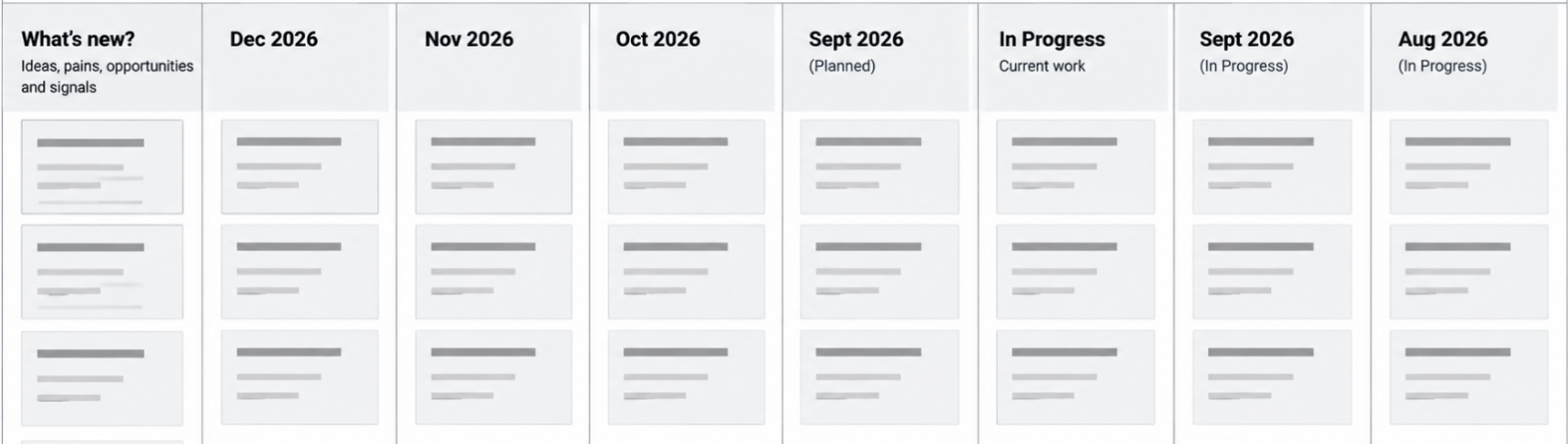
The months aren’t fixed commitments. They help us organise priorities and have practical conversations about capacity. Something might sit in What’s New? while we learn more, then become important enough to say, let’s put that into next month. Keep some stretch items in each month, but if there is clearly too much, move things forward.
Over time, the board gives everyone a simple view of what we’re hearing, what’s coming next, what’s happening now and what we’ve already achieved.
The conversation finds the themes. Time gives them a place. The board keeps them moving.
Once a month, look a little further ahead
Once a month, make the weekly session an hour. Use the first 30 minutes for exactly the same rhythm you use every week: what’s new, what’s in progress and what’s next. Then use the second half to lift your eyes a little further.
Look properly at next month and the month after that. Given everything we’ve learned over the last few weeks, do the things sitting there still feel right? Are themes emerging that now deserve a place? Has something become less important? Are there dependencies we need to prepare for? Is the amount of change realistic for the capacity available?
This is also a useful opportunity to look at pace. Are we moving at roughly the rate we expected? Is there room to bring something forward? Are we consistently carrying too much from one month into the next? Is there a larger enhancement on the horizon that might need additional investment or planning?
This isn’t about locking down another project plan. It’s about maintaining enough certainty about what comes next that everyone can move with confidence, while leaving enough flexibility to respond to what we learn.
Plan for value and the capacity for change
A Managed Services relationship has capacity. So does the business. Both matter.
There may be enough delivery capacity to make ten changes, but if the business only has the capacity to test, adopt and absorb three, delivering ten isn’t necessarily success. Equally, a Product Owner might identify twenty genuinely valuable opportunities, but that doesn’t mean they all need to happen immediately.
The board makes those trade-offs visible. We can keep some stretch items in the current month and pull them forward if things move faster than expected. We can move other things into future months knowing they haven’t been forgotten. And when something genuinely becomes more important, we can bring it forward and consciously move something else.
That is very different from continuously adding things to a backlog and hoping we eventually get to them. We’re organising change around value, impact and the capacity to absorb it.
Don’t combine Product Owner cadences
If you have multiple Product Owners across a connected ecosystem, it can be tempting to bring them all into the same weekly Managed Services conversation. Generally, we wouldn’t.
Each Business Product Owner benefits from having their own regular conversation because their product, users and needs are different. A CRM Product Owner might talk about processes, reports, flows and configuration, with many of those conversations leading to product change. A Marketing or Digital Product Owner might talk about audiences, engagement, campaigns, conversion and analytics, with the conversation leaning more towards strategy, advice and making better use of the capabilities they already have.
The person they meet with from the Managed Services team may be different too. The CRM Product Owner might benefit from someone who knows their solution and can help shape functional change, while the Marketing Product Owner may get more value from someone bringing marketing, digital and engagement expertise. The cadence should connect the Product Owner with the people best equipped to help them make their product better.
IT and Data Product Owners can work differently again. They are often more on demand, becoming involved when a need, opportunity or risk emerges: we need to think differently about PII, or I think we’ve identified a data risk. Those conversations may need architecture, data or integration expertise rather than a standing weekly cadence.
Combining all of this into one meeting can actually reduce its value. People spend time listening to conversations that don’t need them, while the conversations that do matter get less time and less access to the right expertise. Collaboration doesn’t require everyone to be in everything.
Keep the individual cadences focused and bring people together when there is something worth connecting. For closely related products, an additional monthly cross-product conversation can still be useful for looking ahead at dependencies and shared impacts, but it should complement the individual relationships rather than replace them.
Give each Product Owner the conversation they need, with the people they need, then connect those conversations when it matters.
Keep it simple and keep talking
That’s really what a good Managed Services and Product Owner cadence looks like. And it doesn’t need to look identical for every product.
Where there is a steady flow of business change, start every week with what’s new? Listen for the voice of the business and the themes beginning to emerge. Quickly check what’s in progress and clear anything getting in the way. Look at what’s next and make sure the current month remains realistic. Keep the board moving in the background rather than spending your meeting administering it.
Once a month, spend another 30 minutes looking ahead and shaping the next couple of months. Where there are multiple related products, occasionally bring those Product Owners together to look across the ecosystem without turning every decision into a committee decision.
Then do it again next week.
The value isn’t in the meeting itself, the Kanban board or having the perfect backlog. The value is in the continuity of the conversation. Something that seems small today can connect with something we hear next week, and over time those signals help us recognise where attention and investment will create the most value.
You don’t need to manage all of that alone. Bring us what you’re hearing from the business and where you want to go. We’ll bring what we’re seeing through support and delivery, what we know about the technology and the experience to help you give it shape.
Keep talking, keep learning, and together we’ll keep making the product better.
You’ve Been Made the Product Owner.
Now What?
You’ve been told you’re the Product Owner for Salesforce, your marketing platform, fundraising platform or another important business system.
So, what exactly have you just become responsible for?
Product Owner is one of those titles that sounds reasonably self-explanatory until you actually have to do the job. You might not administer the platform. You may not be particularly technical. There may already be an internal IT team, an implementation partner or a Managed Services partner responsible for much of the work. You probably don’t manage everyone who uses the product either.
Yet somehow, you’re now its owner.
At its simplest, a Product Owner is accountable for the direction, priorities and ongoing evolution of a product. Your job is to understand what the product is there to achieve, who it serves, where it needs to improve and what matters most next.
That doesn’t mean you need to know how to build everything. In fact, one of the most important distinctions in Product Ownership is between what and why and how. You should be able to explain what the business needs, why it matters, who it affects, how important it is and what a good outcome would look like. Your technical teams and delivery partners can then help determine how best to achieve it.
In practical terms, that means taking responsibility for a number of things:
- Own the product direction and priorities. Decide what matters most, where the product needs to go and what should happen next.
- Maintain and prioritise the product backlog. Balance strategy, business needs, user feedback, support insights, defects and opportunities rather than treating the backlog as a queue of requests.
- Triage support demand. Users should be able to report the pain, problem or opportunity they experience without diagnosing the underlying technology or prescribing the solution. You help determine whether the need is support, training, process change, a defect or a genuine product improvement.
- Protect the product from drift. User feedback and support demand should inform the roadmap, but the product shouldn’t be shaped by the loudest user, the most recent request or simply the greatest number of requests.
- Define what and why, not necessarily how. Articulate the problem, desired outcome, importance and what good looks like, then work with technical and delivery specialists to determine how best to achieve it.
- Understand the product ecosystem. Know the important upstream and downstream influences, integrations and hand-offs affecting your product. You don’t need to be the expert in all of them, but you need to know when your decisions have consequences beyond your product.
- Collaborate across product boundaries. When an issue or opportunity involves another platform, work with its Product Owner rather than expecting users to understand or navigate the underlying architecture.
- Own value, not just change. Consider adoption, training, usability and business outcomes, not simply whether functionality has been delivered.
Product Ownership is an important responsibility, but it doesn’t need to become your whole job. In many organisations, it is something you bring into the role you already have: a clearer responsibility for listening, setting direction, making priorities visible and helping shape how the product evolves. You don’t need to become the technical expert or spend every day managing a backlog. What you gain is the opportunity to influence how an important business product develops, make sure investment is focused where it can create the most value, and help turn the things you and your colleagues experience every day into meaningful improvement.
And you aren’t doing that alone. You bring your understanding of the business, its people and its priorities; your implementation or Managed Services partner brings their understanding of the technology and what it can do. Product Ownership is where those two perspectives come together.
You own the product, not the technology
For a business-facing platform such as Salesforce CRM, Product Ownership will often sit in the Business. That’s because most of the important decisions about its ongoing evolution are ultimately business decisions. How should we manage this relationship? Where is this process creating unnecessary effort? What information do our people need? What should we improve next? Which opportunity is more important?
That doesn’t mean every platform should be Business-owned. Enterprise-enabling products such as an integration platform or enterprise data platform may quite reasonably have IT or Data Product Owners because their primary responsibilities span multiple business products and include architecture, data, security, reliability and governance.
The important principle is that Product Ownership should sit close to where the product’s primary value can be understood and governed.
It can also change over time. During the very early stages of a major transformation, IT-led Product Ownership can make a lot of sense. When you’re replacing Dynamics with Salesforce, for example, the immediate risks may be migration, architecture, security, integration, data and establishing strong technical foundations. Once that platform moves into business requirement, however, the emphasis changes. The question becomes less about successfully establishing Salesforce and more about continually making Salesforce work better for the business.
The ownership model should be able to mature with the product.
Your backlog is not a list of requests
Once you’re the Product Owner, people are going to tell you what they want.
Some will have problems. Others will have ideas. Someone will want another field. Someone else will want a report. A team will have developed a workaround they want automated. A senior stakeholder will have seen something another organisation does and want the same thing. Support tickets will arrive. Your implementation or Managed Services partner will identify technical debt and opportunities. Vendors will release new capabilities.
All of these are signals. They are not automatically priorities.
One of the Product Owner’s most important responsibilities is turning those signals into a coherent product direction and prioritised backlog. That requires understanding the problem behind the request rather than simply accepting the requested solution.
But you’re not expected to do that alone. You know your business. Your implementation or Managed Services partner knows the technology. This is where the relationship between the two becomes really valuable.
As Product Owner, you should be able to have open and honest conversations about what you want for the business: what’s getting in the way, what you’re trying to improve, where people are struggling, what opportunities you can see and what outcomes matter most. You don’t need to translate all of that into a technical solution before bringing it to your partner. In fact, it’s often better if you don’t.
A good implementation or Managed Services partner can take that business context and bring their understanding of the platform, architecture and available capabilities to the conversation. Together, you can explore what is possible, challenge assumptions and find a better way to achieve the outcome. The Product
- Owner brings clarity about the business problem, the desired outcome and its priority;
- the partner brings clarity about how the systems can help achieve it.
This is where some of the best product decisions happen. Rather than the Business prescribing a solution and the partner simply building it, both sides bring their expertise to the problem. The result can be simpler, more sustainable and sometimes quite different from what either side would have proposed independently.
- Someone asking for another field may actually have a reporting problem.
- Someone requesting automation may have a broken process.
- A recurring support ticket may indicate a training problem rather than a technology problem.
- Something described as a defect may actually be the product behaving exactly as designed, but in a way users don’t understand.
The Product Owner needs to understand those differences, but they have a partner to help them do it.
This is why support should inform the product roadmap; it should not define it. The number of people asking for something matters, but Product Ownership isn’t product development by popular vote. Equally, the loudest person, most senior person or person who most recently raised an issue shouldn’t automatically determine what happens next.
Your job is to listen broadly, work with the people who understand the technology and decide deliberately.
Users should tell you what hurts
There is another important distinction when triaging demand: users shouldn’t be expected to diagnose the technology.
Modern platforms rarely operate independently. Salesforce might be connected to a fundraising platform, an integration platform, Data Cloud, a marketing platform, finance systems and a collection of other services. The person using Salesforce doesn’t need to understand any of that.
If they can’t see a donation they expect to see, that’s what they should tell you. They shouldn’t have to decide whether Salesforce is broken, Raisely hasn’t sent something, MuleSoft has failed or Data Cloud hasn’t resolved an identity correctly.
Users should report the pain, problem or opportunity in the product in front of them.
The Product Owner and supporting team can then triage that signal and determine what it means. It might require support, training, process change, defect resolution or a genuine product enhancement. Investigation might also determine that the underlying cause sits in another product.
That’s where another part of Product Ownership becomes important.
You own a product within an ecosystem
Having a Product Owner for Salesforce doesn’t mean that person owns every technology connected to Salesforce.
As we explored in our article, What Role Do Your Systems Play?, systems play different roles within an organisation. Some are systems of engagement, others provide identity and authority, integration, automation, knowledge or insight. Increasingly, the same platform may even play more than one of those roles. Understanding those roles helps us think about where Product Ownership should sit and, just as importantly, where the boundaries between products exist.
An organisation might have Salesforce CRM owned by Partnerships, Marketing Cloud and Raisely owned by Marketing, while Data Cloud and MuleSoft are owned by IT. Each has a different purpose, different users and different priorities, so separate Product Ownership can make good sense.
But those Product Owners cannot operate independently. The systems may have different roles and owners, but they are part of the same ecosystem. A change to Salesforce might affect an integration into MuleSoft, the data represented in Data Cloud or the audiences available to Marketing. A change in Raisely might alter what arrives in CRM. A new marketing requirement might depend upon data that originates somewhere else entirely.
A good Product Owner therefore understands the important upstream and downstream influences on their product. They don’t need to become an expert in every connected platform, but they need enough awareness of the ecosystem to recognise when a decision crosses a product boundary and when another Product Owner needs to be involved.
Ownership gives you authority within your product. It doesn’t give you authority over connected products.
The model works when there is clear ownership locally, cooperation at the boundaries and shared responsibility for the end-to-end outcome.
The Product Owner as the signal between Business and Delivery
All of this becomes even more important when an organisation is working with an implementation partner or Managed Services partner. In fact, I think Product Owner may be the most critical client-side role in making those engagements successful.
A delivery partner can bring architects, consultants, developers, administrators, analysts, testers and specialists. They can understand the technology, recommend approaches and deliver change. What they cannot independently determine is what matters most to your organisation.
Without effective Product Ownership, the partner is exposed directly to the noise of the business. Different stakeholders raise different priorities. Users submit enhancement requests. Someone escalates a support ticket. A meeting creates three new ideas. Another team wants something urgently. An executive asks whether a new feature can be implemented. Meanwhile there is technical debt to address, an existing backlog and strategic work already underway.
If all of those signals travel directly into delivery, the partner can become very busy without the product necessarily becoming much better.
Filter and focus
This is where the Product Owner creates enormous value. Their job isn’t to block the Business from the delivery team. It is to filter and focus what the Business is telling us into signals that delivery can respond to effectively.
That means listening to the noise and finding the patterns within it. It means separating symptoms from causes and problems from proposed solutions. It means identifying where several apparently different requests are actually manifestations of the same underlying issue. It means deciding when something is important enough to interrupt current priorities and when it belongs in the backlog.
Most importantly, it means providing delivery with clarity.
Instead of five users independently asking a Managed Services team for five slightly different Salesforce changes, the Product Owner might be able to say:
“We’re seeing a consistent problem with how our Partnerships team manages this part of the relationship lifecycle. Here are the users affected, here is what they’re trying to achieve, here is the business impact and this is now one of our priorities.”
That’s a very different signal. It gives the delivery team something they can investigate, design around and solve properly rather than simply implementing a collection of requests.
Protecting the product from drift
Most individual requests are reasonable. That’s what makes this difficult. Adding a field might genuinely help somebody. Changing a workflow might make one team’s job easier. Creating another automation might solve an immediate problem. None of these decisions necessarily looks damaging in isolation.
Over several years, however, hundreds of individually reasonable decisions can create a product nobody deliberately designed. Processes become inconsistent, fields proliferate, automations overlap and different teams solve similar problems differently. The underlying architecture becomes harder to understand and eventually the organisation begins describing the platform as complicated or difficult to use.
This isn’t necessarily the result of bad implementation. It can simply be the accumulated effect of change without strong Product Ownership.
The Product Owner protects against that drift by continually bringing decisions back to the product’s purpose, strategy and priorities. They don’t prevent change; they make change deliberate. Your implementation or Managed Services partner can challenge, advise and help you shape those decisions, but they shouldn’t become the de facto Product Owner. Ultimately, the decisions about what matters to the business and where the product should go need to remain with the organisation.
So, you’ve been made the Product Owner
Congratulations. You’ve been given the opportunity to shape a product that matters to your organisation and the people who use it. You have a voice in where it goes next, what gets better and where future investment and effort are focused.
Users will tell you what they’re experiencing. Stakeholders will tell you what they need. Support will show you where there is friction. Strategy will tell you where the organisation is going, and your technology partners will help you understand what is possible.
Your job is to bring those signals together and decide what they mean for the product.
That’s an important role — and a pretty exciting one to have.
Deterministic, Immutable and Other Words I’ve Picked Up From AI
I do a lot of vibe coding these days. We hear plenty about the importance of keeping a qualified human in the loop when working with AI. In my case, I am that human. I make sure the AI and I agree on the requirements, approach and solution before we start building, and I stay involved as we progressively design, build and test the result.
During those conversations, and throughout the build process, I’ve noticed something interesting. There are certain words and actions that AI comes back to again and again.
They’re not AI words. AI didn’t invent them. In many cases they’ve been part of software engineering for decades. Some I’ve known and used for years, some I’ve rarely had reason to use, and others describe familiar concepts with a level of precision that makes them particularly useful when a human and an AI are trying to agree on exactly how something should behave.
What interests me is how naturally they’re becoming part of the language of AI-assisted development. I suspect the next generation of designers, developers and solution people are going to hear them a lot more often too.
The danger is that we start repeating the language without really understanding what we’re saying. So I’ve started compiling a list of the words I keep encountering, what they actually mean and, perhaps more importantly, why they’re useful ideas in the first place.
Here are a few that keep coming up.
Deterministic
Something is deterministic when the same input, under the same conditions, produces the same result.
If I give a system A, B and C today and get X, I want A, B and C tomorrow to produce X again. That’s particularly interesting when we’re building with AI because AI itself can be probabilistic. Ask essentially the same question twice and you may get slightly different answers.
So when someone asks whether part of a solution is deterministic, they’re really asking a simple question: can we rely on this behaving the same way next time?
That’s often exactly what we want from software, even when we’re using a less predictable tool to help us build it.
Heuristic
A heuristic is essentially a practical rule of thumb. It won’t guarantee the right answer every time, but it gives us a useful way to make a decision when an exact answer would be difficult, expensive or unnecessary.
We use heuristics all the time without necessarily calling them that. If we decide that a piece of content over a certain length probably needs a summary, or that three failed attempts should trigger a different process, we’re using a simple rule to make a reasonable decision.
This makes heuristic a useful companion to deterministic. Sometimes we’re saying, “If A happens, B must always happen.” Other times we’re saying, “When we see A, B is usually a sensible thing to try.”
A heuristic isn’t a fact or a guarantee. It’s an informed shortcut that’s useful often enough to help us make a decision.
Immutable
Immutable means something can’t be changed after it has been created.
That doesn’t necessarily mean nothing can ever change. It means we don’t rewrite the original. If something changes, we create a new value, version or record while preserving what existed before.
Think of a historical transaction. If we change yesterday’s transaction every time our understanding changes, eventually we no longer have a reliable record of what actually happened yesterday.
Calling something immutable is therefore more than saying, “Please don’t edit this.” We’re saying that preserving its original state is part of the design.
Idempotent
Idempotent is probably one of the less familiar words on this list, but it describes a very useful idea.
Something is idempotent when you can do the same thing more than once without each repetition creating an additional unintended result.
Imagine we send a request to create a payment but don’t receive a response. Did the payment fail, or did it succeed and we simply didn’t hear back? We need to try again, but we certainly don’t want to charge the person twice.
If that operation is idempotent, we can safely repeat the request. The system recognises that we’ve already asked it to perform that particular action and doesn’t blindly do it again.
This comes up constantly in integrations, APIs and automation because retries are a normal part of building reliable systems. Networks fail, responses time out and processes get interrupted.
The useful question behind the word is wonderfully simple: what happens if we do this twice?
If the answer is “we accidentally create two of them”, idempotency might be something worth thinking about.
Scalar
A scalar is simply a single value.
That value might be a number, a piece of text, a true/false value or another simple value depending on the context. The important distinction is that we’re talking about one value rather than a collection, structure or more complex object.
If someone’s age is 51, that’s a scalar. If we have a list containing the ages of 100 people, we’re no longer dealing with a single scalar value. Likewise, "Sydney" can be a scalar value, while a customer record containing a name, address, phone number and email is a more complex structure made up of multiple values.
You’ll hear the term used in slightly different ways across programming, databases, mathematics and data systems, but the underlying idea is similar.
When AI says it “expects a scalar”, the useful translation is usually: give me one value, not a collection of things.
Smoke Test
A smoke test is a quick test to establish whether the important parts of something basically work before we spend time testing it more deeply.
We deploy a change. Does the application load? Can we perform the core action? Are the important components responding? Has anything obviously caught fire?
If the smoke test fails, there isn’t much point beginning a detailed test plan. We already know we have a fundamental problem.
That’s why you’ll hear AI coding tools suggest smoke tests so frequently. When we’re making lots of changes quickly, stopping regularly to establish that the thing basically still works is cheap insurance.
Drift
Drift is what happens when something gradually moves away from its intended or known state.
Code can drift away from the original architecture. Configuration can drift between environments. Documentation can drift away from what the application actually does. Even requirements and implementation can slowly become different versions of the truth.
The important word there is gradually. Drift doesn’t necessarily happen because someone makes one obviously bad decision. Lots of individually reasonable little changes can accumulate until what we have is no longer quite what we thought we had.
So when you hear someone talking about drift, the question underneath it is: are we still where we think we are?
Linting
Linting is automated checking of code for errors, suspicious patterns, inconsistencies and breaches of agreed coding conventions.
We’ve had linters for a long time. CSS linting, JavaScript linting and other forms of static code checking certainly aren’t inventions of the AI era. What AI-assisted development does is make linting an incredibly natural part of a very fast development loop.
Make the change, lint it, fix what the linter finds, test it and move on. A linter doesn’t prove the solution works, because that’s not its job. It catches a class of cheap, avoidable problems before they get further through the process.
That’s probably why I hear the word so much more now. AI can produce and change code quickly, and linting provides a fast way to check some of that work just as quickly.
Hydration
Hydration is one of those wonderfully visual words that modern web development has adopted for a fairly technical process.
A page can arrive from the server already containing its HTML and content. The browser then adds the JavaScript behaviour needed to make that page interactive. That process is called hydration.
The page is already there. Hydration brings it to life.
When you hear about a hydration error, it’s often because what the browser expected when it took over doesn’t quite match what was originally rendered by the server.
You don’t necessarily need to be the person fixing that problem to understand the conversation. If someone says, “This looks like a hydration issue”, you now have a pretty good idea which part of the journey they’re talking about.
Worker
Worker is a wonderfully ordinary word that has a more specific meaning when it turns up in a technical conversation.
A worker is essentially a piece of software given a job to do. Rather than everything happening inside the main application while a user waits, work can be handed off to a worker to process separately.
That job might be resizing an image, processing a queue, sending notifications, transforming data or responding to an event. Some workers run in the background, some run on a schedule and others wake up when something happens, do their job and disappear again.
You’ll hear the word used in slightly different contexts. A web worker can perform work away from the browser’s main thread. A service worker can sit between a web application and the network. A cloud worker can run code without us needing to think in terms of a traditional server sitting there waiting for requests.
The implementations are different, but the basic mental model is useful: there’s a job to do, so give it to a worker.
Once you understand that, a lot of conversations about queues, background processing and distributed applications become much easier to follow.
Canonical
Canonical means the recognised, authoritative or standard version of something when several possible representations exist.
Maybe several URLs can reach effectively the same content, but one is the canonical URL. Maybe information can arrive in several different structures, but we convert it into one canonical format before the rest of the system processes it.
In plain language, when someone asks, “What’s the canonical version?”, they’re asking: of all the ways this thing can exist, which one do we agree is the one?
That’s particularly useful when humans and AI are working together. Ambiguity creates problems quickly. Establishing the canonical representation gives everyone, human and machine, the same thing to work from.
Shape
Shape might be the least technical word on this list, which is partly why I’ve noticed it.
AI uses shape constantly. Shape the data. Shape the response. Shape the implementation. Shape the behaviour. Shape the solution around a particular requirement.
In this context, shaping something means deliberately giving it the structure or characteristics we need rather than simply accepting whatever form it happens to take.
We might receive data in one format and shape it into something our application can use. We might shape a response so it contains only the information required by the next process. Or we might shape an implementation around a set of constraints rather than allowing the technology to dictate the solution.
It’s a simple word, but it’s a useful distinction. Shape doesn’t necessarily mean create. Often the thing already exists. We’re organising, constraining or transforming it into the form we need.
And perhaps that’s why it works so well in conversations with AI. Much of what we’re doing isn’t asking AI to invent something from nothing. We’re progressively shaping an idea, requirement or implementation until it becomes the solution we actually want.
Why These Words Matter
None of these words are new, and that’s really the point.
AI isn’t inventing a new language for software development. What I think it is doing is exposing that language to a much broader group of people, while also making some existing engineering language much more common in our everyday conversations.
Someone who might previously have written requirements, designed an experience, managed a project or described what they wanted a solution to do can now sit beside an AI and progressively build that solution. Along the way, they’re going to find themselves much closer to the language and disciplines of software engineering than they might have been before.
I think that’s particularly important for the next generation coming into our industry. AI can remove a lot of the barriers to building something, but removing the barrier to writing code isn’t the same as removing the need to understand what we’re doing.
We shouldn’t learn these words because they make us sound more technical, and we shouldn’t simply repeat them because AI does. We should understand what they mean, the idea behind them and why someone chose that particular word in the first place. Once you do, many of them turn out to be remarkably good shorthand for ideas that would otherwise take a sentence or two to explain.
And there’s a slightly funny consequence I’ve noticed in myself.
After spending so much time talking to AI this way, these words have started escaping the AI conversation. I now find myself using them in my writing, in solution discussions and in everyday conversations with other people. Something has drifted. We need to shape the approach. Which version is canonical? Is the outcome deterministic?
Apparently, if you spend enough time talking to AI, it doesn’t just learn how you communicate.
You start picking up some of its vocabulary too.
What Role Do Your Systems Play?
Most organisations can produce a list of their systems. CRM, website, finance, marketing, service desk, document management, analytics, integration, collaboration, HR and, increasingly, a growing collection of AI tools. Ask what each one does, and you will might get a reasonable answer too.
But there is a slightly different question that organisations don’t ask nearly as often: what role does each system play for them?
Where does the authoritative customer record live? Which system owns identity? Where should customers engage? What system is allowed to make a decision or perform an action? Where does organisational knowledge live? How does information move between all of these places?
And perhaps most importantly, what happens when two or more systems believe they have the same job?
If you haven’t considered your technology estate this way before, maybe you should.
Start With the Systems You Already Have
Don’t start by redesigning your architecture or choosing new technology. Start by cataloguing what you already have.
List the systems your organisation currently uses, and don’t limit this to the large enterprise platforms. Include websites, SaaS products, databases, integration tools, reporting platforms, communication platforms, document repositories, collaboration tools and AI. That spreadsheet somebody relies on to run an important business process probably deserves to be there too.
Then, rather than simply documenting what each product is or what vendor provides it, consider the roles it plays within your organisation.
A single system can have several roles, and that’s completely normal. Salesforce might be a System of Record, a System of Automation and a System of Engagement. A website may provide Engagement, Experience and Communication. Microsoft Teams could provide Collaboration, Communication and Knowledge.
The objective isn’t to put every product neatly into one box. It is to make the responsibilities you have given those products visible.
A Catalogue of System Roles
There isn’t necessarily one universal taxonomy for this, and organisations will have roles specific to their environment. But the following provides a useful catalogue to start the exercise.
System of Record
A System of Record is the authoritative home of information. It is the system that has the greatest right to a particular record or piece of data.
It is common to hear organisations refer to the System of Record, but in practice there will often be several, each authoritative for a different type of information. Your CRM might be the System of Customer Record, your finance platform the System of Financial Record, your HR platform the System of Employee Record, and another system the authoritative source for products, services, assets or transactions.
The distinction can become more nuanced again. A CRM might own the customer relationship and core customer identity, while a finance system has greater authority over that customer’s billing details and transaction history. A marketing platform might hold a copy of their email address and preferences, but neither necessarily belongs there as the authoritative record. Thinking in terms of Systems of X Record helps identify these boundaries rather than trying to nominate one platform as the source of truth for everything.
Other systems will almost certainly hold copies of the same information, and that isn’t inherently a problem. The important question is what happens when those copies disagree. For each important information domain, you should be able to answer: which system has the greatest right to say what is true?
System of Engagement / Experience
A System of Engagement / Experience manages where and how people interact with the organisation. This can include websites, portals, apps and service platforms, but also communication channels such as email, SMS, messaging and push notifications. Engagement might be initiated by the person or by the organisation; what defines the role is that it sits at the point where the organisation and its audiences interact.
These systems shape what someone sees, receives and can do, but they don’t necessarily own the underlying information. A website might allow a customer to update their details, while a marketing platform sends communications based on their interests. In both cases, the CRM might remain the System of Record for the customer, their preferences and their consent.
There may legitimately be several Systems of Engagement / Experience serving different audiences, purposes and channels. Mapping them as a role helps establish which systems are authorised to engage with whom, through which channels, and using information owned by which other systems.
Examples: WordPress, Salesforce Experience Cloud, Salesforce Marketing Cloud.
System of Identity / Authority
A System of Identity / Authority establishes who someone or something is and which representation of that identity should be trusted. This can include authentication and access, but also customer identity, account matching and the relationships between different representations of the same person or organisation.
An organisation may have many identifiers for one person across CRM, website, marketing, service and transactional systems. Those systems may all know something about that person without having equal authority over their identity. A System of Identity / Authority establishes which identity should be trusted, how other identities relate to it and, where relevant, what that identity is authorised to access or do.
This becomes particularly important as systems become more connected. Knowing that two records probably represent the same person is different from having the authority to declare that they do.
Examples: Microsoft Entra ID, Salesforce Identity, Okta.
System of Integration / Ingestion
A System of Integration / Ingestion is responsible for bringing information into the organisation’s technology ecosystem and moving it between systems. It can receive, move, transform, synchronise and route information so that individual systems don’t all need bespoke knowledge of one another.
Integration generally describes information moving between known systems, while ingestion broadens the role to include information arriving from external sources, files, feeds, APIs, events or other inputs. In both cases, the role is primarily about getting information from where it is to where it needs to be.
Its responsibility should usually remain different from owning or interpreting the information it transports. Integration and ingestion systems have a habit of accumulating business logic over time. Eventually something that was intended to move information starts deciding what that information means, which can blur the responsibilities between Integration / Ingestion, Record and Automation / Action.
Examples: MuleSoft, Salesforce Data Cloud, Workato.
System of Automation / Action
A System of Automation / Action is responsible for making things happen. It responds to events, applies rules or decisions and executes the process that should follow, whether that means creating a record, assigning a task, updating a status, sending a notification or coordinating work across several systems.
The decision and the action don’t necessarily need to happen in the same place. One system might determine what should happen while another executes it, particularly as predictive models and AI become more involved in organisational processes. For the purpose of mapping system roles, however, they are part of the same broader responsibility: turning information, events and decisions into action.
There may legitimately be several Systems of Automation / Action, but where multiple systems can initiate or control the same process, it is worth establishing which has the greatest right to do so. Knowing which system is authorised to make something happen can be just as important as knowing which system owns the underlying data.
Automation may exist inside your CRM, marketing platform, integration layer or dedicated workflow technology. The important thing is knowing which system has responsibility for making a particular process happen.
Examples: Salesforce Flow, Salesforce Agentforce, Workato.
System of Collaboration
A System of Collaboration is where people work together. Teams, Slack, project workspaces and other collaborative environments are obvious examples.
These platforms frequently overlap with Communication and Knowledge. A decision discussed in Teams can quickly become organisational knowledge, even though Teams may not be where that knowledge should ultimately live. Identifying the roles helps expose those blurred boundaries.
Examples: Slack, Microsoft Teams, Jira.
System of Knowledge / Content
A System of Knowledge / Content is where an organisation creates, manages and maintains the information it wants people and systems to use. This might include website content, policies, procedures, guidance, documentation, project history, research, articles, resources and other reusable organisational knowledge.
There may be several Systems of Knowledge / Content serving different purposes. A CMS might be authoritative for published website content, a document management platform for controlled policies and procedures, and another knowledge base for internal guidance. As with Systems of Record, the important question is not necessarily whether there should be only one, but whether it is clear which system has authority over which type of knowledge or content.
This role is becoming particularly important with AI. Giving an AI assistant access to ten repositories doesn’t solve the knowledge problem; it can expose it. If several systems contain different versions of the same policy, guidance or content, the AI still needs to know which one is current, authoritative and appropriate to use. Understanding your Systems of Knowledge / Content therefore becomes part of establishing what both people and machines should trust.
Examples: WordPress, Salesforce Knowledge, Confluence.
System of Insight / Intelligence
A System of Insight / Intelligence helps turn information into understanding. This can range from reporting, analytics and dashboards that explain what has happened, through to systems that identify patterns, make predictions, summarise information, discover relationships and recommend what might happen next.
These systems often bring together information from multiple sources without becoming the authority for the underlying records. Their role is to interpret information and make it useful, rather than necessarily own it.
AI is rapidly expanding what this role can do, but intelligence doesn’t need to mean AI. Traditional reporting, behavioural analytics, forecasting, predictive models and AI can all play different parts in helping an organisation move from having information to understanding and acting on it.
Examples: Tableau, Salesforce CRM Analytics, Agentforce.
Now Look for the Overlaps
Once you have your systems and roles, create a simple matrix. Put your systems down one side and the roles across the top, then mark every role that each system currently performs. Don’t worry if individual systems end up with lots of marks. Systems performing multiple roles isn’t the problem.
What you are looking for is the pattern in the other direction: multiple systems performing the same role.
Perhaps three systems maintain customer contact details. Two systems trigger customer communications. Four places contain organisational knowledge. The CRM and finance platform both maintain an organisation name. The website, CRM and marketing platform can all update communication preferences.
None of these examples automatically means the architecture is wrong. They simply identify places where another question needs to be asked: which system has the greatest right to perform that role?
Give Your Systems Rights
When multiple systems perform the same role, the answer isn’t necessarily to eliminate all but one. Information and capabilities genuinely need to exist in multiple places in modern architectures.
Instead, establish their rights.
One system might own the information while another can create it. Several systems might consume it. Another might be permitted to update particular attributes, while others can only read them. A customer email address might legitimately appear in six systems, but there should still be an answer to which system has the greatest right to say what that email address actually is.
The same principle applies beyond data. Which system has the right to communicate with the customer? Which can make a decision? Which can initiate automation? Which can approve an action? Which owns organisational knowledge? Which can modify another system’s record?
Thinking in terms of rights turns the exercise from a system inventory into an architecture.
Look for the Gaps Too
Overlap isn’t the only thing the matrix will reveal. Empty columns can be just as interesting.
You might discover that you have plenty of Systems of Record but no clear System of Knowledge. You collect enormous amounts of information without having a meaningful System of Insight. Automation exists everywhere, but nobody can identify where governance sits. Or perhaps AI is rapidly becoming a System of Intelligence without anyone having decided which Systems of Record and Knowledge it should trust.
These aren’t necessarily reasons to buy another product. Sometimes the capability already exists and simply hasn’t been deliberately assigned. The first step is recognising that the role matters.
Turn the Catalogue Into a Roadmap
Now the catalogue becomes much more useful than an asset register. For each role, consider who performs it today, who should perform it in the future, which system has the greatest right to own it, where responsibilities are unnecessarily duplicated and where no clear owner exists.
You don’t need to fix every overlap. Some will be completely intentional, some will be practical compromises, and some platforms will continue performing several roles because they genuinely are the best place to do so.
Other overlaps will reveal obvious opportunities. An old database can stop being a System of Record. A marketing platform can consume preferences rather than own them. A website can remain the System of Engagement without becoming another customer database. An integration can stop making business decisions that belong elsewhere. An AI assistant can become a powerful System of Intelligence without quietly becoming a System of Record.
That creates a technology roadmap based on something more meaningful than which products should we replace? It asks instead: what responsibilities should our systems have in the future, and how do we move from the architecture we have today to that architecture?
Your Architecture Already Exists
Every organisation already has answers to these questions. The problem is that those answers aren’t always deliberate.
Someone needed a field, so they added it. A project needed an integration, so one was built. A team needed automation, so they configured it. Another department bought a platform. A website started collecting information. A spreadsheet became surprisingly important. Now AI is being connected to all of it.
Individually, each decision probably made sense. Collectively, those decisions became your architecture.
Cataloguing your systems and assigning their roles gives you an opportunity to make that architecture deliberate again. Start with what you have, identify the roles each system plays, find the overlaps and gaps, decide which systems have the greatest rights, and use those decisions to shape where your architecture goes next.
Before deciding what technology you need next, understand the jobs you’ve already given the technology you have.
Duplicate Matching, Merging and Unification Are Different Things
When two records appear to represent the same person, it is easy to treat the problem as a simple duplicate. But modern customer platforms provide several different ways to respond, and each one serves a different business purpose.
- Duplicate matching helps identify possible duplicates.
- Merging combines confirmed duplicates into one operational record.
- Unification connects related records to create a broader view of the person without changing the original records.
These capabilities are related, but they are not interchangeable.
Understanding the difference helps organisations make better decisions about data quality, customer service, reporting and engagement.
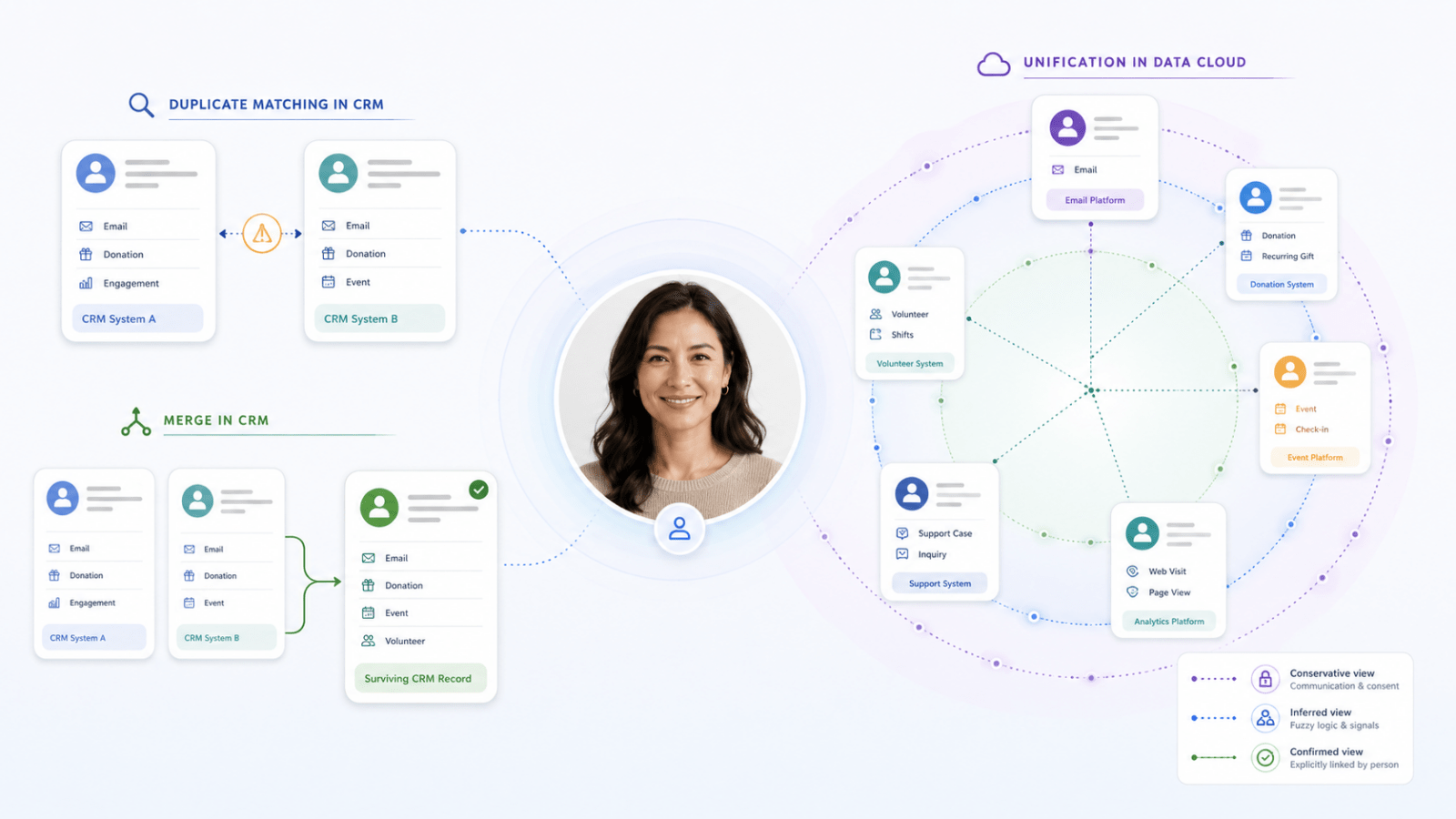
Duplicate matching happens in your CRM
Your CRM is the operational system your teams use to manage customers, supporters, members or other constituents. When a new record is created or an existing record is updated, duplicate matching rules can compare it with records already held in the CRM. Those rules might consider information such as:
- name;
- email address;
- phone number;
- postcode;
- date of birth;
- other identifying details.
Depending on how the organisation configures them, the CRM may warn the user, prevent the record from being created or flag a possible duplicate for review. For the business, this helps reduce unnecessary duplication at the point information enters the organisation. It helps staff find an existing person rather than creating another record and splitting their history across several places.
But duplicate matching does not necessarily prove that two records are the same person. It tells the business:
Duplicate review allows the business to decide
Some possible duplicates are obvious, while others require context that the system does not have.
Two records might share an email address but contain different names. Two people may live at the same address. A parent and child may use the same contact details. One person may use a work email address for one interaction and a personal address for another.
In these situations, the CRM can bring the possible match to someone’s attention so a staff member can decide whether the records are genuinely duplicates or whether they should remain separate.
This provides an important middle ground. The technology helps identify a potential issue, while the business retains control over decisions that may affect customer history, donations, registrations, services or communication preferences.
Merging changes the operational CRM record
When the organisation is confident that two CRM records are genuine duplicates, they can be merged. A merge combines the records and leaves one surviving operational record. The organisation may need to decide:
- which name and address should be retained;
- which contact details are current;
- which record becomes the surviving record;
- how activities, transactions and relationships are transferred;
- what happens when the records contain conflicting information.
For staff, merging can create one trusted place to manage the relationship. It can bring together information that was previously fragmented and reduce confusion about which record should be used.
But merging is a consequential action because it changes the operational data held in the CRM. That is why a possible match should not automatically become a merge.
Duplicate matching asks:
Do these records look like they may represent the same person?
Merging asks:
Are we confident that these records should become one operational CRM record?
They are different decisions.
Unification happens in Data Cloud
Sometimes several records appear to relate to the same person, but merging them is not necessary or appropriate.
A person may:
- register through an event platform;
- volunteer through another system;
- donate through a fundraising platform;
- appear separately in the CRM;
- subscribe using another email address.
Each platform may need to retain its own operational record, while the organisation still wants to understand those records together. This is where Data Cloud identity resolution provides a different capability. Data Cloud can evaluate information from multiple systems and determine which records should be treated as representing the same person for a defined business purpose.
The original records remain unchanged:
- the CRM record stays in the CRM;
- the volunteer record stays in the volunteer platform;
- the fundraising record remains in the fundraising platform;
- the registration record remains in the system that owns it.
Data Cloud creates a unified view across those records. For the business, this can support:
- more complete reporting;
- relevant audience segmentation;
- personalised communication;
- lifetime supporter or customer insights;
- engagement scoring;
- understanding interests and behaviour;
- calculated measures drawn from several systems.
Unification does not physically merge the source records. It allows the organisation to understand them together.
Merging and unification solve different problems
Merging is about correcting operational data in the CRM, while unification is about creating a connected view across records and systems in Data Cloud.
A merge says:
These CRM records are duplicates and should become one operational record.
Unification says:
These records should be understood together for this particular business purpose.
That distinction matters. A volunteer record may be valid in the volunteer system. A fundraising record may be valid in the fundraising platform. A CRM record may be required for customer service and relationship management.
The organisation does not need to destroy those distinctions to understand the broader relationship. Data Cloud provides the connected view while the operational systems continue to perform their own roles.
One identity resolution is not enough
It can be tempting to create one identity resolution and use it for every purpose, but our view is that this introduces unnecessary risk. Different business outcomes require different levels of confidence and different ways of deciding whether records should be understood together.
We recommend three separate identity resolutions in Data Cloud:
- a marketing and consent identity;
- an inferred relationship identity for segmentation and calculated insights;
- a confirmed relationship identity for records the person has explicitly connected.
Marketing and consent identity
The first identity resolution should support marketing communication and consent, and it should be conservative. Its purpose is to ensure that the organisation communicates through the correct contact point and respects the preferences associated with it.
One person may use a work email address for professional events and a personal email address for donations or volunteering. Those email addresses may belong to the same human, but they do not necessarily represent the same marketing relationship. Consent and communication preferences may differ between them.
For marketing, it is therefore safer to use strict matching rules and avoid combining records simply because they appear broadly similar.
The marketing identity should prioritise:
- safe communication;
- correct contact details;
- consent and preference management;
- a low risk of combining different people;
- clear segmentation and journey eligibility.
It may produce a narrower view of the person, but that is appropriate for the purpose.
Inferred relationship identity
The second identity resolution should support internal analysis, segmentation and calculated insights. Its purpose is to help the organisation understand a person’s broader relationship across time, systems and activities, even where that relationship has not been explicitly confirmed.
This identity will lean on fuzzy matching logic, using a wider range of evidence to identify records that are likely to represent the same person even when the details are not identical.
That evidence may include:
- similar or previous names;
- phone numbers;
- current and previous addresses;
- date of birth;
- current and previous email addresses;
- source-system identifiers;
- other relevant matching information.
For example, two records may have slightly different versions of a name, an old and new address, or different email addresses, but enough other information may align for Data Cloud to infer that they probably relate to the same person.
It could connect records for the purpose of calculating:
- lifetime giving;
- total event participation;
- volunteer activity;
- overall engagement;
- engagement scores;
- broader supporter or customer history.
This view effectively says:
Based on the information available and the fuzzy matching rules we have agreed, we believe these records probably relate to the same person.
That can be extremely useful for internal analysis and segmentation, provided the organisation understands that the relationship is inferred rather than proven. The broader the fuzzy matching rules, the more complete the view may become, but the greater the need to ensure the resulting insights are used for an appropriate business purpose.
Confirmed relationship identity
The third identity resolution should represent relationships the person has explicitly confirmed.
For example, someone may sign in and tell the organisation that an older email address, previous account or historical registration also belongs to them. Once that connection has been verified, the organisation has stronger evidence than it gains from matching data alone.
This view effectively says:
You have told us that these records also belong to you, so we have connected them.
A confirmed relationship identity can support more trusted customer views, stronger account continuity and more reliable personalisation.
However, it should not be treated as a complete record of the person’s history. Someone may have forgotten an old email address. They may no longer have access to a previous account. There may be historical, guest or offline activity they do not recognise or know exists.
The confirmed identity therefore provides greater certainty, but it may cover fewer records than the inferred identity.
The same person can have three valid unified views
This may initially sound unusual. If the records represent the same person, why not create one unified identity and use it everywhere?
The answer is that each identity is being resolved for a different purpose.
The marketing and consent identity asks:
Which records can be safely treated together so we communicate through the right contact point and respect consent?
The inferred relationship identity asks:
Which records probably relate to the same person and should contribute to internal insights, segmentation and calculated measures?
The confirmed relationship identity asks:
Which records has the person explicitly told us belong to them?
All three views can be valid at the same time.
The marketing identity may be the narrowest because it must minimise the risk of communicating incorrectly. The inferred identity may be the broadest because it is designed to reveal likely relationships and patterns. The confirmed identity may provide the strongest evidence, while still missing historical records the person has forgotten or cannot verify.
Using three identity resolutions allows the organisation to distinguish between safe communication, useful inference and confirmed connection without forcing one definition of identity to serve every business need.
Authentication is a separate capability
Authentication is often discussed alongside customer identity, but it solves another problem. Authentication determines who is accessing a website, portal or application. It can help people:
- use a consistent login across services;
- return to an existing journey;
- access protected information;
- manage their account;
- confirm that older records or accounts belong to them.
Authentication can provide stronger evidence about authenticated activity, but it does not replace duplicate matching, merging or Data Cloud identity resolution. A person may still have:
- historical records created before the account existed;
- guest donations or registrations;
- offline interactions;
- records created through external systems;
- activity completed on behalf of another person;
- several legitimate email addresses or contact points.
Authentication helps answer:
Who is accessing this digital service?
Duplicate matching, merging and unification answer different questions about the records held across the organisation.
Start with the outcome
The right technology depends on what the organisation is trying to achieve.
If the goal is to stop an unnecessary CRM record from being created, use duplicate matching. If the system has found a possible duplicate but the evidence is uncertain, use a review process. If two CRM records are confirmed duplicates and should be managed as one, merge them.
If valid records across several systems need to be understood together, use Data Cloud identity resolution. If the organisation needs to communicate safely and manage consent, use a conservative marketing and consent identity. If the organisation wants to understand likely lifetime engagement and calculate broader insights, use an inferred relationship identity. If a person has explicitly confirmed that other records belong to them, use a confirmed relationship identity.
Where people need consistent access across digital services, design an authentication and account experience.
The technology should follow the business purpose.
The goal is not one record or one identity rule
Better customer identity does not mean forcing every interaction into one CRM record. Nor does it mean creating one identity resolution and using it for every decision. The better approach is to use each capability deliberately:
- prevent avoidable duplicates in the CRM;
- review uncertain matches;
- merge confirmed duplicates when one operational record is required;
- use Data Cloud to connect valid records across systems;
- keep marketing and consent identity conservative;
- use a broader inferred identity for internal insights;
- retain a separate confirmed identity for relationships the person has explicitly verified;
- use authentication where a consistent account experience creates value.
When organisations understand these differences, they can improve data quality, communicate more safely and gain a fuller understanding of the people they serve without forcing every system and every business purpose into a single definition of identity.
Salesforce Feels Different Now. Here’s Why That Matters for Nonprofits.
Article by:
If you’ve been in the not-for-profit sector for a while, you probably have an opinion about Salesforce. Maybe you’ve seen it implemented well. Maybe you’ve heard mixed things. Maybe someone has tried to sell it to you and you weren’t quite sure what to make of it.
I recently had the chance to sit in on a conversation between two people I respect enormously in this space. Justin Yoon, Director of Consulting at AlphaSys, and Tammy Ven Dange, Independent Advisor to NFP Leaders for Major Technology Investments at Roundbox Consulting, have both spent years working at the intersection of technology and the nonprofit sector. What they talked about wasn’t a sales pitch. It was an honest, experienced conversation about how Salesforce has evolved, who it’s actually right for, and where it’s heading next.
The conversation is broken into clips below. Each one stands on its own, but together they paint a picture that I think is genuinely useful for any nonprofit leader thinking about their technology future.
How Salesforce went from a Sales Tool to a Sector Platform
Why watch this clip: If you’ve ever wondered how Salesforce usevolved from a B2B CRM to a nonprofit-aligned platform, Justin’s explanation of the history here is the clearest I’ve heard.
Salesforce was built for business-to-business sales. That’s just the origin story. Sales Cloud and Service Cloud were designed for organisations selling to other businesses, and when nonprofits started using it, they were working with a model that wasn’t originally built with their needs in mind.
The nonprofit sector found a way forward through something called NPSP, the Nonprofit Success Pack, which grew out of an open source community effort and eventually became a Salesforce-supported product. It helped a lot of organisations get started, and for many it worked well. But it was always a product that grew feature by feature over time rather than being architected from scratch with nonprofit complexity at its core.
About two and a half years ago, Salesforce made a significant decision: build it properly from the ground up. The result was the Industry Cloud family, purpose-built configurations for specific sectors including nonprofit and education. Rather than adapting a general-purpose tool, Salesforce borrowed proven design patterns from across their product suite, financial services, health, public sector, and built something that genuinely reflects how nonprofits receive funding, deliver services, and manage relationships.
The practical benefit is significant. Because Nonprofit Cloud now sits on the core Salesforce platform, every new investment Salesforce makes in AI, marketing, and data capability flows through automatically. The innovation curve has accelerated, and organisations using Nonprofit Cloud today are better positioned to take advantage of what’s coming than they would have been on any previous configuration.
What Actually Changed Under the Hood
Why watch this clip: Tammy asks the question most non-technical people have always wanted to ask, and Justin’s answer makes something genuinely complex very easy to understand.
For anyone who has sat in a reporting meeting and watched two people get different results from what should be the same data, this clip will feel familiar. It’s a challenge that has existed across many CRM platforms over the years, not unique to Salesforce, but one that Nonprofit Cloud has made real progress in addressing.
One of the meaningful improvements in Nonprofit Cloud is the separation of the data structure from the user interface. You can now design your data model around what your organisation actually needs for reporting and outcomes, and then configure how that data looks on screen independently. A one-off online donation, a major gift, and a corporate contribution can all be structured consistently in the background while looking completely different to the staff member entering or viewing them.
It’s a shift that sounds technical but has very practical consequences. Cleaner reporting, less workaround, and a system that’s easier to maintain and build on as your organisation evolves. For teams who have historically spent time wrestling with data rather than using it, this is a meaningful change.
What This Means in Practice for Your Organisation
Why watch this clip: Justin explains the real-world benefits of Nonprofit Cloud in a way that goes beyond the feature list, and his point about the innovation curve is particularly worth hearing.
One of the things Justin talks about in this clip is design risk, and it’s a concept worth sitting with for a moment.
When you implement a highly configurable system, every design decision your implementation partner makes is a bet. This is how we think your organisation should structure its data. This is how we think your workflows should run. Some of those bets pay off brilliantly. Others create complexity down the track that takes time to unwind.
Nonprofit Cloud reduces that risk significantly because Salesforce has done a substantial amount of the design work already, drawing on two decades of sector experience and direct collaboration with organisations like AlphaSys to define what best practice actually looks like. The number of decisions that need to be made from scratch is much lower, which means faster time to value, lower delivery cost, and less technical debt over the life of the system.
The other benefit Justin highlights is the innovation roadmap. As a consultancy, AlphaSys’s only product is time. What Salesforce provides is a continuously evolving platform where research and development investments are made centrally and flow through to every client using the product. AI summarisation of case files, automated donor profile insights, agent-assisted task management: these are being built into the platform and made available to clients without needing to be designed from scratch each time. The pace of that innovation is one of the most compelling reasons to be on the platform right now.
Why the Partner You Choose Still Matters
Why watch this clip: Tammy shares something she says she has genuinely never seen a Salesforce partner do before, and Justin’s explanation of how AlphaSys works is one of the more honest descriptions of what good implementation actually looks like.
A reasonable question comes up when a platform becomes more pre-configured: does it reduce the need for a specialist partner? If so much is already built, can’t anyone implement it?
Justin’s answer is direct. The value of a partner like AlphaSys was never primarily in the building. It’s in the bridging. Understanding the business processes, helping consolidate five intake workflows into one or two, identifying where the platform’s standard configuration is enough and where a client’s genuine point of difference warrants something custom. That work doesn’t diminish because the platform is better. If anything it becomes more important, because the decisions that remain are the consequential ones.
Tammy makes a point that stuck with me. During a recent sales cycle, AlphaSys was able to put a working prototype in front of her client before the contract was even signed. In her words, she had never seen a Salesforce partner do that before. It’s possible because AlphaSys has done enough implementations to have a strong baseline to build from, but it matters because it does something genuinely hard in technology projects: it reduces the uncertainty before a client has committed to anything.
As Justin puts it, change is hard and people are tired of it. Getting something real in front of people early doesn’t just manage anxiety. It surfaces the actual gaps that need to be solved, so the project focuses on what truly matters rather than designing everything from a document.
Is Salesforce Actually Right for Your Organisation?
Why watch this clip: This is the clip where Justin is most candid, and that honesty is genuinely useful if you’re in the middle of a technology decision right now.
Not every organisation needs the most sophisticated platform available. Justin is clear about this, and it’s not a throwaway caveat. It’s something he thinks about carefully with every prospect.
The deciding factor isn’t size. AlphaSys has small clients using Salesforce to punch well above their weight, raising significant funds with lean teams because the platform amplifies what they’re capable of. What tends to matter more than size is the organisation’s readiness to treat the system as a strategic asset, to invest in it consistently, govern it well, and develop capability over time.
Justin’s framing is a useful one: if a five-person fundraising team is raising forty million dollars because they’ve built their operations around the platform, the return on that investment is obvious. The technology enables the team to achieve outcomes that simply wouldn’t be possible otherwise. That’s the version of Salesforce at its best.
For organisations where the value is delivered through deeply personal, one-to-one relationships that don’t require scale or process efficiency, a simpler solution might be a better fit, and there’s no shame in that conclusion. What matters is making the right call for where your organisation actually is, not where you hope it might be.
The Opportunity Inside the Challenge
Why watch this clip: Justin and Tammy talk honestly about the pressures facing the sector, but the core message here is actually an encouraging one about what good infrastructure makes possible.
The environment for nonprofits in Australia is changing. Funding margins in some streams are tightening, and organisations are increasingly being asked to do more with less. In that environment, the organisations best positioned to grow are the ones that have invested in systems that give them agility.
Justin makes a compelling point about what strong infrastructure actually enables. When a new funding opportunity or contract comes up, an organisation with the right foundations can walk into that conversation with confidence: the intake process is ready, the referral workflow is set up, the scheduling and funding reporting are already in place. That’s not just reassuring to a funder. It’s a genuine competitive advantage that opens doors.
The honest truth is that getting there requires investment, in the technology, in the people, and in the governance that keeps everything running well over time. It’s not a set-and-forget proposition. But for organisations that are willing to make that commitment, the upside is real, and the gap between those who have invested and those who haven’t is only going to grow.
Tammy puts it well: the organisations that struggle aren’t usually let down by the technology. They’re let down by underestimating what it takes to run a system that sits at the heart of their operations. Understanding that from the outset, and partnering with someone who will be honest about it, is the best foundation for getting it right.
A New Conversation for Membership Organisations
Why watch this clip: If you work in or advise a professional association, this clip opens a door that may not have been there the last time you looked at Salesforce.
For a long time, professional associations and membership organisations weren’t a natural fit for Salesforce. The complexity of their relationships, members who are simultaneously individuals, employees of member businesses, and licensees in their own right, didn’t map cleanly onto a general-purpose CRM.
That’s changed. Justin walks through how Education Cloud’s data model, built around the concept of person accounts and flexible entity relationships, is designed to handle exactly this kind of complexity. A member can be linked to multiple organisations simultaneously, not just as a primary contact but as an equal participant in each. CPD tracking, certification pathways, application and review processes, short courses and accredited programmes: these can now live in the same platform rather than being spread across disconnected systems.
For associations that also operate as registered training organisations, there’s more on the horizon. Salesforce is working towards Education Cloud functioning as a student management system, which would mean the separate RTO software many associations currently rely on could eventually be consolidated into the same environment. Justin is careful to note this is a direction rather than something available today, but for organisations planning a technology roadmap over the next three to five years, it’s a development worth knowing about.
The practical takeaway is this: if your association has complex learning requirements, a mix of B2B and B2C relationships, and multiple revenue streams across membership, education, and professional services, the Salesforce conversation is worth having again even if you’ve had it before and walked away.
Where Data Cloud Changes Everything
Why watch this clip: This is the clip that connects everything else in the conversation, and Justin’s explanation of what Data Cloud actually does is the clearest framing of it I’ve come across.
For years, one of the tensions in working with any CRM was the trade-off between wanting comprehensive data visibility and the cost and complexity of storing and managing data you weren’t using every day. Different systems held different pieces of the picture, and connecting them required significant effort.
Data Cloud changes that equation in a meaningful way. Rather than the CRM sitting at the centre of the architecture with everything else connecting to it, Data Cloud becomes the central layer. Information from your LMS, your finance system, your website, your marketing platform, can all flow in without needing to be stored as active CRM records. The CRM becomes the lens through which your staff see and interact with that data, but the data itself lives in a unified layer that any part of the platform can draw on.
The practical example Justin gives is a good one. You might not need to store which specific questions a course participant answered, but knowing that someone spent significantly more time on a particular module is exactly the kind of signal you’d want to trigger a relevant follow-up communication. With Data Cloud, you put the information in and let the platform surface it where it’s useful, without the overhead of a traditional data integration project.
For nonprofits thinking about AI, this is particularly relevant. The AI capability being built into Salesforce is only as good as the data available to it. Data Cloud is what makes that data accessible, and for most Australian nonprofits, Justin’s view is that it can effectively serve as a full data layer without needing a separate solution. That’s a significant simplification of what used to be a complicated and expensive part of the technology picture.
Final Thoughts
What struck me most listening back to this conversation was how much the technology has genuinely moved, and how consistent the human side of it remains.
Justin and Tammy are two of the most experienced people I know in this space, and they both keep returning to the same idea: the organisations that get the most out of platforms like Salesforce are the ones that invest in understanding their own operations first, that approach technology as something to be developed over time, and that choose partners who understand their sector well enough to challenge them as much as support them.
Salesforce has done the hard work of building a platform that genuinely fits the nonprofit and association sector. The question for any organisation is whether they’re ready to meet it halfway. When that alignment exists, the results speak for themselves.
Your Preference Centre Is Working Against You (And You Probably Don’t Know It)
Article by:
If you work in marketing or fundraising for a not-for-profit, chances are you’ve thought about your preference centre at some point. Maybe it feels a bit clunky. Maybe your unsubscribe rates are creeping up. Maybe someone in the team mentioned GDPR and you nodded along hoping it wouldn’t come up again.
I sat down with Chris, Director of Digital Capability here at AlphaSys, to talk through why preference centres matter more than most organisations realise, what’s changed globally, and what a smarter approach actually looks like. The conversation is broken into short clips below, with context and insight alongside each one so you can go as deep as you like.
You Don’t Actually Own Your Preference Centre
Why watch this clip: It reframes something most organisations take for granted. If you’ve never questioned who actually owns your preference centre data, this is where to start.
This is the part most organisations don’t think about until it’s too late. When your preference centre lives inside your marketing platform, it belongs to that platform, not to you. The moment you consider switching platforms, you realise just how locked in you are.
As Chris explains, the fix is straightforward in principle: pull your preference centre out of the platform and tie it to your CRM. That way, your data stays yours regardless of what tools you’re using. It also means you’re meeting the baseline expectations that have existed in Australian law for a while now, telling people why they’re receiving your communications, giving them a way to opt out, and respecting that choice.
It sounds simple, but most organisations haven’t done it. And as the rest of this conversation shows, the stakes have only grown.
GDPR Rattled the World, and the Ripple Effects Reached Australia
Why watch this clip: It explains how a European regulation became a global standard, and why Australian not-for-profits can’t afford to treat it as someone else’s problem.
About a decade ago, Europe introduced GDPR (General Data Protection Regulation) and fundamentally changed the conversation around data and consent. It wasn’t just about unsubscribe buttons anymore. It was about people having the right to say who can and can’t communicate with them, and why.
The practical implications were significant. Suddenly you couldn’t collect a phone number without a legitimate reason to call someone. You couldn’t ask for a mailing address unless you actually planned to post something. For fundraising organisations that had spent years collecting every data point they could “just in case”, it was a wake-up call.
What’s worth noting is that GDPR wasn’t just a European problem. If your organisation raises funds from people in Europe, those rules apply to you. And even if they don’t, the standard it set has quietly shaped expectations globally, including here in Australia.
Then Google and Microsoft Stepped In
Why watch this clip: It explains the technical shift that made an external preference centre more urgent than ever, and why older platforms are leaving organisations exposed.
While regulators were moving slowly, the tech industry decided to act. Google and Microsoft introduced one-click unsubscribe buttons directly inside Gmail and Outlook, sitting above the email body where marketers have no control. If you didn’t provide a URL to sit behind that button, the platforms would simply opt people out of everything.
For organisations running on older marketing platforms, this created a serious problem. The opt-out data was now split across two places: inside the platform and inside the preference centre. Your CRM might say you have 100 active subscribers. Your marketing platform might say 50. That gap represents real people you’ve lost track of, and real relationships that have quietly broken down.
Newer platforms like Ortto and Agentforce Marketing have built in the ability to route that one-click unsubscribe directly to your external preference centre, keeping everything clean and aligned.
The Accidental Opt-Out Is Costing You More Than You Think
Why watch this clip: The scenario Chris walks through here is surprisingly common. If you’ve ever wondered why your unsubscribe numbers don’t quite add up, this clip might explain why.
Here’s a scenario that plays out more often than most organisations realise.
A long-time supporter is going through a difficult period personally. It’s end of financial year, your campaign emails are coming thick and fast, and they just need a break. They go to unsubscribe from the campaign, but the first button they see is the one Gmail or Outlook has placed at the top of the email. They click it thinking they’re pausing, but on an older platform, that click means something much more permanent: they’ve opted out of everything, forever.
You’ve lost a supporter who was never actually done with you. They just needed a breather.
With a modern platform and a properly configured preference centre, that same person could have opted out of the end of financial year campaign specifically, and still received your next volunteering event invite, your next webinar, your next newsletter. The relationship stays intact.
It’s a small technical detail with a significant human consequence.
It’s Not a Burden. It’s an Opportunity.
Why watch this clip: This is the mindset shift that changes how you see everything else in this conversation. Chris’s answer to this question is probably the most practical takeaway in the whole series.
This is the mindset shift that I found most compelling in our conversation.
Most organisations approach consent and opt-out compliance as something being done to them. Rules to follow, boxes to tick. But as Chris points out, the organisations that have leaned into this have discovered something different: when you stop asking people to subscribe to a list and start asking them what they actually care about, the whole relationship changes.
Instead of “here’s our newsletter, do you want it?”, you’re asking “what matters to you, and how can we be useful?” That’s a fundamentally different conversation, and it produces fundamentally different results. Better engagement, more meaningful communication, and supporters who feel seen rather than spammed.
I also asked Chris about measurement: is unsubscribe rate the key metric to watch? His answer was nuanced. It’s less about the overall number and more about identifying the accidental opt-outs within it. The challenge is that many not-for-profits have historically collected contacts indiscriminately, which means there’s always organic churn from people who were never really engaged. Until your list reflects your actual audience, unsubscribe rate alone won’t tell you the full story.
The technology has finally caught up to make a better approach possible. The question is whether organisations are ready to think differently about how they use it.
Not All Consent Is Equal
Why watch this clip: Chris breaks down the four levels of consent in plain language. Knowing where your organisation sits on this spectrum is a useful starting point for any data or marketing conversation.
Chris walks through four levels of consent that are worth understanding, because they’re all technically legal in Australia, but they’re not all equally effective.
At the lowest end, you assume consent without telling anyone. A step up from that, you inform people but give them no way to change their mind. Then there’s the opt-out default, where consent is assumed unless someone actively unchecks a box. And at the highest end, explicit opt-in, where you ask clearly and don’t assume anything.
All of these are acceptable under current Australian law. But the higher up you go, the better your data quality becomes. Smaller lists, yes. But higher read rates, higher conversion, and a much cleaner picture of who actually wants to hear from you.
Quality over quantity isn’t just a nice idea. It’s a measurable outcome.
This is also where the conversation started to widen out for me. Once you’re thinking seriously about consent, you’re inevitably thinking about how people interact with your entire digital presence, not just your emails. Behavioural tracking, cookies, personally identifying data stored against user activity: these are all part of the same conversation. The preference centre is the starting point, but the consent engagement loop runs much deeper.
Consent Is Becoming the New Buzzword, and That’s a Good Thing
Why watch this clip: If you’re not sure whether any of this applies to your organisation, Chris’s answer to this question will help you recognise the signs.
Much like AI a couple of years ago, consent is the word that’s starting to appear everywhere: in industry articles, in board conversations, in marketing team meetings. And while buzzwords can be easy to dismiss, this one points to something real.
In my experience talking to organisations, they’re rarely looking for a preference centre conversation specifically. They’re noticing a collection of smaller frustrations: retention slipping, engagement declining, compliance questions coming up more often. None of it feels like a single landmine. It’s more like straws on a camel’s back.
Chris describes the shift as a move away from subscription as the core metric and towards consent as the organising principle for how organisations communicate with their audiences. That means thinking about behavioural tracking, about what data you’re collecting and why, and about how people can genuinely control their own experience with your brand.
For not-for-profits, this is particularly relevant. Your constituents aren’t just customers. They’re people who care about your mission. Treating their attention and their data with respect isn’t just good compliance practice. It’s good relationship management. And as Chris puts it, if you’re sending to a million people and a hundred are reading it, or sending to 200 people and a hundred are reading it, you’re no worse off. You’re just making less noise.
Start With Your Goals, Not the Tool
Why watch this clip: This is the clip to share with anyone in your team who’s about to kick off a platform review or a preference centre project. It reframes the whole conversation.
If you’ve made it this far and you’re thinking “we need to revamp our preference centre”, here’s something I’d push back on: that’s probably the wrong starting point.
The organisations that get the best outcomes don’t begin with the tool. They begin with the question: what are we actually trying to achieve? Better retention. Stronger loyalty. More tailored communication. A clearer picture of who our audience really is.
Once you’re clear on the goals, the right solution tends to become obvious. And sometimes it is a preference centre overhaul. But sometimes it’s something else entirely. Starting with the tool before the goal is how organisations end up with shiny new technology that doesn’t actually move the needle.
At AlphaSys, this is the conversation we try to have first. What does success look like for you? Everything else follows from there.
Final Thoughts
Talking with Chris reminded me that most of the organisations I speak with aren’t struggling because they’ve made bad decisions. They’re struggling because the tools and habits they built their communications around were designed for a different era, one where collecting more data and reaching more people was always the goal.
That era is shifting. The organisations that are getting ahead aren’t necessarily the ones with the biggest lists or the most sophisticated platforms. They’re the ones asking better questions: who actually wants to hear from us, what do they care about, and how do we earn the right to stay in their inbox?
Consent isn’t a compliance checkbox. It’s a way of thinking about relationships. And for not-for-profits, where trust is everything, getting this right isn’t just good practice. It’s foundational.
When One Person Is Not One Record
Why deduplication and unification are no longer the same problem
For a long time, we treated identity as something that needed to be cleaned up.
Multiple records for the same person? That was a problem.
Different email addresses? Something to resolve.
Duplicate contacts? Merge them and move on.
This way of thinking made sense in a world where systems were simpler, data was smaller, and identity was expected to be singular. But that world is changing. What we’re seeing now is not just a technical shift. It’s a shift in how people exist across systems. And it’s forcing us to separate two ideas that have been incorrectly bundled together for years … Deduplication and unification.
Deduplication is about mistakes
Deduplication is familiar. It’s the process of identifying and resolving accidental duplicates inside a system. Two records that should be one. Two profiles that represent the same individual in the same context.
This is a data quality problem.
It belongs in the CRM.
It needs to be deterministic.
It needs to be governed by clear rules.
Same email? Merge.
Same person account? Update.
Conflicting records? Resolve.
The goal is simple: one person, one record, one source of truth.
And in many cases, that still holds. But only within a defined boundary.
Unification is about reality
Unification is something else entirely. It’s not about fixing mistakes. It’s about making sense of fragmentation that is often intentional.
A person might exist as:
- A donor in one system
- A volunteer in another
- A parent in a third
- An anonymous browser on your website
- A subscriber under a different email
These are not always duplicates. They are partial identities.
Each one is valid in its own context. Unification doesn’t try to collapse them into one record. It tries to connect them. This is where platforms like Salesforce Data Cloud operate differently to traditional CRM systems. Instead of enforcing a single record, they use a model that is closer to a key ring:
- Multiple identifiers
- Multiple sources
- Probabilistic matching
- Context-aware linking
The goal is not a single record. The goal is a usable understanding of a person across contexts.
These are not the same thing
The problem is that many organisations still treat these as one. They try to use deduplication rules to solve unification problems. Or they use unification logic to justify poor data hygiene. Both approaches break.
Because they are solving different questions:
- Deduplication asks: “Should these be the same record?”
- Unification asks: “Could these belong to the same person?”
One is binary. The other is relational.
One is about control. The other is about interpretation.
The line is shifting from accidental to intentional
Here’s where it gets interesting.
Historically, multiple identities were often accidental. Now, they are increasingly deliberate. People are choosing to present themselves differently depending on context:
- Work vs personal
- Public vs private
- Transactional vs relational
- Anonymous vs known
They might:
- Use different email addresses on purpose
- Engage differently across channels
- Avoid being stitched into a single profile
And in many cases, they are right to do so. This creates a new kind of pressure on systems.
Because now the question isn’t just: “How do we merge duplicates?”
It becomes: “When should we not merge?”
CRM holds the line
In this world, CRM still has a critical role. It remains the place where:
- Legal identity is managed
- Transactions are recorded
- Permissions are enforced
- Operational processes rely on certainty
This is where deduplication must stay strong. Because downstream systems depend on it being correct. CRM is not the place for ambiguity.

Data Cloud explores the edges
But outside of that core, we need a different way of thinking. This is where unification lives. Platforms like Salesforce Data Cloud allow organisations to:
- Link identities without forcing a merge
- Explore relationships between records
- Activate segments based on patterns, not certainty
- Maintain multiple truths without breaking the system
This is not about replacing CRM. It’s about extending it into a more human model of identity.

A more human system
If you zoom out, this is less about technology and more about people.
People are not single-threaded.
They are not static.
They are not always consistent.
They move between roles, needs and contexts. What we’re seeing now is systems finally catching up to that reality.
Deduplication still matters.
Unification now matters just as much.
But they need to be designed differently. Governed differently. Explained differently.
The real design challenge
The hardest part is not technical. It’s deciding:
- When do we enforce a single identity?
- When do we allow multiple identities to coexist?
- When do we link them?
- When do we keep them separate?
This is not a data problem. It’s a business logic and experience design problem. Because every decision changes:
- How you communicate
- What you personalise
- What you assume about a person
- And how much control they have over their own identity
Looking forward
As we move through 2026 and beyond, this distinction will only become more important. Organisations that get this right will:
- Maintain clean, trusted operational systems
- While still understanding people in a richer, more flexible way
Those that don’t will either:
- Over-merge and lose nuance
- Or under-connect and lose insight
The future is not one identity. It’s not unlimited fragmentation either. It’s something in between. A system that knows when to be certain,
… and when to stay open.
Navigation Should Guide, Not Hide
Why most public websites are better off without dropdown navigation
Submenus look helpful, but they often create a false sense of usability.
They reassure internal teams that important pages are easy to find because more options are available from the main menu. But making more links available does not mean the user’s journey is clearer. In practice, submenus often add another layer of decision-making. The user has to open the menu, interpret the labels, compare the options, and choose a path before the page has had any chance to guide them. That might work for staff who already know the website structure. It is less helpful for users arriving with a need, a question, or a problem to solve.
In 2026, navigation has evolved. Hover is now the minority behaviour, not the primary interaction model websites should be designed around.
Users tap, swipe, scroll, search, skim, follow shared links, and land deep inside websites from search engines, campaigns, social posts and AI-generated answers. These behaviours have changed what people need from navigation systems. Navigation can no longer just expose hidden structure and expect users to discover the right path.
There is also a practical reason submenus became so common. They come from a time when the internet was slower and moving between pages carried more cost. If a user clicked into the wrong page, waited for it to load, realised it was not what they needed, and then had to go back and try again, that was a poor experience.
But websites and user expectations have changed. Pages are faster, search is better, and we have more ways to make content dynamic, contextual and responsive to the user’s needs. A well-designed page can now guide users forward without making them continually retreat to the main menu to choose again.
Once we design for touch, a submenu usually needs to become a toggle, and that creates a different experience with its own trade-offs. Once a submenu becomes a toggle, every submenu interaction becomes at least two clicks. The first click opens the menu. The second click selects the page. That matters because the top-level page is often where the journey should begin. It introduces the section, explains the options, and guides the user toward the right next step. When that page is treated as just another submenu item, the website makes the user work harder to reach the page that should be doing the onboarding.
This is where the issue becomes less about menu design and more about journey design. Today, there are better ways to support users as they engage with you online.
Better ways to support navigation
The better approach is not to remove submenus and leave users with fewer pathways. It is to move those pathways into places where they can be more useful.
A homepage can promote the most important sections of the site, not just list them in the header. A parent page can introduce a section and guide users to the right child pages. A content page can promote related pages at the point they become relevant. In-page navigation can help users move through a topic without forcing them back to the main menu.
These patterns are stronger because they happen in context.
Instead of asking the user to open a hidden menu and choose from a list, the website can present the next step when the user is ready for it. It can explain why a page matters, who it is for, and what the user might need to understand before they continue.
Search also plays a bigger role now. A good search experience can help users find specific content faster than a submenu ever could. Indexed content, synonyms and semantic search allow users to search in their own language, not just the organisation’s menu labels. That matters because users do not always know what something is called. They may know what they need, but not where it lives. They may describe a service, form, resource or process differently from the organisation. Smarter search helps close that gap.
Together, these patterns create a more useful navigation system.
The main menu provides the primary pathways. The homepage promotes the highest-value destinations. Parent pages guide users into each section. Content pages promote related next steps. In-page navigation supports movement within the current journey. Search helps users find specific content using their own words.
That is a much stronger model than expecting a submenu to do all of that work.
When submenus can work
Submenus are not always wrong, but most websites are better off without them. They can work for familiar, repeat-use audiences, such as staff portals, member portals, documentation sites, product dashboards, or systems where users return often and learn the structure over time.
That is not the same as most public websites. Most public users are not returning every day. They have not learned the structure. They arrive with a need, a question, or a task, and they need the website to guide them.
Submenus can also work when they act as a preview of the next page rather than a hidden filing cabinet. In that case, the submenu gives the user a small, curated set of meaningful pathways with enough context to help them decide. But if the submenu needs to explain the section, it is worth asking whether that explanation belongs on the page instead.
A submenu can also be useful when the top-level item is not intended to be a destination. For example, if “Resources” is only a grouping label and not a page users need to visit, using it to open a menu may be reasonable. But again, that is a compromise. It only works when the organisation is comfortable saying that the top-level item is not a meaningful page. If the section deserves an introduction, explanation or guided entry point, a parent page is usually the stronger choice.
So yes, submenus can work. But for most public websites, the threshold should be high.
They should reduce effort, not just expose more structure. They should help the user make a faster decision, not ask them to decode the organisation’s content model.
For most public websites, the better default is still no submenu.
Use the main navigation for primary pathways. Use landing pages to introduce sections. Use in-page navigation to support the journey. Use related links to move users forward. Use search to help people find specific content.
A submenu should only survive if it does something those patterns cannot do better.
The real issue is not the submenu
The real issue is decision-making.
Submenus often appear when an organisation is trying to avoid prioritising. Everything feels important, so everything gets placed into the menu. That might satisfy internal stakeholders, but it does not always help users.
Good navigation requires choices.
It requires the organisation to decide what the main pathways are, what each section page needs to explain, and how users should be guided once they arrive.
No-submenu navigation forces those decisions earlier.
It helps prevent the main navigation from becoming a dumping ground. It encourages better landing pages. It improves touch-first usability. It reduces hidden complexity. It supports users who arrive from anywhere, not just the home page. It also makes the website easier to govern because the menu is no longer expected to carry every content decision.
No-submenu navigation is not about making a website smaller. It is about making the journey clearer. It shifts the work away from hidden menus and into visible, purposeful page design. It asks the organisation to guide users rather than expecting them to discover the right path through a dropdown.
That is why no submenus often makes a better website.
Not because dropdowns are impossible to use. Not because every website should remove them without thought. But because, in many cases, submenus create a false sense of usability while adding friction, hiding priority and pushing decision-making onto the user.
A clearer website does not expose every pathway at once, It helps people understand where they are, what matters, and what to do next.
Want to know more?
If you want to explore this further, these references are a useful place to start.
Nielsen Norman Group explains how hidden navigation can reduce discoverability, slow users down, and make tasks feel harder.
W3C’s guidance on fly-out menus is a helpful accessibility reference for understanding why submenus often fall short, and the extra considerations needed to make them accessible across mouse, keyboard and assistive technology use.
UXPin’s article on advanced search shows how better search experiences, including synonyms, filters and semantic search, can help users find content without relying on deep menu structures.
The U.S. Web Design System’s in-page navigation guidance is a practical example of moving navigation support into the page, where it can help users understand and move through content in context.
Google Material Design’s navigation guidance is also useful for thinking about navigation as movement, orientation and decision support, rather than simply exposing a website structure.
References:
- Nielsen Norman Group: https://www.nngroup.com/articles/hamburger-menus/
- W3C WAI: https://www.w3.org/WAI/tutorials/menus/flyout/
- UXPin: https://www.uxpin.com/studio/blog/advanced-search-ux/
- U.S. Web Design System: https://designsystem.digital.gov/components/in-page-navigation/
- Google Material Design: https://m2.material.io/design/navigation/understanding-navigation.html
A Form Is Not Just a Form:
Gravity Forms, Salesforce and the Architecture Behind Website Submissions
Forms look simple…. A user fills in a few fields, clicks submit, and the data goes somewhere.
For a long time, that was probably enough of a mental model. A form was a form. It collected data, sent an email, and maybe created a lead or case somewhere. But modern websites are no longer just brochureware with a few contact forms attached. They are part of a wider digital operating system. They connect to CRMs, marketing platforms, payment gateways, analytics tools, preference centres, automation platforms, reporting models and downstream business processes. That means a form is rarely just a form anymore.
It is a capture point in a much larger system, and when that form connects to Salesforce, the real question is often not: “Which form tool should we use?” It is: “Where should the intelligence of the system live?”
Start with the architecture principle
Before choosing Gravity Forms, FormAssembly, Web-to-Lead, Web-to-Case, a Salesforce add-on, webhooks, Screen Flow, OmniStudio or Lightning Web Components, it helps to agree the architecture principle. One of the most important questions is:
Should Salesforce receive transformed data, or should Salesforce transform the data it receives?
Those are very different models.
In the first model, the external system prepares Salesforce-ready data. The website, form tool or integration layer decides what Salesforce object should be updated, how the fields should map, what values should be transformed, and what record should be created or changed. That can be fast and direct, but it also spreads business logic across external systems. It works, but over time it can quietly create technical debt.
In the second model, the external system sends Salesforce a structured source submission. Salesforce then owns the interpretation, transformation, matching, validation and downstream processing. That usually requires a more deliberate intake pattern, but it keeps the core business logic closer to the system of record. It is the difference between connecting tools quickly and designing a system that can last.
This is where patterns like a Data Source Entry, staging object or controlled intake object become important. They allow external systems like Gravity Forms to submit a consistent payload without needing to own the Salesforce data model or all of the downstream business rules. In that model, Gravity Forms does not need to know everything about Salesforce. It needs to capture the submission, package it correctly, and send it to the agreed intake point. Salesforce then decides what happens next.
That changes the conversation. The question is not simply: “Can Gravity Forms map to Salesforce?” It can. The better question is:
“Do we want Gravity Forms to map directly to Salesforce records, or do we want Gravity Forms to submit structured data for Salesforce to process?”
If the principle is that Salesforce owns transformation from any data source, then a controlled payload or webhook pattern may be the right answer. If the principle is that each source system sends already-transformed Salesforce-ready data, then direct field mapping becomes more attractive, but the governance needs to sit closer to the website. The principle should come before the tool choice.
The tool choice is only one layer
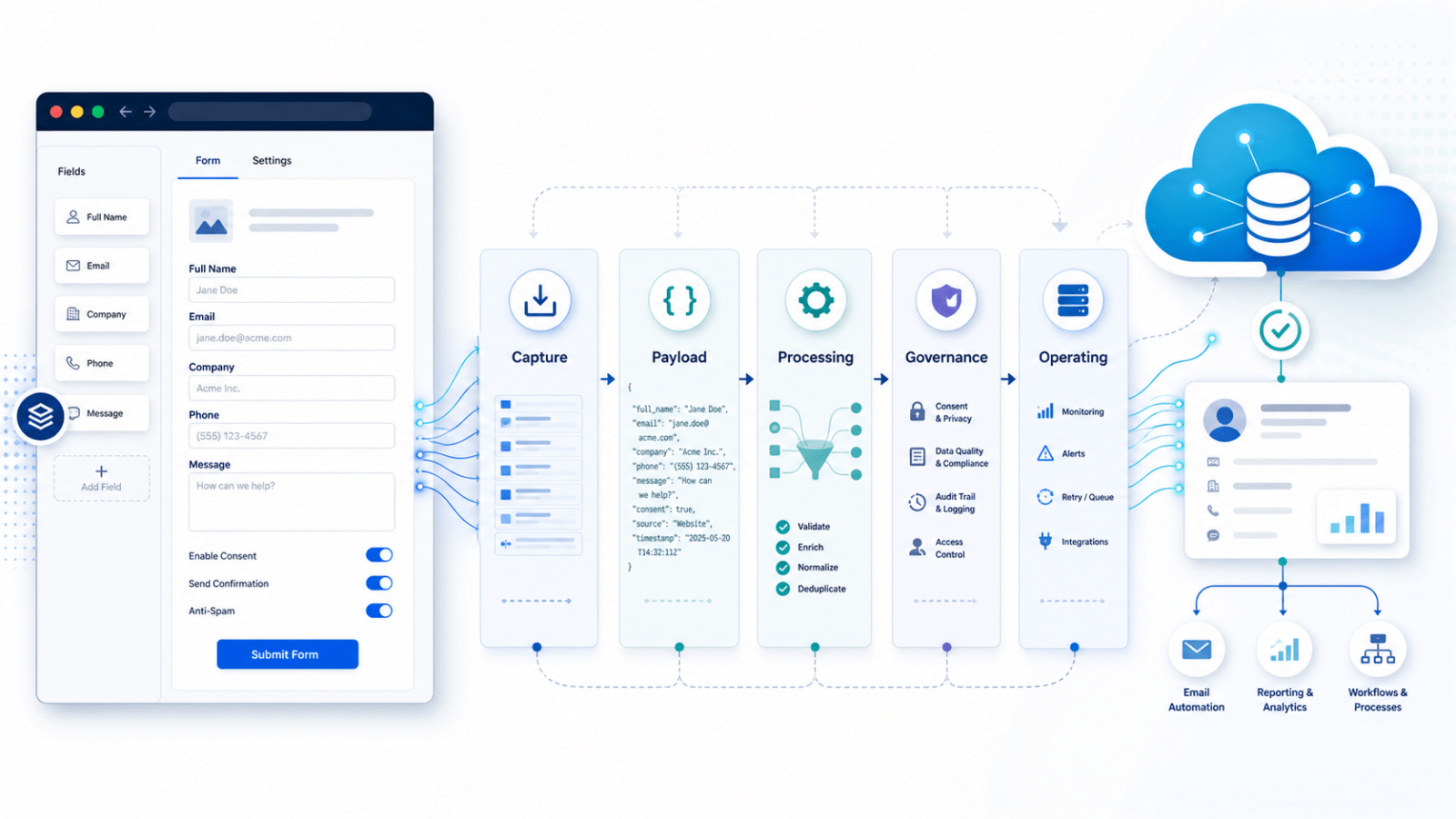
This is why form platform comparisons can get messy.
Gravity Forms versus FormAssembly sounds like a simple product decision. Gravity Forms versus a Salesforce-native form sounds like a technical decision. Webhooks versus a Salesforce add-on sounds like an implementation decision. But each option changes more than the form.
It changes who owns the data logic, who can safely make changes, where testing needs to happen, and how much governance is required before a form can go live.
Gravity Forms is a useful example because it can support several patterns. It can work with simple Salesforce capture, direct mapped integration, webhook-based submission, temporary storage, permanent storage, or very little long-term storage in WordPress. That flexibility is valuable, but it also means “we use Gravity Forms” is not really the architecture.
It could mean the website owns the field mapping. It could mean Salesforce owns the processing. It could mean a hybrid model where simple forms are easier to self-manage and governed forms follow a more controlled pathway. So the tool is only the visible part of the decision.
Capture and processing are not the same thing
A website form is often the right place to create the user experience. It can ask campaign-specific questions, capture UTMs, apply conditional display logic, change confirmation behaviour, and help marketing teams move quickly. But that does not automatically mean the website should decide how to match a person in Salesforce, how to prevent duplicates, how to apply consent rules, how to transform values, or how to trigger downstream processes. Those decisions may belong somewhere else.
In many Salesforce environments, the website should act as the capture layer. It collects the submission and passes it on in a structured way. Salesforce, or an agreed integration layer, then acts as the processing layer and decides what the submission means. That distinction is important because it changes the operating model.
If the website owns too much logic, it can be faster to change but harder to govern. If Salesforce owns more of the logic, the system can be more controlled and consistent, but some changes may need more formal support, testing and governance.
Neither model is automatically right or wrong. The point is to make the choice deliberately.
The real trade-off is agility versus governance
Direct field mapping can be a good fit for simple, low-risk forms: newsletter sign-ups, basic enquiries, simple lead capture, or lightweight campaign forms.
In those scenarios, it may be reasonable for a form administrator to map a website field directly to a Salesforce field. The benefit is speed. Marketing and digital teams can create forms, add fields, update labels, adjust confirmation messages and test campaign ideas without turning every change into a development task. That agility matters.
But the picture changes when a form affects more important parts of the system.
If a form touches consent, preferences, identity matching, duplicate management, campaign attribution, applications, payments, supporter records, student records or downstream operational workflows, direct field mapping may not be enough. In those cases, a controlled webhook, middleware or staging pattern can be stronger. The website captures the submission, but Salesforce owns the matching, deduplication, consent handling, validation, transformation and downstream processing.
The trade-off is that controlled processing is not always fully self-service. If a new field changes the payload, the staging model, the transformation logic or the downstream Salesforce process, then it may need technical support. That is not a failure of the form tool. It is usually a sign that the form is part of a governed business process.
The better question is not simply: “Can we add a field?” It is: “Can we add this field without accidentally changing consent behaviour, duplicate logic, reporting, automations, segmentation or downstream Salesforce processing?”
That is the question that decides whether the change should be self-service or governed.
Salesforce-native is not always the answer
It is tempting to assume that if Salesforce is the system of record, then Salesforce-native forms must always be the best answer.
Sometimes they are.
Salesforce-native experiences such as Screen Flow, OmniStudio or Lightning Web Components can be powerful choices for authenticated experiences, guided internal processes, complex applications, portal journeys or forms that need deep Salesforce logic at the point of interaction.
But they are not automatically better for every website form.
If the goal is to let a marketing team create campaign landing pages, test new messages, add lightweight questions, capture UTMs, adjust thank-you pages and respond to opportunities in market, a fully Salesforce-native form model may be too heavy.
It can move too much of the website experience into a Salesforce delivery process. That may protect governance, but it can reduce digital agility.
Gravity Forms can be useful because it keeps the website experience flexible while still allowing Salesforce to remain the system of record. That is often the practical middle ground: marketing gets a nimble capture layer, while Salesforce continues to govern the records and processes that matter.
This is showing up across projects
This is not a one-off issue.
Across different website and Salesforce projects, the same pattern keeps appearing. A discussion starts as a form tool decision, but quickly becomes a wider architecture and operating model decision.
On one project, the question may be whether a marketing team can create new forms and fields without external support. On another, the question may be whether the website should map directly into Salesforce objects, or whether Salesforce should receive a structured submission and own validation, matching, transformation and downstream processing.
They look like different problems, but they are really asking the same question: Where should the intelligence of the system live?
That question is becoming one of the most important design decisions in modern website and CRM integration work.
A simple way to frame the decision
A useful way to avoid over-simplifying the decision is to separate the form into layers.
| Layer | Key question |
|---|---|
| Capture layer | How does the user submit the data? |
| Payload layer | What structured data is sent downstream? |
| Processing layer | Who transforms the submission into Salesforce records? |
| Governance layer | Who owns validation, consent, matching and dedupe? |
| Operating layer | Who can safely change forms and fields later? |
Once those layers are clear, the options become easier to assess.
A team might choose Gravity Forms as the capture layer, a JSON payload as the hand-off, Salesforce as the processing and governance layer, and a hybrid operating model where simple forms are self-service but governed forms require support.
That is much clearer than simply saying: “We use Gravity Forms.” Because Gravity Forms is not one architecture.
It is a flexible form layer that can support several architectures.
The real decision
A form is not just a form.
It is a point where user experience, data quality, consent, identity, automation, reporting and operational process meet.
That is why form decisions should not be reduced to a simple tool comparison.
Gravity Forms versus FormAssembly is not the whole question.
Gravity Forms versus Salesforce-native forms is not the whole question.
Webhooks versus direct mapping is not the whole question.
The better question is: What should be easy to change, and what should be carefully governed?
Once that is clear, the form architecture becomes much easier to design.
Gravity Forms can be a strong choice when organisations need a flexible website capture layer that supports marketing agility. Salesforce-native forms can be the right choice when the process needs to live close to Salesforce. Webhooks, add-ons, staging objects and direct mappings are simply different ways to decide where the logic sits.
The goal is not to make every form self-service. The goal is to make the right forms self-service, and to govern the forms that need governance. That is the difference between choosing a form tool and designing a sustainable digital system.