
A Form Is Not Just a Form:
Gravity Forms, Salesforce and the Architecture Behind Website Submissions
Forms look simple…. A user fills in a few fields, clicks submit, and the data goes somewhere.
For a long time, that was probably enough of a mental model. A form was a form. It collected data, sent an email, and maybe created a lead or case somewhere. But modern websites are no longer just brochureware with a few contact forms attached. They are part of a wider digital operating system. They connect to CRMs, marketing platforms, payment gateways, analytics tools, preference centres, automation platforms, reporting models and downstream business processes. That means a form is rarely just a form anymore.
It is a capture point in a much larger system, and when that form connects to Salesforce, the real question is often not: “Which form tool should we use?” It is: “Where should the intelligence of the system live?”
Start with the architecture principle
Before choosing Gravity Forms, FormAssembly, Web-to-Lead, Web-to-Case, a Salesforce add-on, webhooks, Screen Flow, OmniStudio or Lightning Web Components, it helps to agree the architecture principle. One of the most important questions is:
Should Salesforce receive transformed data, or should Salesforce transform the data it receives?
Those are very different models.
In the first model, the external system prepares Salesforce-ready data. The website, form tool or integration layer decides what Salesforce object should be updated, how the fields should map, what values should be transformed, and what record should be created or changed. That can be fast and direct, but it also spreads business logic across external systems. It works, but over time it can quietly create technical debt.
In the second model, the external system sends Salesforce a structured source submission. Salesforce then owns the interpretation, transformation, matching, validation and downstream processing. That usually requires a more deliberate intake pattern, but it keeps the core business logic closer to the system of record. It is the difference between connecting tools quickly and designing a system that can last.
This is where patterns like a Data Source Entry, staging object or controlled intake object become important. They allow external systems like Gravity Forms to submit a consistent payload without needing to own the Salesforce data model or all of the downstream business rules. In that model, Gravity Forms does not need to know everything about Salesforce. It needs to capture the submission, package it correctly, and send it to the agreed intake point. Salesforce then decides what happens next.
That changes the conversation. The question is not simply: “Can Gravity Forms map to Salesforce?” It can. The better question is:
“Do we want Gravity Forms to map directly to Salesforce records, or do we want Gravity Forms to submit structured data for Salesforce to process?”
If the principle is that Salesforce owns transformation from any data source, then a controlled payload or webhook pattern may be the right answer. If the principle is that each source system sends already-transformed Salesforce-ready data, then direct field mapping becomes more attractive, but the governance needs to sit closer to the website. The principle should come before the tool choice.
The tool choice is only one layer
This is why form platform comparisons can get messy.
Gravity Forms versus FormAssembly sounds like a simple product decision. Gravity Forms versus a Salesforce-native form sounds like a technical decision. Webhooks versus a Salesforce add-on sounds like an implementation decision. But each option changes more than the form.
It changes who owns the data logic, who can safely make changes, where testing needs to happen, and how much governance is required before a form can go live.
Gravity Forms is a useful example because it can support several patterns. It can work with simple Salesforce capture, direct mapped integration, webhook-based submission, temporary storage, permanent storage, or very little long-term storage in WordPress. That flexibility is valuable, but it also means “we use Gravity Forms” is not really the architecture.
It could mean the website owns the field mapping. It could mean Salesforce owns the processing. It could mean a hybrid model where simple forms are easier to self-manage and governed forms follow a more controlled pathway. So the tool is only the visible part of the decision.
Capture and processing are not the same thing
A website form is often the right place to create the user experience. It can ask campaign-specific questions, capture UTMs, apply conditional display logic, change confirmation behaviour, and help marketing teams move quickly. But that does not automatically mean the website should decide how to match a person in Salesforce, how to prevent duplicates, how to apply consent rules, how to transform values, or how to trigger downstream processes. Those decisions may belong somewhere else.
In many Salesforce environments, the website should act as the capture layer. It collects the submission and passes it on in a structured way. Salesforce, or an agreed integration layer, then acts as the processing layer and decides what the submission means. That distinction is important because it changes the operating model.
If the website owns too much logic, it can be faster to change but harder to govern. If Salesforce owns more of the logic, the system can be more controlled and consistent, but some changes may need more formal support, testing and governance.
Neither model is automatically right or wrong. The point is to make the choice deliberately.
The real trade-off is agility versus governance
Direct field mapping can be a good fit for simple, low-risk forms: newsletter sign-ups, basic enquiries, simple lead capture, or lightweight campaign forms.
In those scenarios, it may be reasonable for a form administrator to map a website field directly to a Salesforce field. The benefit is speed. Marketing and digital teams can create forms, add fields, update labels, adjust confirmation messages and test campaign ideas without turning every change into a development task. That agility matters.
But the picture changes when a form affects more important parts of the system.
If a form touches consent, preferences, identity matching, duplicate management, campaign attribution, applications, payments, supporter records, student records or downstream operational workflows, direct field mapping may not be enough. In those cases, a controlled webhook, middleware or staging pattern can be stronger. The website captures the submission, but Salesforce owns the matching, deduplication, consent handling, validation, transformation and downstream processing.
The trade-off is that controlled processing is not always fully self-service. If a new field changes the payload, the staging model, the transformation logic or the downstream Salesforce process, then it may need technical support. That is not a failure of the form tool. It is usually a sign that the form is part of a governed business process.
The better question is not simply: “Can we add a field?” It is: “Can we add this field without accidentally changing consent behaviour, duplicate logic, reporting, automations, segmentation or downstream Salesforce processing?”
That is the question that decides whether the change should be self-service or governed.
Salesforce-native is not always the answer
It is tempting to assume that if Salesforce is the system of record, then Salesforce-native forms must always be the best answer.
Sometimes they are.
Salesforce-native experiences such as Screen Flow, OmniStudio or Lightning Web Components can be powerful choices for authenticated experiences, guided internal processes, complex applications, portal journeys or forms that need deep Salesforce logic at the point of interaction.
But they are not automatically better for every website form.
If the goal is to let a marketing team create campaign landing pages, test new messages, add lightweight questions, capture UTMs, adjust thank-you pages and respond to opportunities in market, a fully Salesforce-native form model may be too heavy.
It can move too much of the website experience into a Salesforce delivery process. That may protect governance, but it can reduce digital agility.
Gravity Forms can be useful because it keeps the website experience flexible while still allowing Salesforce to remain the system of record. That is often the practical middle ground: marketing gets a nimble capture layer, while Salesforce continues to govern the records and processes that matter.
This is showing up across projects
This is not a one-off issue.
Across different website and Salesforce projects, the same pattern keeps appearing. A discussion starts as a form tool decision, but quickly becomes a wider architecture and operating model decision.
On one project, the question may be whether a marketing team can create new forms and fields without external support. On another, the question may be whether the website should map directly into Salesforce objects, or whether Salesforce should receive a structured submission and own validation, matching, transformation and downstream processing.
They look like different problems, but they are really asking the same question: Where should the intelligence of the system live?
That question is becoming one of the most important design decisions in modern website and CRM integration work.
A simple way to frame the decision
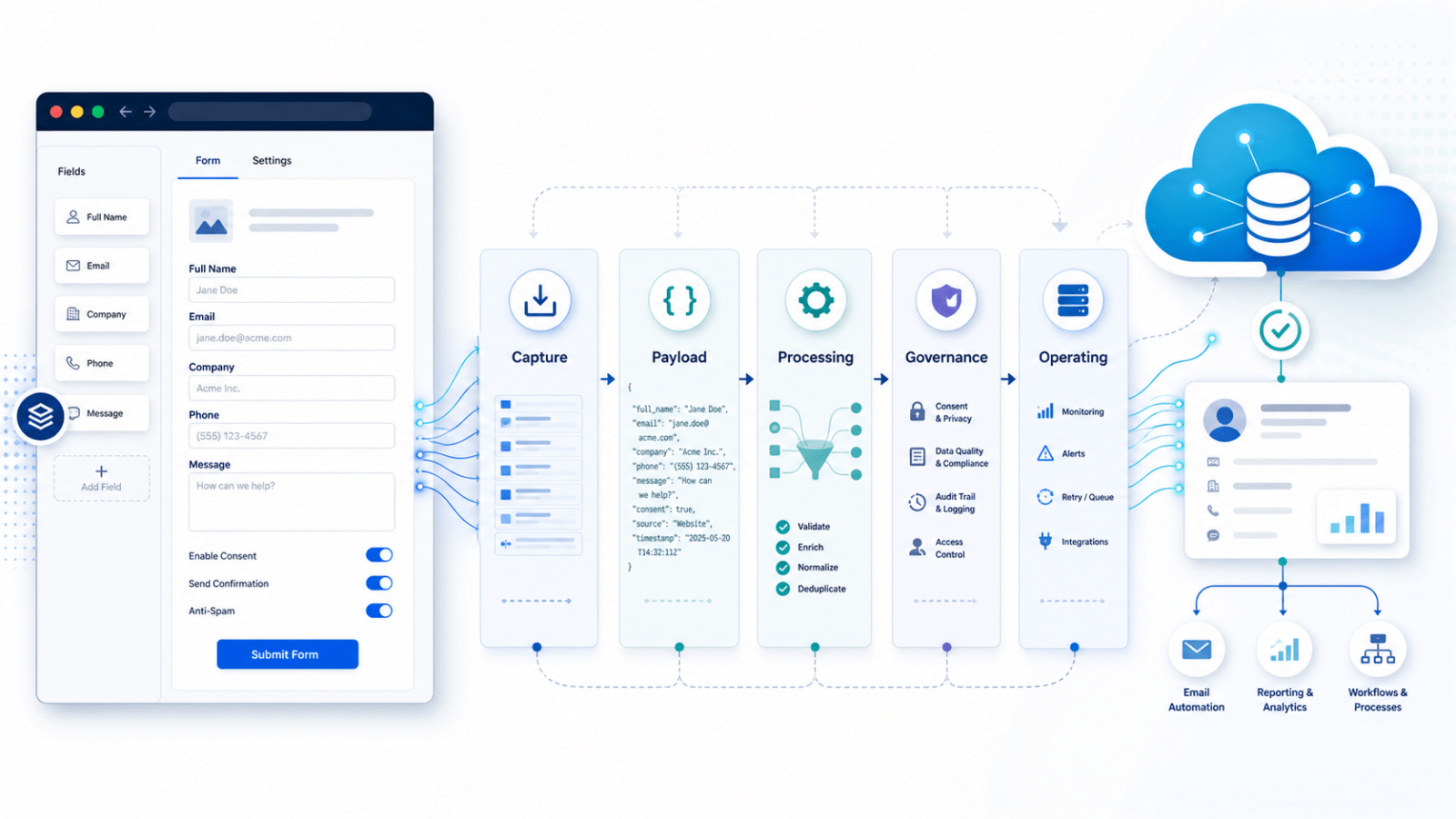
A useful way to avoid over-simplifying the decision is to separate the form into layers.
| Layer | Key question |
|---|---|
| Capture layer | How does the user submit the data? |
| Payload layer | What structured data is sent downstream? |
| Processing layer | Who transforms the submission into Salesforce records? |
| Governance layer | Who owns validation, consent, matching and dedupe? |
| Operating layer | Who can safely change forms and fields later? |
Once those layers are clear, the options become easier to assess.
A team might choose Gravity Forms as the capture layer, a JSON payload as the hand-off, Salesforce as the processing and governance layer, and a hybrid operating model where simple forms are self-service but governed forms require support.
That is much clearer than simply saying: “We use Gravity Forms.” Because Gravity Forms is not one architecture.
It is a flexible form layer that can support several architectures.
The real decision
A form is not just a form.
It is a point where user experience, data quality, consent, identity, automation, reporting and operational process meet.
That is why form decisions should not be reduced to a simple tool comparison.
Gravity Forms versus FormAssembly is not the whole question.
Gravity Forms versus Salesforce-native forms is not the whole question.
Webhooks versus direct mapping is not the whole question.
The better question is: What should be easy to change, and what should be carefully governed?
Once that is clear, the form architecture becomes much easier to design.
Gravity Forms can be a strong choice when organisations need a flexible website capture layer that supports marketing agility. Salesforce-native forms can be the right choice when the process needs to live close to Salesforce. Webhooks, add-ons, staging objects and direct mappings are simply different ways to decide where the logic sits.
The goal is not to make every form self-service. The goal is to make the right forms self-service, and to govern the forms that need governance. That is the difference between choosing a form tool and designing a sustainable digital system.